

The 2026 Field-First Playbook: Making Construction Tech Work for You
How to Implement, Adopt, and Scale Innovation Without Disrupting the Build
The New Reality of 2026
The U.S. construction industry faces an urgent challenge: it must attract an estimated 349,000 net new workers just to meet current demand. With nearly one-quarter of the existing workforce approaching retirement age, the industry is at a crossroads. Digital transformation is no longer a luxury; it is a baseline for survival.
For the commercial Project Manager (PM), 2026 is the year where tech moves from being an “innovation trial” to a core contract requirement. But for the person in the trailer, the question remains: Does this tool help me build, or is it just one more thing I have to manage?
Let’s dive in.

The “Field-First” Filter
In 2026, 66% of all enterprises are reducing entry-level hiring due to AI. However, a tool that looks impressive in an executive boardroom can become a burden in the field. Successful PMs use a “field-first” filter to vet technology before it hits the jobsite.
- The Workflow Integration Test: Do not buy tech that requires a new way of working; buy tech that automates an existing one. If your team uses Procore, your new tech must feed data into it automatically.
- The “One-In, One-Out” Rule: To prevent “app fatigue,” every new digital tool should eliminate at least one manual task. If you implement automated site capture, you should officially retire manual daily photo walks. Scott Brown of Garney Construction insists that for tech to work, “something else has to come off their plate.”
- The Personal Friction Audit: Before rolling a tool out to the crew, the PM must use it personally for 48 hours. If you find the interface “annoying” or the login process cumbersome, your field team will find it impossible. Ben Stocker of Skender acts as a gatekeeper; if it’s a hurdle for him, it never makes it to the field.
The “Crawl, Walk, Run” Rollout
Implementing Innovation Without the Headache
The biggest mistake PMs make is “The Big Bang” rollout, or trying to launch five new tools on Monday morning. To succeed, use a phased approach:
1. The Crawl (Zero-Effort Wins)
Start with one piece of tech that requires little to no behavioral change. Start with implementing one camera. They are the ultimate “Crawl” tool. Once installed, they provide data, security, and history without the field team having to press a single button.
2. The Walk (The Champion Model)
Don’t train 50 people at once. Identify one tech-savvy Foreman or APM as your “Champion.” Let them master the tool and demonstrate the “wins” to their peers.
3. The Run (Burning the Boats)
Once a tool is proven, make it the standard. Stop accepting paper RFI responses or manual photo-dumps. If the digital way is the only way, adoption becomes inevitable.
"Just learn how it works, learn how it operates. And then from there, you can start to scale"
Austin Lay
Project Manager,
Layton Construction
Construction Cameras as a PM Multiplier
How Visual Data Makes Your Life Easier
While many view cameras as simple security devices, in 2026, they have evolved into a PM’s most reliable assistant, handling the “busy work” of project documentation while you focus on the schedule.
The “Remote” Hack: Stop spending half your week driving between sites. Use high-definition live feeds to host meetings. Review progress in real-time from the trailer, providing immediate visual answers to design questions without a site walk.
The “Vacation” ROI: Visual tech provides constant peace of mind. As industry veterans note, being able to check a high-def camera feed from a phone allows PMs to actually disconnect, knowing exactly what happened on-site that morning without making ten phone calls.
Dispute Prevention: Use the historical timeline to “look back in time.” If a dispute arises about a delivery or weather delays, you have timestamped, high-resolution proof that saves millions in litigation.
Automated Transparency: Set your cameras to auto-generate weekly time-lapses and send you or your boss images via email. This automates your client reporting, providing professional updates to stakeholders and marketing teams without you lifting a finger.

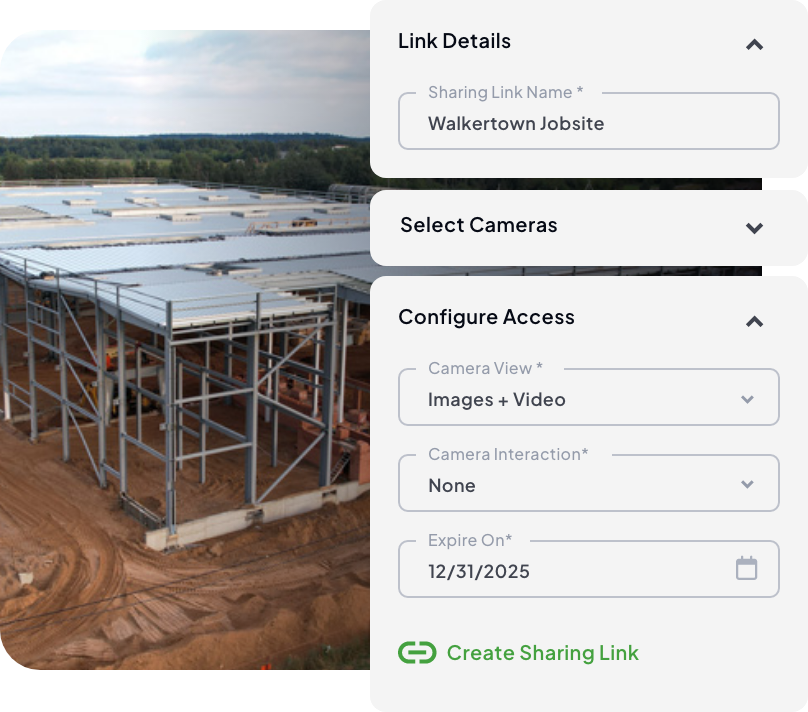

The Intelligent Jobsite Stack
Using AI Software to Analyze Your Visual Data
In 2026, the most efficient PMs don’t just “watch” video; they use AI-driven software to audit it. By integrating your site cameras with specialized AI platforms, you transform raw images into a sophisticated project-tracking machine that works while you sleep.
- Automated Progress Auditing: Stop walking the site with a clipboard to verify percent-complete. When you feed data into AI platforms, a software automatically maps visual progress against your schedule and budget. It provides an objective audit of subcontractor work, making pay approvals a matter of data, not debate.
- AI-Powered Safety & PPE Detection: You can’t be everywhere at once, but AI can. Specialized analytics tools, such as TrueAI PPE can now scan your live feeds in real-time to detect safety violations, such as missing hard hats or high-visibility vests. These “digital safety officers” alert you to high-risk areas immediately, allowing you to correct behavior before an inspector arrives or an incident occurs.
- Risk Mitigation through Visual Mapping: By syncing your camera’s “visual record” with your floor plans, an AI software can create a walkthrough history of the project. If a leak occurs behind a wall six months from now, you can use the AI-indexed archive to “travel back in time” and see exactly how the piping was installed before the drywall went up.

TrueLook + OnsiteIQ
Gain a smarter view of your jobsite with the integration of TrueLook cameras into OnsiteIQ’s progress intelligence platform. Bringing your documentation tools together saves valuable time while consolidating site imagery and insights in one seamless workflow.
Red Flags & When to Say No 🚨
Identifying the “Shelfware” of Tomorrow
Not every innovation belongs on your jobsite. Ben Stocker of Skender warns that if a tool requires “hoops to jump through” or complex workarounds, field teams will simply stop using it. To avoid wasting budget on “shelfware”or expensive tech that sits in the trailer gathering dust.
Watch for these critical deal-breakers:
If the software doesn’t integrate seamlessly with your existing tech stack (like Procore or Autodesk Build), it will likely be ignored. Your camera feed, AI alerts, and progress photos should live where your drawings do. If your team has to remember a fifth password to see the jobsite, they won’t.
Implementation is harder than procurement. If a vendor doesn’t offer 24/7 technical support and a dedicated success manager to guide you through the first 30 days of change management, the rollout will likely stall. You need a partner who helps you troubleshoot in the field, not just a salesperson who disappears once the contract is signed.
An expensive tool with 0% field usage is a failure, regardless of its theoretical ROI. Successful PMs always pilot new tech on a small, low-risk project first. This allows you to iron out the kinks and prove the value to the crew before a broad rollout. If it doesn’t solve a specific problem during the pilot, it won’t solve it at scale.
If a tool requires constant calibration, frequent battery swaps, or “babying” in extreme weather, it isn’t construction-grade. Any tech that adds more maintenance tasks to your Superintendent’s plate is a net loss for the project.
Lead with the Result
If you want your team to adopt new technology, don’t start with the manual. Start with the “why.” Show them the final deliverable—the saved rework report, the 4K time-lapse that impressed the owner, or the hour they get back in their day because they didn’t have to drive to a remote site.
In 2026, the best Project Manager isn’t the one with the most gadgets; it’s the one who uses technology to clear the path for their team to do what they do best: build.