AI-driven insights from construction cameras turn a passive time-lapse feed into an active source of intelligence. Paired with AI, the same camera that builds your closeout video can flag a missing hard hat, spot a productivity bottleneck, and alert your team to unusual activity after hours, all from footage you were already capturing. TrueLook calls this layer TrueAI, and it turns a jobsite’s visual record into a running stream of operational intelligence.
Key Takeaways
- AI-driven insights from construction cameras come from analyzing the same time-lapse and live footage cameras already capture, no separate sensors or hardware required.
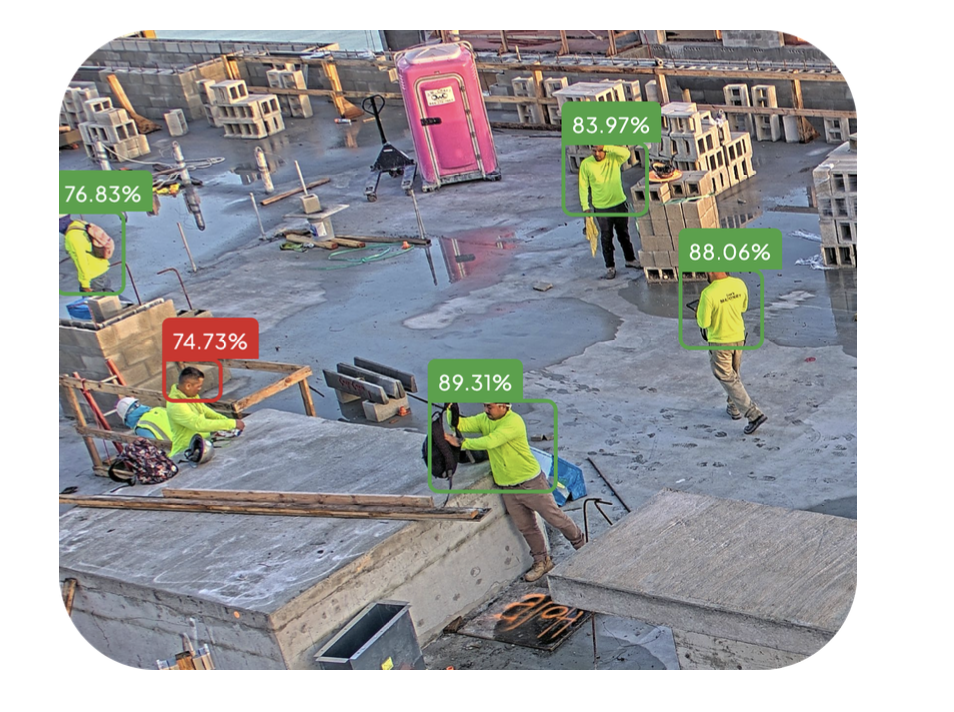
- Safety detection identifies PPE compliance, restricted-zone entry, and fall hazards in near real time, giving PMs a chance to correct issues before OSHA does.
- Productivity pattern analysis turns thousands of time-lapse frames into data on crew activity, equipment idle time, and schedule pacing.
- Anomaly alerts flag after-hours motion, unexpected vehicles, or activity outside the normal jobsite rhythm, useful for both security and quality control.
- The output is only useful if it’s actionable; the best systems turn detections into instant notifications, not just data buried in a dashboard.
What Are AI-Driven Insights From Construction Cameras?
AI-driven insights from construction cameras are the specific events, patterns, and risks that computer vision and machine learning surface by automatically analyzing jobsite camera footage (live streams, time-lapse archives, or both) without a person watching the feed manually. Instead of a PM scrubbing through hours of footage after an incident, the system classifies what it sees (a worker, a vehicle, a piece of PPE, a restricted zone) and generates an alert, log entry, or report in real time.
This differs from a basic time-lapse or livestream camera, which only records. AI adds a layer of interpretation on top of the visual record, the same distinction between a security camera and a security system.
How Does AI Detect Safety Issues on a Construction Site?
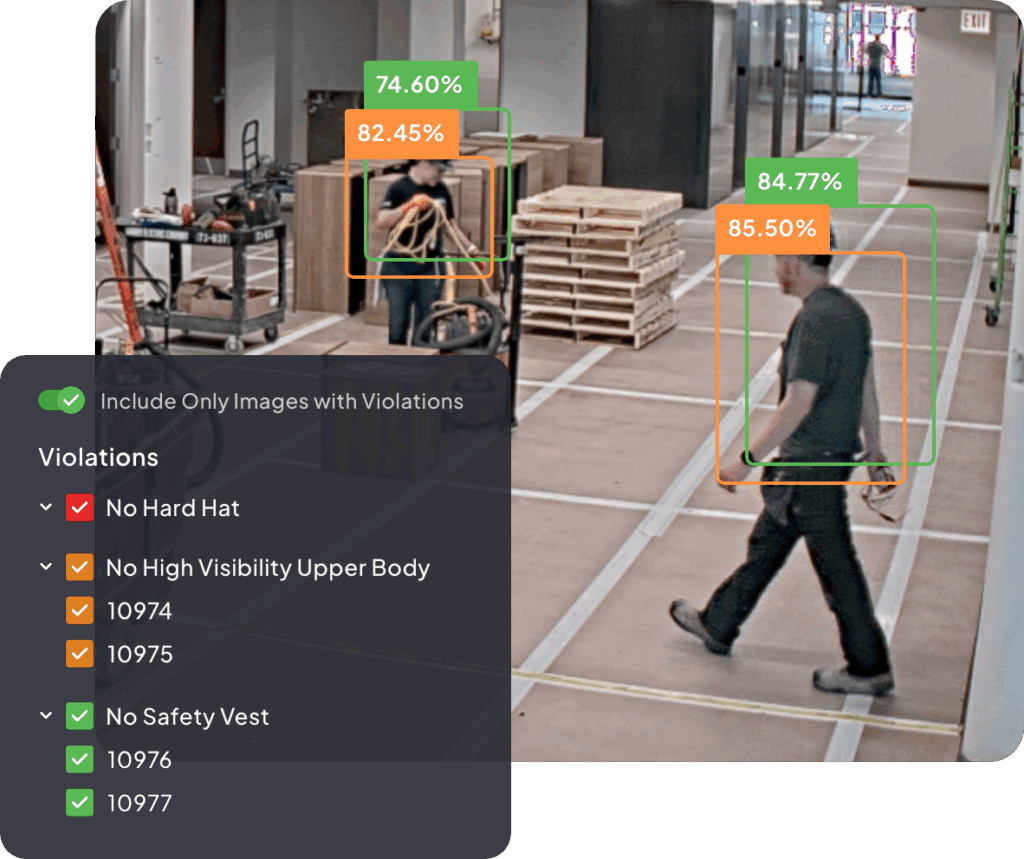
AI safety detection works by training computer vision models to recognize specific objects and behaviors in camera footage (hard hats, high-vis vests, harnesses, ladders, restricted-zone boundaries) and comparing what the model sees against safety rules set for that jobsite.
Common AI safety detections include:
- PPE compliance — flags workers without a hard hat, vest, or other required gear in a monitored zone
- Restricted-zone entry — alerts when a person or vehicle enters an area marked off-limits (crane swing radius, excavation edge, active demo zone)
- Fall-hazard proximity — identifies workers near unprotected edges, openings, or scaffolding without visible fall protection
- Vehicle-worker proximity — detects when equipment and personnel occupy the same space without adequate separation
This matters because falls, slips, and trips remain the leading cause of construction fatalities, making up close to 40% of all construction deaths, and construction workers account for roughly one in five workplace fatalities nationwide (OSHA/BLS). Fall protection has also been OSHA’s most frequently cited construction standard for over a decade. AI detection doesn’t replace a safety program; it catches the gaps between walkthroughs, when a PM isn’t standing on-site to see the violation happen.
Can Time-Lapse Cameras Track Productivity Patterns?
Yes. Time-lapse cameras capture a photo at set intervals over the life of a project. AI can process that same photo archive to detect patterns in labor and equipment activity that would take a person days to review manually.
Productivity insights AI can extract from time-lapse data include:
- Crew activity levels by time of day — when work actually starts, stalls, and stops relative to scheduled hours
- Equipment utilization vs. idle time — how much of a crane, excavator, or lift’s on-site time is spent working versus sitting idle
- Subcontractor arrival and departure patterns — useful for verifying trade coordination and staging without walking the site
- Material staging and movement — tracking when deliveries arrive and how quickly material moves from laydown to installation
- Weather-related delay documentation — correlating stalled activity with recorded weather conditions for schedule and claims support
None of this requires new hardware. It’s the same time-lapse archive used for owner updates and project closeout videos; AI just adds a second, analytical use for the footage.
What Are Anomaly Alerts on a Jobsite Camera?
Anomaly alerts are notifications triggered when AI detects activity that falls outside a jobsite’s expected pattern, most often after-hours motion, an unrecognized vehicle, or movement in an area that should be empty. Unlike a simple motion sensor, which triggers on any movement, anomaly detection uses smart motion classification to distinguish a person, vehicle, or animal from irrelevant triggers like blowing debris or shifting light.
Typical anomaly alerts include:
- After-hours activity — motion detected outside scheduled work hours, when the site should be empty
- Unrecognized vehicles — a vehicle entering the site that doesn’t match expected delivery or crew patterns
- Perimeter breaches — activity at fencing, gates, or laydown yards where material and equipment are stored
- Unusual equipment movement — machinery operating outside its expected zone or schedule
Jobsite theft and unauthorized access are persistent, expensive problems, and anomaly alerts give PMs a way to respond in the moment rather than discover the damage the next morning. This is also where AI-driven monitoring overlaps with security: a real-time alert that a PM or monitoring team can act on immediately is worth far more than a recording reviewed after the fact.
How TrueLook’s TrueAI Delivers AI-Driven Insights From Construction Cameras
TrueLook’s TrueAI applies computer vision directly to the live and time-lapse footage a TrueLook camera is already capturing — PPE detection, object and vehicle recognition, and smart motion classification run on the same feed used to generate a project’s time-lapse video. That means a GC gets two outputs from one camera system: a polished time-lapse for owners and closeout packages, and a continuous layer of AI-driven insight from construction camera footage running in the background.
Because TrueAI is built into TrueLook’s existing camera hardware and Multi-Site Dashboard, PMs see AI-flagged events alongside live views and time-lapse archives in one interface, no separate software, no exporting footage to a third-party analysis tool. For GC’s managing several active jobsites, that consolidation matters: one dashboard, one login, one place where footage and AI insight live together.
Ready to see what your jobsite footage is missing?
See how TrueAI turns your time-lapse camera into a safety and productivity monitoring system
Common Challenges When Adopting AI Camera Monitoring
- Alert fatigue — systems that flag too many low-value events train PMs to ignore notifications. Look for configurable sensitivity and zone-specific rules, especially for OSHA compliance-related alerts.
- Camera placement and coverage — AI can only detect what the camera can see; blind spots around scaffolding, trailers, or site perimeter reduce accuracy.
- Integration with existing workflows — insights are only useful if they reach the right person through a channel they already check, whether that’s a dashboard, text alert, or integration with a platform like Procore.
- Connectivity on remote or developing sites — a jobsite without stable WiFi needs a camera with independent connectivity (TrueLook’s cameras run on a built-in 4G LTE modem) to keep AI alerts flowing.
FAQ
It depends on the camera system. TrueLook’s AI-driven features run on the same live and time-lapse footage its cameras already capture, so no separate hardware is needed. Older or third-party time-lapse systems without built-in AI processing typically can’t add this capability retroactively.
Basic motion detection triggers on any movement, including wind, shadows, or animals. AI anomaly detection classifies what’s moving (person, vehicle, or object) and compares it against expected jobsite patterns before sending an alert, which cuts down on false alarms significantly.
Yes. PPE and restricted-zone detections create a timestamped visual record that supports internal safety audits and can help demonstrate a good-faith safety program if OSHA compliance is ever questioned. For a deeper look at how this works, see The Role of AI in OSHA Compliance. It doesn’t replace a formal safety program, but it strengthens the documentation behind one.
On systems like TrueLook’s TrueAI, detections are processed against live footage and surfaced as near-real-time alerts, allowing a PM or safety manager to respond the same day an issue occurs rather than discovering it in a weekly footage review.
No. AI catches gaps between physical walkthroughs and creates a documented record, but it works best as a supplement to, not a replacement for an active on-site safety program.
Bottom Line
AI-driven insights from construction cameras turn a passive time-lapse feed into an active source of intelligence, flagging safety violations, surfacing productivity patterns, and alerting teams to anomalies as they happen, all from the same footage already used for time-lapse and live-streaming. TrueLook’s TrueAI builds this directly into its camera systems and Multi-Site Dashboard, giving PMs one place to see, document, and act on what’s happening across every active jobsite.
Get a quote to see it running on your own footage.