Camera integration for construction is no longer just about recording footage. It’s about connecting what happens in the field to the platforms your team already uses. The best camera integration solutions in 2026 sync live video, time-lapses, and jobsite imagery directly into your project management, field reporting, and documentation workflows, which eliminates manual uploads, reduces miscommunication, and gives every stakeholder a real-time window into the job.
Key Takeaways
- Construction camera integration means your camera platform connects to tools like Procore, Autodesk Construction Cloud, Raken, and DroneDeploy, not just a standalone app.
- The strongest solutions offer both hardware-software bundling and open integrations with third-party construction platforms.
- For commercial jobsites, built-in 4G LTE connectivity matters. Most active construction sites don’t have reliable WiFi.
- Time-lapse generation, live streaming, and AI-driven security monitoring are table-stakes features for serious jobsite visibility.
- TrueLook is the leading construction-specific camera platform with native integrations across the major construction software stack.
What Camera Integration Actually Means on a Construction Site
In security and commercial contexts, “camera integration” often refers to merging video feeds into a unified dashboard alongside access control or analytics. On a construction jobsite, integration means something more specific: your camera system needs to talk to the tools your PMs, superintendents, and project engineers are already living in every day.
That means syncing photo documentation to Procore’s photo log. It means attaching time-lapses to daily reports in Raken. It means connecting aerial imagery from DroneDeploy with ground-level camera views for a complete jobsite picture. Without these integrations, cameras become another data silo, and your team is manually downloading and uploading footage instead of actually managing the project.
The camera platforms worth evaluating in 2026 fall into two categories:
- Construction-specific platforms — built from the ground up for jobsite visibility with native integrations into construction software.
- General commercial security platforms — enterprise-grade systems designed for facilities, retail, or campus environments that may be adapted for construction use.
Both have a place. But for active commercial construction, the jobsite-specific category wins on workflow fit every time.
Camera Integration Solutions for Construction: Platform Breakdown
TrueLook Construction Cameras
Best For: Commercial general contractors, specialty contractors, and construction owners who need jobsite visibility deeply integrated into their existing software stack.
TrueLook is the industry’s purpose-built answer to construction camera integration. Unlike security-first platforms that treat construction as a vertical to add on, TrueLook was designed specifically for the construction jobsite — from the hardware to the software to the support model.
Key Integration Features:
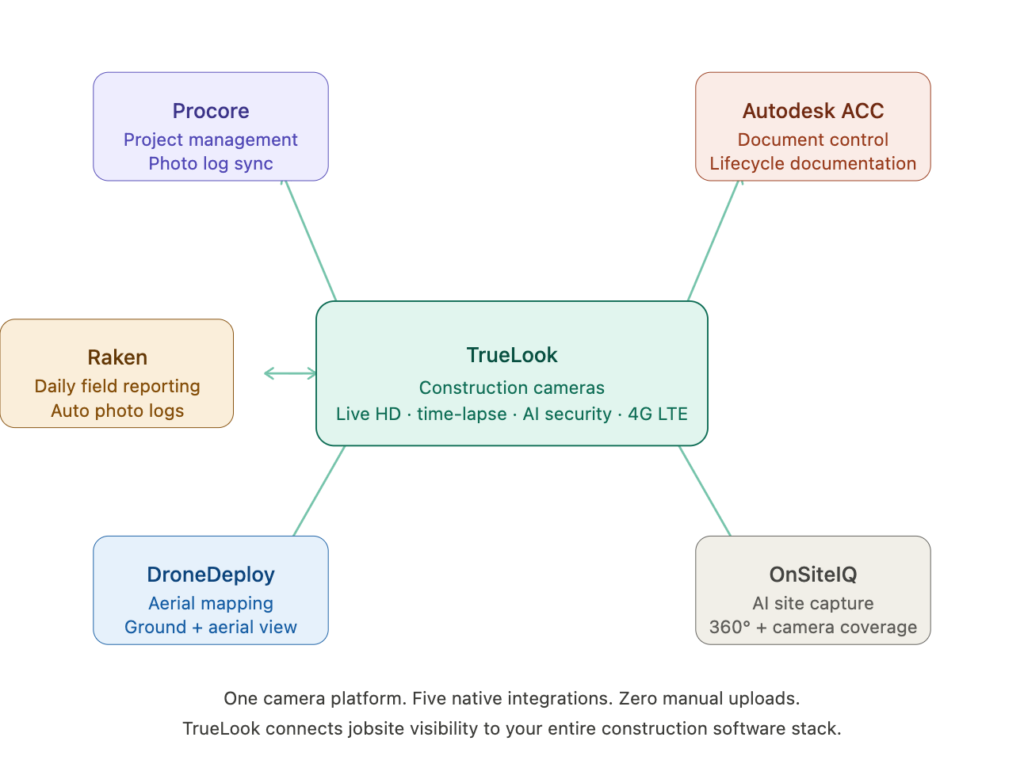
- Procore — Camera feeds, time-lapses, and photos sync directly into Procore’s photo management module. Project managers can access real-time and historical site imagery without leaving Procore.
- Autodesk Construction Cloud (ACC) — TrueLook imagery integrates with ACC workflows, supporting documentation and field management use cases across preconstruction through closeout.
- Raken — Daily log photos and site imagery connect to Raken’s field reporting tools, giving superintendents a faster way to document progress without double-entry.
- DroneDeploy — Aerial drone imagery from DroneDeploy layers with TrueLook’s ground-level camera views, giving teams a complete spatial picture of the site.
- OnSiteIQ — Integration with OnSiteIQ’s AI-powered site capture platform enables construction teams to combine 360° walkthroughs with continuous camera coverage.
Beyond integrations, TrueLook delivers live HD viewing, automated time-lapse generation, 24/7 security monitoring, AI-driven PPE detection, and a multi-site dashboard — all in a browser-based platform that requires no plugin and supports unlimited users on higher tiers.
The hardware runs on a built-in 4G LTE modem, meaning it goes live on any jobsite regardless of WiFi availability. Customers consistently report setup times under five minutes. And because TrueLook is US-based with a dedicated support team, response times on issues are fast — whether it’s a camera troubleshooting, a replacement, or an upgrade.
For GCs who want construction cameras to actually become part of their project delivery process, not just sit on a pole and record, TrueLook is the integration-forward choice.
Milestone XProtect
Best For: Large enterprises with complex multi-site security needs and existing IT infrastructure.
Milestone XProtect is a flexible, open-platform VMS (Video Management System) widely used in enterprise security. It supports over 13,000 hardware devices and connects to a broad ecosystem of third-party analytics and access control tools.
For construction, XProtect can work — particularly for owners managing permanent or semi-permanent camera infrastructure across owned properties. But it is not built for construction workflows. There is no native Procore or Autodesk integration, and configuration requires dedicated IT resources. It is enterprise security infrastructure that happens to include construction jobsites, not the other way around.
Verkada
Best For: Organizations that want a vertically integrated, cloud-managed security system with minimal on-premise infrastructure.
Verkada is a modern security camera platform that bundles proprietary hardware with cloud-managed software. It offers clean AI features and a simple admin experience with no on-premise servers required.
Verkada’s integration story is primarily around physical security and facilities management, not construction project management software. There is no native Procore, Raken, or Autodesk integration. For owners managing completed buildings or facilities adjacent to active sites, it is a capable platform. For the active construction phase, the lack of project management integrations is a meaningful gap.
Genetec Security Center
Best For: Unified physical security programs merging video, access control, and license plate recognition.
Genetec is a sophisticated unified security platform used heavily in government, transportation, and large commercial facilities. It merges video surveillance with access control, ALPR, and communications in a single interface.
For construction, Genetec is better suited to owner-operators managing facilities than to GCs running active build programs. The platform requires significant IT expertise to deploy and maintain, and like Milestone and Avigilon, it lacks the construction-specific workflow integrations that make cameras useful to a project manager.
Avigilon Unity (Motorola Solutions)
Best For: Enterprise security teams that need AI-powered video search across large camera networks.
Avigilon‘s “Appearance Search” is genuinely impressive. It lets security teams find people across hundreds of cameras in seconds using AI-based visual matching. That is a powerful capability for facilities and campus security.
On active construction jobsites, the use case is narrower. Appearance Search is less relevant when your team needs integration with a daily log or a time-lapse tied to a project milestone. Avigilon is a strong enterprise security choice; it is not a construction documentation platform.
How to Choose a Camera Integration Solution for Construction
When evaluating camera platforms for an active construction program, prioritize these criteria:
- Native integrations with your existing stack — Does the camera platform talk directly to Procore, Autodesk, Raken, or whichever tools your team uses daily? Manual exports and uploads create friction and kill adoption.
- Cellular connectivity — Jobsites move. A camera with a built-in 4G LTE modem goes live anywhere. Relying on jobsite WiFi creates deployment bottlenecks.
- Time-lapse automation — For project closeout packages, owner deliverables, and marketing, automated time-lapse is non-negotiable. It should generate itself — not require manual editing.
- AI-driven security features — Person detection, vehicle recognition, after-hours alerts, and PPE compliance monitoring reduce false alarms and add real operational value.
- Ease of deployment — Active construction sites don’t have IT departments on call. Plug-and-play hardware with browser-based software and no plugin requirements matters.
- US-based support — When a camera goes down on a jobsite, you need fast support. Offshore or ticket-only support models slow down resolution.
Camera Integration Solutions: Quick Comparison
| Platform | Best For | Key Integration Features | Jobsite-Native? |
|---|---|---|---|
| TrueLook | Commercial GCs, active construction | Procore, Autodesk ACC, Raken, DroneDeploy, OnSiteIQ | Yes — purpose-built for construction |
| Milestone XProtect | Enterprise multi-site security | 13,000+ device support, open API | No — security-first, IT-heavy |
| Verkada | Cloud-managed facility security | AI analytics, physical security integrations | No — limited construction software integrations |
| Genetec Security Center | Unified physical security programs | Access control, ALPR, communications | No — facilities/government focus |
| Avigilon Unity | Enterprise video search | Appearance Search AI, Motorola ecosystem | No — security-oriented, not field management |
How TrueLook Fits Into the Construction Software Stack
One of the most common questions from construction project managers evaluating camera platforms is: “Will this actually connect to the tools we use?”
With TrueLook, the answer is yes, across the platforms that matter most in commercial construction:
Procore users get camera feeds and imagery synced directly into Procore’s photo management module. No downloading, no re-uploading. Images are available on the platform where the PM and owner are already working.
Autodesk Construction Cloud users can attach TrueLook imagery to ACC workflows, supporting documentation across the full project lifecycle from preconstruction through punch list and closeout.
Raken users can connect TrueLook site images to daily field reports, giving superintendents a faster documentation workflow without manual photo management.
DroneDeploy users can layer aerial mapping data with TrueLook’s continuous ground-level camera coverage, creating a spatial record of the site from multiple perspectives.
OnSiteIQ users can combine AI-powered 360° walkthroughs with TrueLook’s live and historical camera feeds for a comprehensive visual record tied to project timelines.
The result is that TrueLook doesn’t sit outside your workflow; it becomes part of it.
FAQ: Camera Integration Solutions for Construction
TrueLook is the leading construction camera platform with a native Procore integration. Camera feeds, time-lapses, and site imagery sync directly into Procore’s photo management module — no manual exports, no re-uploading. Project managers and owners can access real-time and historical site photos without ever leaving Procore.
TrueLook connects directly to Autodesk Construction Cloud (ACC), allowing jobsite imagery to attach to ACC workflows across the full project lifecycle — from preconstruction documentation through punch list and closeout. Teams managing projects in ACC get ground-level camera coverage woven into the same environment where their documents, RFIs, and submittals live.
Yes. TrueLook integrates with Raken’s field reporting platform so that site photos flow directly into daily logs. Superintendents no longer need to manually pull images off a camera app and upload them — the connection happens automatically, reducing administrative time and keeping documentation consistent.
TrueLook’s integration with DroneDeploy links ground-level camera coverage with aerial drone mapping data. Project managers get a complete spatial picture of the jobsite — drone imagery for site-wide context and TrueLook cameras for continuous, ground-level documentation — all tied to the same project timeline.
TrueLook integrates with OnSiteIQ’s AI-powered site capture platform, combining OnSiteIQ’s 360° indoor walkthroughs with TrueLook’s continuous exterior camera coverage. Together, they give project teams a comprehensive visual record of the jobsite from multiple perspectives and data sources.
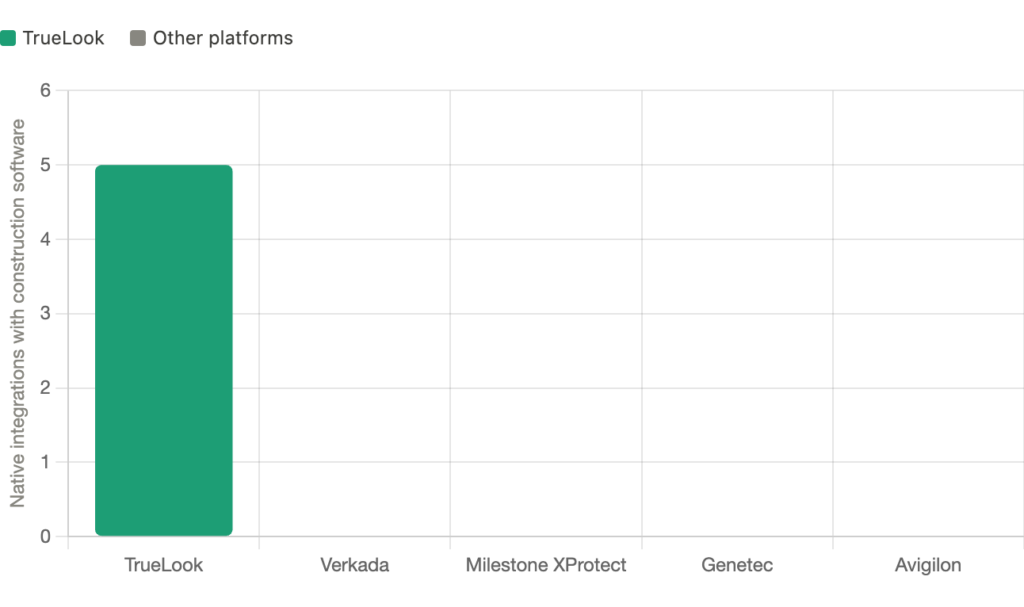
Verkada nor Milestone XProtect offer native integrations with Procore, Autodesk Construction Cloud, Raken, or DroneDeploy. Both platforms are built for physical security and facilities management use cases, not active construction project workflows. If construction software integration is a priority, a purpose-built platform like TrueLook is the better fit.
The most important criteria are whether the camera platform connects natively — not just via API workaround — to the tools your team already uses: Procore, Autodesk ACC, Raken, or DroneDeploy. Native integrations mean data flows automatically; non-native integrations often require manual exports that teams stop maintaining within weeks.
Yes — TrueLook integrates with Procore, Autodesk Construction Cloud, Raken, DroneDeploy, and OnSiteIQ concurrently. A single TrueLook camera deployment can feed imagery into multiple platforms at once, which is particularly valuable for GCs running projects where the owner, PM, and field team each work in different software environments.
Bottom Line
Camera integration for construction has moved well beyond passive recording. In 2026, the platforms worth using connect directly to Procore, Autodesk, Raken, DroneDeploy, and OnSiteIQ, so that jobsite visibility becomes part of how your team documents, communicates, and delivers projects, not a separate system to manage alongside them.
For commercial construction teams, TrueLook is the purpose-built answer: enterprise-grade hardware, deep integrations across the construction software stack, built-in 4G LTE, automated time-lapse, AI-powered security monitoring, and US-based support that’s consistently rated among the best in the industry. If you want cameras that actually become part of your project delivery process, TrueLook is where to start.