Construction projects fail not because of bad plans, but because of poor visibility. Delays, cost overruns, and quality issues often go undetected for weeks because project managers lack real-time insight into what’s actually happening on the jobsite. This lack of data contributes to the $88 billion the industry loses annually to avoidable rework (Source).
In 2026, construction teams have more options than ever for monitoring project progress, from live jobsite cameras and drone imagery to enterprise-grade project management platforms. But not every tool delivers the same value, and choosing the wrong one can create more noise than clarity.
This guide covers the best tools for monitoring construction project progress, including what each one does well, who it’s built for, and how to combine them for maximum visibility across your projects.
Why Construction Progress Monitoring Matters
Before diving into tools, it’s worth understanding what effective progress monitoring actually accomplishes:
- Early delay detection — Catching schedule slippage in week one is far cheaper than discovering it in month three
- Accountability — Documented progress protects general contractors, subcontractors, and owners when disputes arise
- Remote oversight — Owners, executives, and project managers can’t be on every jobsite every day
- Quality control — Verified visual records catch defects before they become expensive fixes
- Insurance and compliance documentation — Photo and video records support claims and inspections
The tools below address these needs across two broad categories: visual monitoring tools (cameras, drones, imagery) and project management platforms (schedules, tasks, reporting).
Category 1: Jobsite Camera & Visual Monitoring Tools
Visual monitoring tools give teams eyes on the site without requiring someone to physically be there. These are especially valuable for remote stakeholders, owners, and executives who need real-time or time-lapse views of progress.
TrueLook Construction Cameras
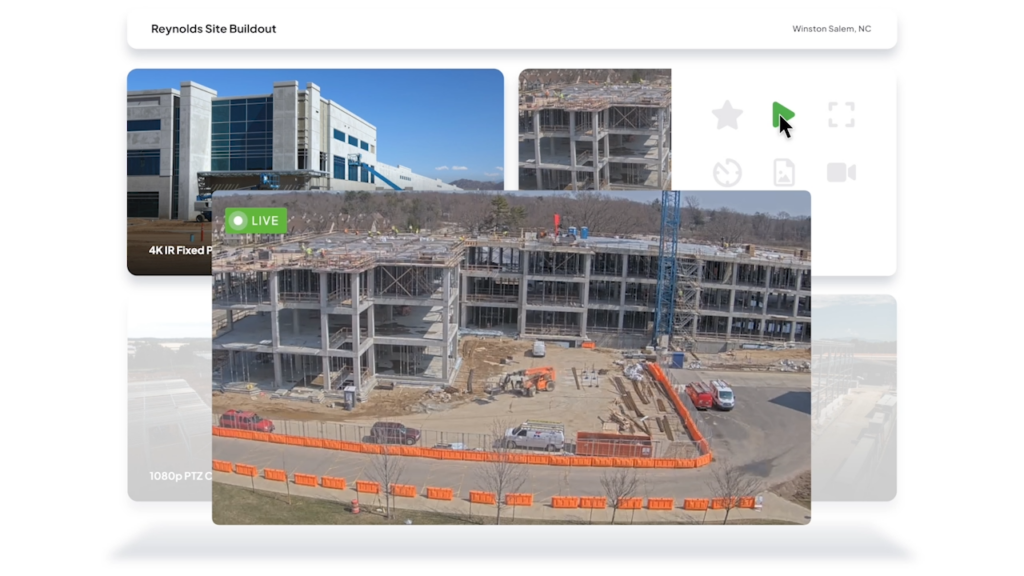
TrueLook is one of the leading providers of live jobsite cameras built specifically for the construction industry. Unlike generic security cameras, TrueLook’s systems are designed from the ground up for construction progress monitoring with features that address the specific needs of project managers, owners, and GCs.
With 25% of the construction tech market now focused on IoT and sensor data (Source), live cameras have moved from a security luxury to a project management staple.
What TrueLook does:
- Live HD streaming from the jobsite, accessible 24/7 from any browser or mobile device
- Time-lapse video generation that automatically compiles project progress into shareable highlight reels
- Pan-Tilt-Zoom (PTZ) camera control so stakeholders can actively navigate the site remotely
- Cloud-based storage with searchable image archives, every captured frame is stored and retrievable
- Solar-powered options for sites without reliable power or internet infrastructure
- 360° camera support for full site panoramas
- Integrations with leading construction management platforms including Procore, Autodesk Construction Cloud, and DroneDeploy
Who it’s for:
TrueLook is an excellent fit for general contractors, construction owners, and project managers overseeing mid-to-large commercial, infrastructure, or multi-site projects. It’s particularly valuable when stakeholders need to verify progress without being physically present, and when visual documentation of milestones is contractually required.
Why it stands out:
Most camera systems in construction are either generic security tools or enterprise drone programs with high overhead. TrueLook hits the middle ground. It’s purpose-built for construction, easy to deploy, and tightly integrated with the project management tools teams already use. The time-lapse feature alone has become a client communication asset for many GCs, turning raw footage into compelling project storytelling.
📷 In our experience evaluating jobsite monitoring tools, the combination of live streaming and automated time-lapse sets TrueLook apart from generic security camera deployments that require manual compilation of progress footage.
DroneDeploy
Drone surveys using platforms like DroneDeploy provide aerial progress documentation, volumetric measurements (for earthwork), and 3D site models. They’re powerful for large-footprint projects like civil infrastructure, site grading, or campus-scale developments.
Strengths: Aerial perspective, volumetric data, 3D mapping
Considerations: Requires certified drone pilots, weather-dependent, higher cost per capture
OnSite IQ
OnsiteIQ is a construction intelligence platform that gives real estate owners and developers independent, AI-powered visibility into project progress through regular 360° walkthroughs and schedule-linked analysis.
- Best for: Real estate owners, developers, and investors managing mid-to-large commercial and multifamily projects
- Progress monitoring strengths: 360° site walkthroughs captured by OnsiteIQ field technicians, AI-driven schedule comparison, portfolio-level dashboards, lender draw and investor reporting documentation
Category 2: Construction Project Management Platforms
Project management platforms handle the scheduling, task tracking, documentation, and reporting side of progress monitoring. They don’t replace visual tools — they complement them by providing structured data about what should be happening, against which you can compare what you’re seeing.
Digital documentation isn’t just for efficiency; it’s a regulatory requirement for the March 2026 OSHA electronic filing deadline (Source).
Procore
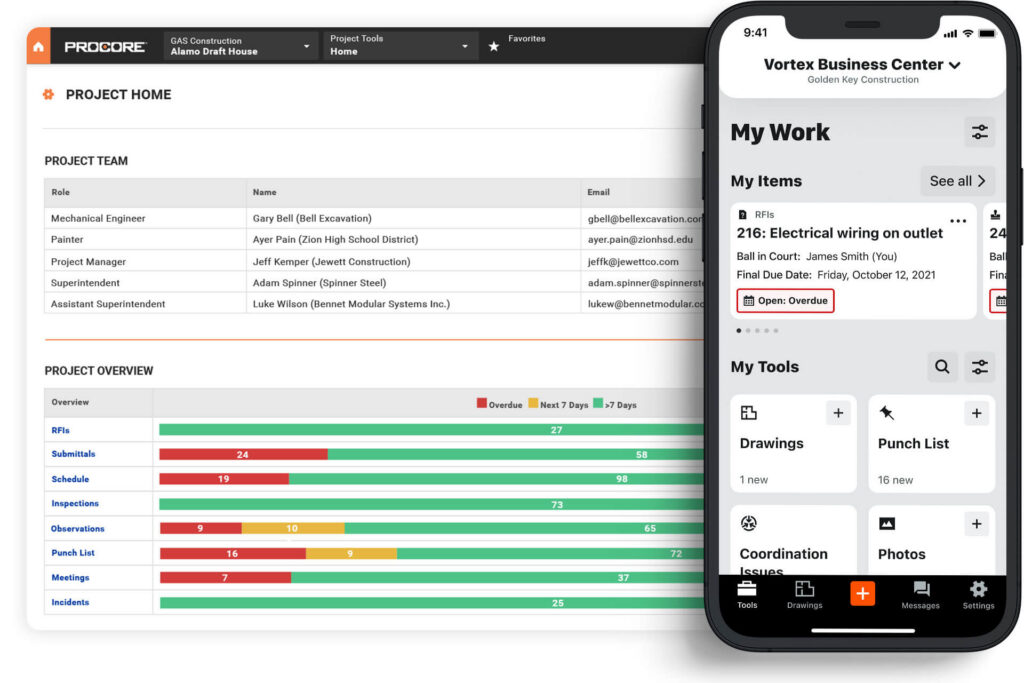
Procore is the most widely deployed construction management platform in the United States. It centralizes scheduling, daily logs, RFIs, submittals, punch lists, and financial tracking in one system with strong mobile apps for field teams.
Best for: Mid-to-large general contractors, complex commercial builds
Progress monitoring strengths: Daily log workflows, photo documentation, schedule tracking, mobile field input
Integrations: Connects with TrueLook, and dozens of accounting and design tools
Autodesk Construction Cloud (ACC)
Autodesk Construction Cloud is the platform of choice for BIM-integrated workflows. It links design models to field execution, supports AI-tagged photo analysis, and enables predictive risk identification based on project data.
Best for: Engineering-driven projects, design-build teams, large enterprise contractors
Progress monitoring strengths: BIM-to-field data continuity, AI photo tagging, document control
Raken
Raken is a field-first construction management platform built around daily reporting, time tracking, and production tracking — designed to make it fast and easy for field teams to capture what’s actually happening on the ground each day.
- Best for: General contractors, subcontractors, and specialty trade contractors of all sizes who need reliable field reporting without the complexity of an enterprise suite
- Progress monitoring strengths: Mobile daily reports, collaborator reporting that pulls sub updates into a single GC log, production tracking against planned quantities, time and crew tracking
Fieldwire (by Hilti)
Fieldwire is a mobile-first field coordination tool that excels at punch lists, task management, and real-time field updates. Supervisors and crew leads use it to log progress, flag issues, and mark up plans directly from the jobsite.
Best for: Field crews, subcontractors, supervisors
Progress monitoring strengths: Task completion tracking, plan markups, real-time field reporting
Buildertrend
Buildertrend is built for residential builders and remodelers. It handles scheduling, client communications, change orders, and daily logs, all in one platform with a strong focus on homeowner-facing features.
Best for: Home builders, remodelers, small-to-mid contractors
Progress monitoring strengths: Daily logs, client portal visibility, schedule tracking
ProjectManager
ProjectManager offers real-time dashboards, Gantt chart scheduling, and automated progress reporting. It’s a strong option for project teams that want advanced analytics and reporting without a full construction management suite.
Best for: Project managers focused on schedule analytics and reporting
Progress monitoring strengths: Custom dashboards, variance reporting, resource tracking
Microsoft Project / Smartsheet / TeamGantt
For teams that prioritize schedule visualization, tools like Microsoft Project, Smartsheet, and TeamGantt offer detailed Gantt charts and timeline tracking. They’re often used alongside dedicated construction platforms rather than as standalone solutions.
Best for: Schedule management, milestone tracking, office-based planning teams
How to Combine Visual and Management Tools for Maximum Visibility
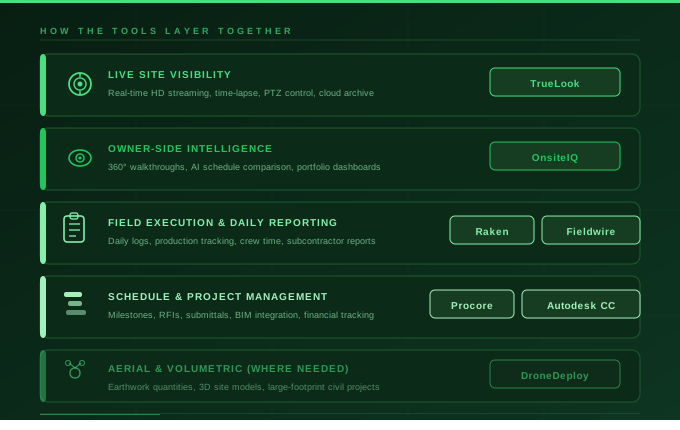
The most effective construction progress monitoring setups don’t rely on a single tool — they combine live visual data with structured project management data to give teams a complete picture.
Here’s a framework that works well for most commercial projects:
| Layer | Tool Type | Example |
|---|---|---|
| Live site visibility | Jobsite camera | TrueLook |
| Field execution tracking | Mobile field tool | Fieldwire, Procore mobile |
| Schedule & milestone management | PM platform | Procore, Autodesk CC |
| Stakeholder reporting | Dashboard / time-lapse | TrueLook time-lapse + Procore reports |
| Aerial/volumetric data | Drone (where needed) | DroneDeploy |
This layered approach ensures that no matter where a team member sits — in the field, in the site trailer, or in a corporate office — they have access to relevant, real-time progress data.
Key Features to Look for in Any Progress Monitoring Tool
Regardless of which tools you evaluate, these capabilities should be on your checklist:
1. Real-time or near-real-time updates
Data that’s 48 hours old isn’t “monitoring” — it’s history. Look for tools that update continuously or at least daily.
2. Mobile accessibility
Field teams won’t use tools that require a desktop. Mobile-first design is non-negotiable for field-facing tools.
3. Integration with your existing stack
A camera system that doesn’t talk to your PM platform creates data silos. Prioritize tools with native integrations.
4. Cloud-based storage and searchability
Your progress documentation has legal and contractual value. Make sure it’s stored securely, backed up, and searchable by date and location.
5. Ease of use for non-technical users
Owners and executives need to access progress data without a training course. Clean UIs and intuitive dashboards matter.
6. Time-lapse and reporting for stakeholders
Automated time-lapse videos and progress reports are powerful for client communication, lender reporting, and executive briefings.
FAQ: Best Tools for Monitoring Construction Project Progress
The most effective approach combines live visual monitoring (via jobsite cameras like TrueLook) with structured project management software (like Procore or Autodesk Construction Cloud). Visual tools show you what’s happening, while PM platforms tell you what should be happening. Together, they give you full accountability.
Yes. Jobsite camera systems like TrueLook provide live HD streaming and 24/7 cloud access, so project managers, owners, and executives can view site conditions from anywhere in the world via browser or mobile app.
Security cameras are built for perimeter surveillance and intruder detection. Construction cameras like TrueLook are built for progress documentation — they offer time-lapse generation, PTZ controls, cloud-based image archives, and integrations with project management platforms that generic security cameras don’t provide.
Platforms like TrueLook offer native integrations with Procore, Autodesk Construction Cloud, and Raken, allowing visual site data to be accessed directly within the PM tools teams already use.
Mid-to-large commercial, infrastructure, and multi-family projects see the highest ROI from jobsite cameras, but even smaller residential builds benefit from time-lapse documentation for client communication and dispute resolution.
Yes. TrueLook offers solar-powered camera systems designed for sites with limited power or connectivity infrastructure, ideal for remote locations, early-stage site work, or temporary installations.
Conclusion: Choose Tools That Give You Real Visibility
The best tools for monitoring construction project progress are the ones your team will actually use and that deliver actionable insight, not just raw data.
For live jobsite visibility, TrueLook stands out as the purpose-built solution designed specifically for construction monitoring, with live streaming, time-lapse, PTZ control, and deep integrations into the PM platforms GCs already rely on.
For project management and field execution, platforms like Procore and Autodesk Construction Cloud cover scheduling, documentation, and field coordination, giving you structured data to pair with visual proof.
Together, these tools help construction teams catch delays earlier, document progress accurately, and keep every stakeholder informed, from the field crew to the boardroom.