
Construction equipment tracking is the practice of recording where each machine on a project is, when it arrived, how long it stayed, and whether it moved when it shouldn’t have. Contractors typically rely on OEM telematics built into newer heavy equipment and aftermarket GPS trackers for mixed fleets.
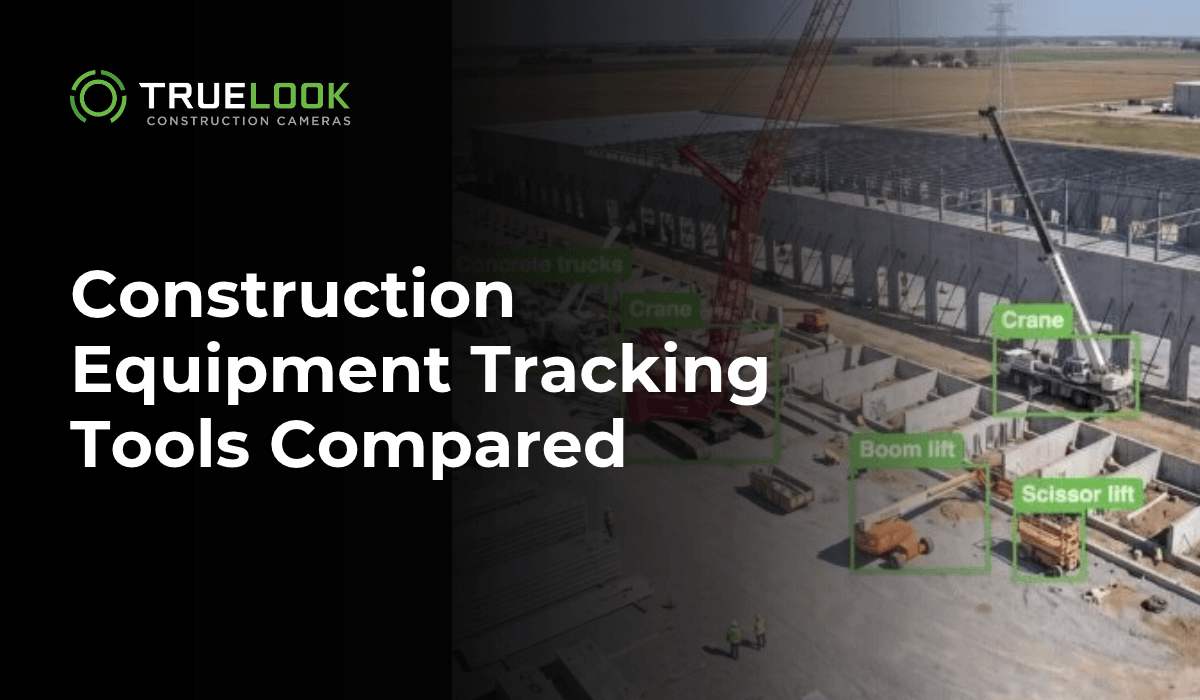
AI jobsite cameras add another option by recognizing equipment visually and logging it with photos. Each one answers a different question, and many GCs and equipment managers end up using more than one.
Key takeaways
- Construction equipment tracking helps PMs and superintendents confirm arrivals, check rental invoices, fill in daily logs, and settle disputes over what was on site.
- OEM telematics reports engine hours, fuel, location, and fault codes, but it covers only machines whose manufacturer supports it.
- Aftermarket GPS trackers and Bluetooth tags extend tracking to older machines and to small assets like attachments and hand tools.
- AI jobsite cameras identify equipment visually, so they log rented and subcontractor machines that carry no tracker at all.
- Camera records add dated photos, which give a team visual proof of what was on site and when it left.
Why do construction teams track equipment on site?
Equipment drives cost and schedule on almost every commercial project, and much of it is rented on short-term rates. A PM or superintendent who knows exactly what is on site can make faster calls on rentals and crew scheduling.
The questions tend to come up in five places:
- Rental billing. A rental invoice covers every day a machine was assigned to the job. Matching those days against when the machine was on site catches billing errors and shows when to call a machine off rent.
- Daily logs. Superintendents record the equipment on site each day, often at the end of a long shift. A dated record of arrivals and departures makes that entry faster and more complete.
- Schedule. A crew scheduled around an excavator can’t start if the excavator hasn’t arrived. Confirming arrivals before committing labor keeps a missed drop-off from costing a full crew day.
- Claims and back-charges. Delay claims and back-charges often come down to what was mobilized and when. A time-stamped record gives the GC and the sub the same set of facts.
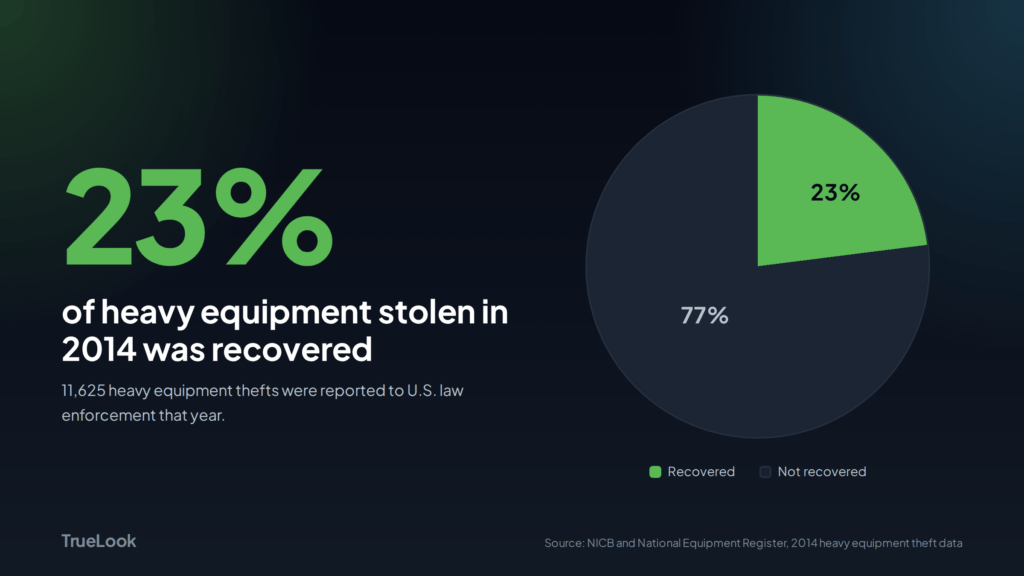
- Theft and after-hours use. According to NICB and the National Equipment Register, 11,625 heavy equipment thefts were reported to law enforcement in 2014, and only 23 percent of that equipment was recovered. Knowing when a machine moved, and having footage of it, shortens the time between a theft and a police report.
How does GPS and telematics equipment tracking work?
GPS and telematics tools report a machine’s location and operating data from a device on the machine itself. They are the standard for equipment managers who own a fleet and need engine hours and maintenance data across every job.
- OEM telematics. Most major manufacturers build telematics into newer machines, including Cat Product Link, Komatsu KOMTRAX, John Deere JDLink, and Volvo CareTrack. Each system reports location, engine hours, fuel, and fault data to its own portal.
- The AEMP 2.0 standard. A fleet with several brands means several portals. The Association of Equipment Management Professionals created a shared format, now formalized as ISO 15143-3, so one construction equipment tracking software platform can pull data from many manufacturers. According to For Construction Pros, AEMP 2.0 covers 19 data elements, up from five in the original version.
- Aftermarket GPS trackers and tags. Older machines, attachments, and tools need added hardware. Tenna offers cellular GPS trackers, Bluetooth beacons, and QR code tags on one platform. Trackunit pairs telematics units on heavy equipment with Bluetooth tags for smaller assets, including a partnership with Hilti’s ON!Track tool management system. Samsara offers GPS gateways and a Bluetooth asset tag, plus geofencing.
Where GPS and telematics fall short on a jobsite
- Coverage depends on hardware. A platform sees only the machines connected to it. Rented equipment and subcontractor machines often report to someone else’s portal, or to none at all.
- Update intervals vary. Battery and solar trackers report on a schedule to save power. Tenna’s solar TennaINTEL S1, for example, reports its GPS location every 23 hours.
- No visual record. GPS confirms coordinates without showing whether the machine was staged in the laydown area or parked across the gate.
How does AI camera equipment detection work?
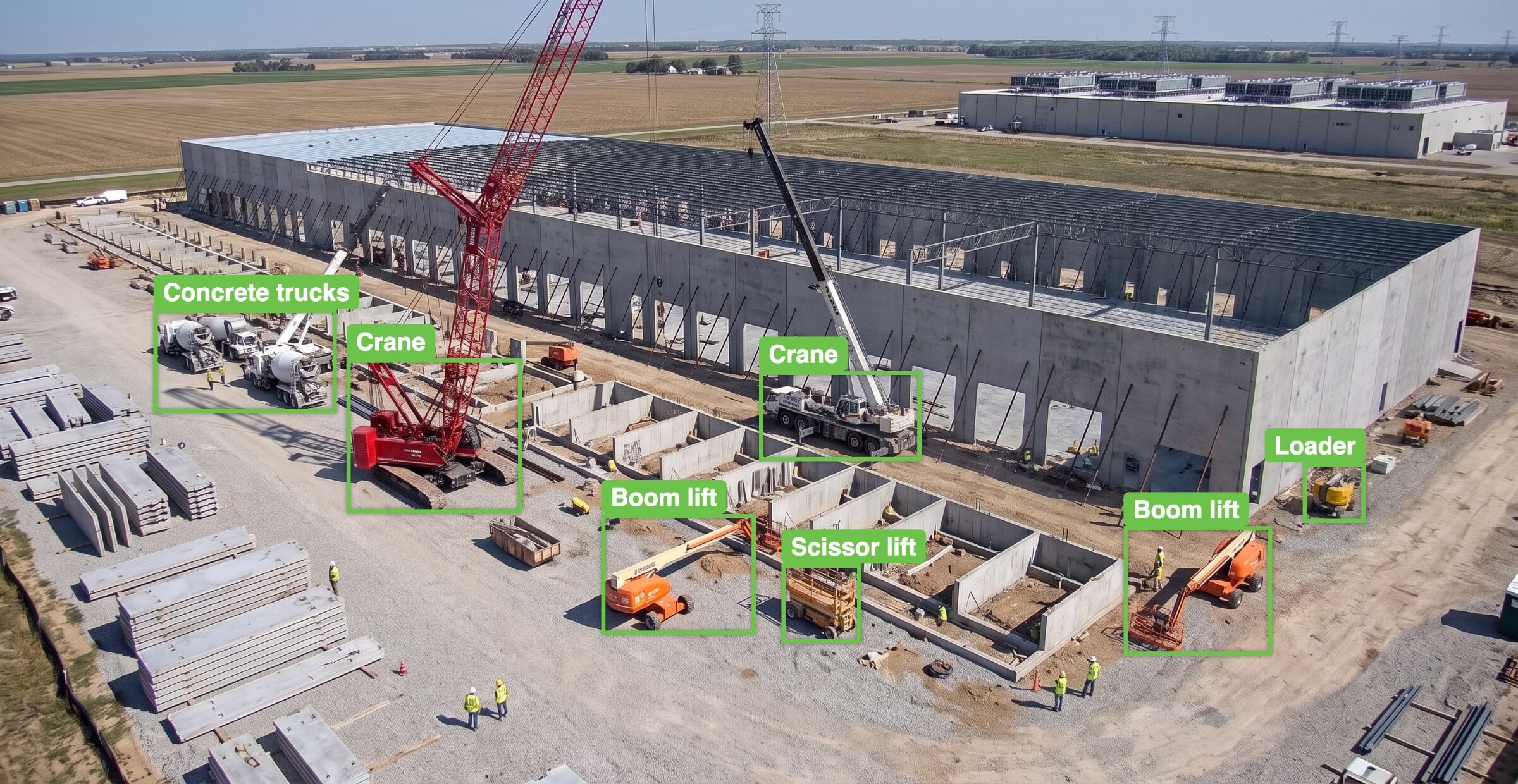
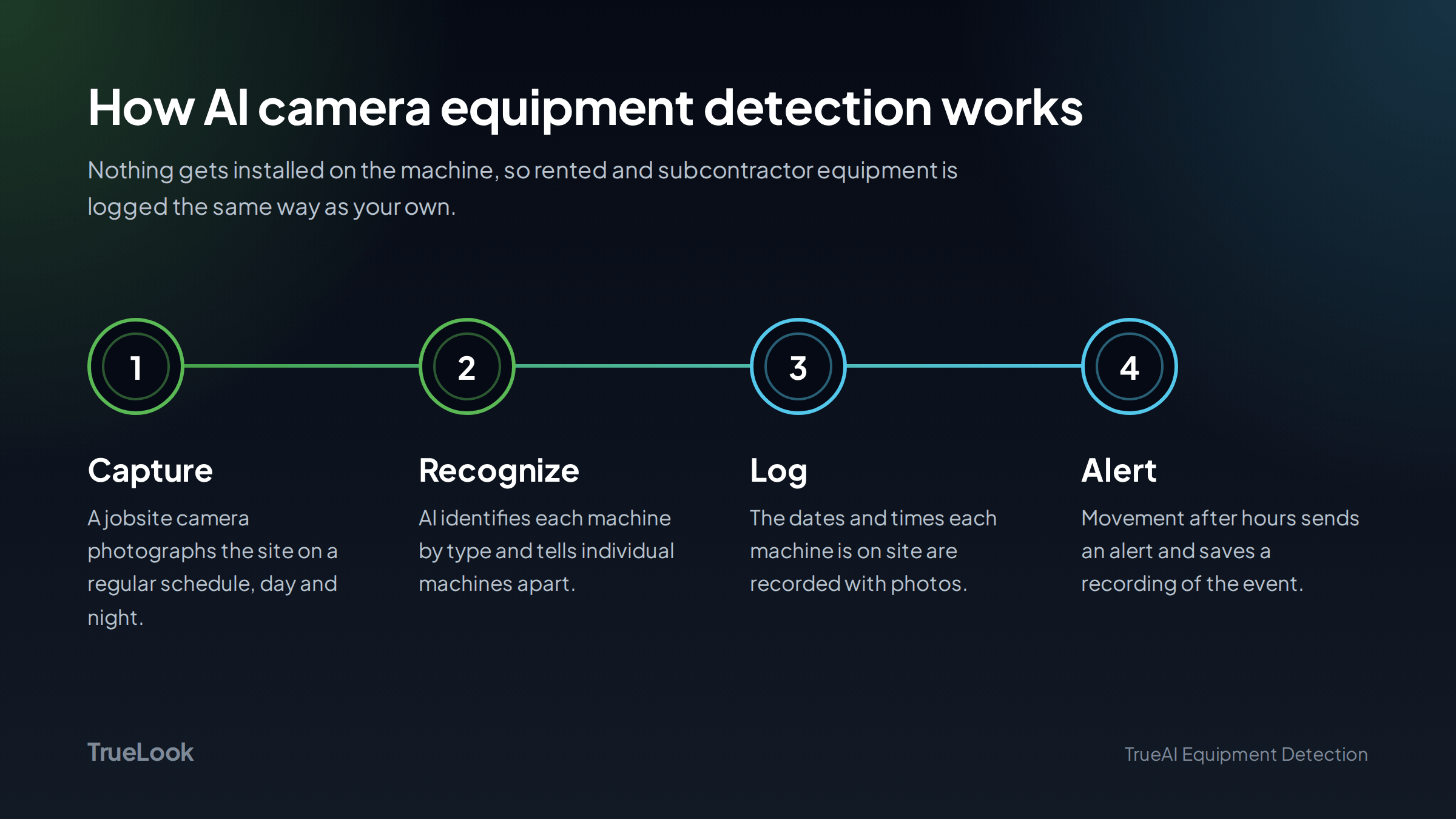
AI camera equipment detection uses a jobsite camera and a computer vision model to recognize machines in the camera’s view and log when each one is on site. Nothing gets installed on the equipment, so rented and subcontractor machines get logged the same way as owned ones.
The process generally runs in four steps:
- Capture. A fixed jobsite camera records images of the site on a regular schedule, day and night.
- Recognize. A trained model identifies equipment in each image by type, such as an excavator, telehandler, skid steer, or boom lift.
- Log. The system records the dates and times each machine is present and attaches photos as visual proof.
- Alert. Activity that needs attention is flagged, such as a machine moving after hours, and the footage is saved.
A camera logs only what sits in its view, so placement matters. On a large or spread-out site, a GC may need more than one camera to cover both the laydown yard and the active work area or need a pan-tilt-zoom camera to capture multiple sections of the site.
GPS and telematics vs. AI cameras: which is better for construction equipment tracking?
Neither replaces the other. Telematics serves the equipment manager who owns the fleet, and AI cameras with construction equipment tracking software serve the PM and superintendent.
| OEM telematics | Aftermarket GPS and tags | AI jobsite cameras | |
|---|---|---|---|
| What it tracks | Newer machines from supporting manufacturers | Any asset fitted with a device, down to small tools | Any equipment in the camera’s view |
| Hardware on the equipment | Built in | Tracker or tag on each asset | None |
| Rented and sub-equipment | Only if connected to your platform | Only if tagged | Yes |
| Engine hours, fuel, fault codes | Yes | Varies by device | No |
| Location across job sites and yards | Yes | Yes | Only sites with a camera |
| Photo proof of what was on site | No | No | Yes |
| Best for | Fleet maintenance and utilization | Mixed fleets, attachments, tools | Site-level records, rentals, disputes, after-hours activity |
A contractor can run telematics for its owned fleet and add cameras for site-level visibility. The camera fills in the rented and subcontractor machines that never show up in the fleet portal.
How TrueLook TrueAI Equipment Detection tracks equipment on site
TrueAI Equipment Detection runs on TrueLook jobsite cameras and recognizes more than 55 types of construction equipment.
For each machine, it logs the dates and times it was on site, with photos. When equipment moves after hours, the system sends an alert and records what happened.
On a real project, that record helps in situations like these:
- Confirm a rental arrived. The rental company says the excavator dropped Tuesday afternoon. The PM checks the log before locking in Wednesday’s dig crew.
- Check a rental invoice. The log shows each day that specific telehandler was on site, with photos, to compare against the rental bill.
- Explain an after-hours move. A loader moves at 11 p.m. on a Saturday. The alert arrives with footage showing whether it was a theft attempt or a sub repositioning for Monday.
- Settle a back-charge. When a back-charge comes up, the dated photo log shows exactly which days it was on the job.
See TrueAI Equipment Detection on your jobsite.
Get a dated, photo-backed record of every machine on site, including rentals and subcontractor equipment.
What to look for in a construction equipment tracking software
Which system fits depends on who needs the answer. An equipment manager tracking maintenance across a fleet needs different data than a PM checking what showed up on one site today.
Six factors help sort the options:
- Who owns the equipment on site. When much of it is rented or belongs to subs, a tool that needs hardware on each machine will miss part of the picture.
- What the record includes. Coordinates and engine hours answer different questions than photos do. Disputes and daily logs go faster with visual proof.
- Update frequency. Some battery trackers report once a day. Arrival checks and theft alerts need closer to real time.
- Individual machine recognition. Counting two excavators is less useful than knowing which two, especially when matching rental invoices.
- After-hours alerts. Look for alerts on movement outside working hours and a saved record of the event.
- Where the data goes. Check whether the records fit into the platforms your team already uses for daily logs and project management.
Construction Equipment Tracking FAQs
Construction equipment tracking records where machines are, when they arrive and leave a jobsite, and how they are used. Common methods include OEM telematics and aftermarket GPS trackers, along with AI jobsite cameras that log equipment visually.
That depends on who owns the equipment and what question you need answered. Telematics and GPS work well for an owned fleet’s location and maintenance data. AI cameras work well for site-level records of every machine on a job, including rentals and sub equipment.
Yes. AI jobsite cameras recognize equipment visually, so they log rented and subcontractor machines with no device installed. The camera records the dates and times each machine is on site, with photos.
GPS tracking reports a machine’s location. Telematics adds operating data such as engine hours, fuel use, and fault codes, usually from a system built in by the manufacturer.
Equipment tracking works best when it covers every machine on site
Fleet telematics and GPS tags do their job well for the equipment a contractor owns. On a busy commercial project, though, many of the machines belong to rental houses and subs, and those machines tend to drive invoice questions and back-charges.
A dated, photo-backed record of every machine on site, owned or not, gives the PM and superintendent the same facts the rental company and the sub are working from. That part is the piece I think about most.
You can’t manage what you can’t see, and a jobsite with a dozen machines from five different owners has a lot to see.
Get a quote for TrueAI Equipment Detection