The most important features to look for in a construction webcam are weatherproofing (IP66 or higher), 4K resolution, solar or cellular connectivity, and tamper-resistant mounting — because most commercial job sites lack reliable power and wired internet. A professional-grade construction webcam purpose-built for job sites typically costs $800–$3,500 per unit depending on resolution, connectivity, and storage options, compared to $100–$400 for repurposed security cameras that often fail under sustained outdoor conditions.
Here’s the thing most people get wrong: they shop for a construction webcam the same way they’d buy a security camera for a parking lot. A fixed building with power, shelter, and stable Wi-Fi is a completely different environment from an active job site. Dust, vibration, temperature swings, pressure washing, and the occasional errant piece of rebar will destroy a consumer-grade camera inside a year. When you’re documenting a $20M ground-up build, that’s not a trade worth making.
Owners and GCs are increasingly using these systems for far more than security — owner reporting, time-lapse documentation, insurance claims, OSHA incident review, and real-time progress monitoring from offsite. Each of those use cases has slightly different requirements. Let’s work through them.
What Image Quality Do You Actually Need on a Construction Webcam?
For commercial construction documentation, 4K (8 megapixel) resolution is the current professional standard, though 2K (4MP) is acceptable for smaller sites where digital zoom isn’t critical. Resolution matters most when you need to zoom into specific areas of a frame after the fact — reviewing rebar placement, identifying workers, reading signage, or verifying equipment positioning.
Does Frame Rate Matter for Construction Cameras?
For time-lapse and documentation, frame rate is less important than resolution and dynamic range. Most construction webcams capture at 1–5 frames per second during work hours and consolidate footage into time-lapse sequences, rather than recording continuous HD video. Continuous recording at full resolution is typically only activated by motion triggers for security purposes.
If your primary goal is security rather than documentation, look for cameras that offer 30fps continuous recording in addition to time-lapse mode.
What About Night Vision for Construction Sites?
Standard infrared (IR) night vision covers 100–150 feet adequately for most perimeter security. For larger sites exceeding 5 acres or with high-value equipment storage, thermal imaging cameras detect heat signatures through darkness, fog, and smoke — though thermal units run $3,000–$8,000+ and are typically reserved for high-risk or high-value projects. For most commercial builds, color night vision provides better identification quality when any artificial lighting is present.
How Should a Construction Webcam Connect to the Internet?
Once you’ve settled on image quality, connectivity is the next decision and it’s where a lot of buyers get caught off guard.
Cellular 4G/LTE or 5G connectivity is the recommended choice for most active construction sites, because it eliminates dependence on the owner’s or GC’s site internet, which is often unavailable in early project phases or disrupted by construction activity. Cellular-connected cameras typically use a dedicated SIM card with a data plan.
Wired ethernet makes sense once a site has permanent power and IT infrastructure, generally after structural enclosure. Wi-Fi is unreliable for outdoor job site cameras due to signal interference and range limitations. Go cellular first, add wired later if it makes sense.
What Power Options Do Construction Webcams Support?
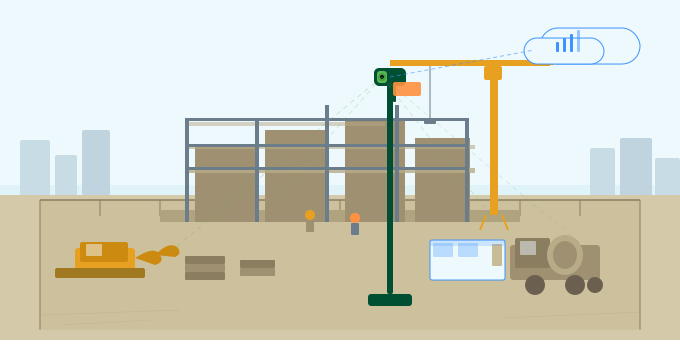
Solar-powered construction cameras with integrated battery backup are the most flexible deployment option, operating entirely off-grid with no trenching or temporary electrical required. A quality solar unit needs a panel rated at 20–40W and a battery capacity of at least 20Ah to maintain 24/7 operation through cloudy periods. Wired 120V power is simpler when available, but the cost of running temporary power to camera locations often exceeds the camera hardware itself on large sites.
What Weatherproofing Ratings Should a Construction Webcam Have?
The minimum acceptable weatherproofing rating for an outdoor construction camera is IP66, which certifies full dust-tight protection and resistance to high-pressure water jets. For cameras in areas subject to pressure washing, flooding, or high vandalism risk, an IP67 or IP68 rating provides submersion protection, important in flood-prone regions or below-grade installations.
The IK impact rating is equally important and frequently overlooked. An IK10-rated housing withstands 20 joules of impact force, which covers most tool-strike and vandalism scenarios. Cameras deployed at grade level or in accessible areas should meet both IP66 and IK10 standards. Also check the operating temperature range — construction cameras should handle at least -4°F to 140°F to hold up across U.S. climates without thermal shutoff.
Grade-level and accessible cameras should meet both IP66 and IK10. These are the two ratings most commonly skipped on budget camera specs.
What Mounting and Deployment Options Should You Consider?
Here’s a practical point that doesn’t show up in most spec sheets: a construction site changes dramatically from month to month. The camera position that gives you a perfect view of the foundation pour is useless once the building starts going vertical. Plan for that.
For large projects like a 500,000+ SF, phased development, or master-planned campuses, multi-camera systems with a central management dashboard let owners and project managers monitor the full site from one interface. Pan-tilt-zoom (PTZ) cameras can cover an area that would otherwise require 3–4 fixed cameras, though they introduce mechanical complexity and higher maintenance risk.
What Software and Storage Features Matter Most?
The hardware gets you the image. The software determines whether that image is actually useful six months from now when you need it.
Look for cameras with cloud storage, not just onboard SD card storage. SD cards fail, get stolen, and have limited capacity. Cloud-based systems with 30–90 day rolling storage are standard for professional construction applications. If you’re on a project with any litigation or insurance documentation exposure, pay for the unlimited archive tier. It’s cheap compared to the alternative.
For commercial GCs and owners, integrations with construction management platforms (Procore, Autodesk Construction Cloud, Raken) allow webcam feeds and time-lapse footage to be embedded directly into project dashboards. OSHA 29 CFR 1926 doesn’t mandate webcam documentation, but timestamped video footage has become a standard risk management tool for incident investigation, safety compliance verification, and subcontractor accountability.
Automated time-lapse generation where the camera compiles a progress video on a daily, weekly, or milestone basis is the single software feature with the highest ROI for owner communications. Owners love it. It’s also excellent marketing content for your completed projects.
Construction Webcam Feature Checklist by Project Type
FAQ: Construction Webcam Features
What’s the difference between a construction webcam and a regular security camera?
Construction webcams are purpose-built for long-term outdoor deployment with solar power, cellular connectivity, and time-lapse software, features standard security cameras lack. A typical IP security camera rated for indoor or light outdoor use will fail within 6–18 months under sustained job site conditions. Professional construction cameras are engineered for continuous deployment with minimal maintenance.
How many cameras do I need for a commercial construction project?
A single well-positioned 4K camera covers most sites under 2 acres for documentation purposes. For security perimeter coverage of a typical commercial site, plan for one camera per 300–500 linear feet of perimeter, though PTZ cameras can expand effective coverage to 600–800 feet.
What does a construction webcam system cost to operate monthly?
Ongoing costs typically include cellular data, cloud storage, and software platform fees. Total monthly operating cost for a single-camera setup typically runs $100–$500/month, not including hardware amortization.
Bottom Line: Key Takeaways
- IP66 weatherproofing and IK10 impact resistance are the minimum hardware standards for any outdoor construction camera on a commercial project
- 4K resolution is the professional standard; consumer security cameras are not a reliable substitute for long-duration outdoor deployment
- Cellular connectivity with solar power provides the most flexible, reliable deployment across all project phases
- Cloud storage with 90-day minimum retention protects documentation for insurance claims, OSHA review, and dispute resolution
- Automated time-lapse generation is the highest-ROI software feature, prioritize platforms that include it without per-video fees
- Plan for camera repositioning as the project progresses; portable mast systems are worth the investment