
What is AI in construction management?
AI in construction management refers to software that reads your project data (schedules, daily reports, insurance policies, jobsite camera photos) and turns it into answers, alerts, and written summaries a project manager can act on. In 2026, the useful tools do four jobs: answer plain-language questions, watch for specific conditions, write recurring reports, and catch risk before it reaches the field. The ones worth paying for show you the evidence behind every answer.
I’ve spent 20+ years working with general contractors, and every vendor at every trade show now has an AI badge on the booth. A PM needs two things from any of them: proof the tool gives hours back to the team each week, and a way to check what it says. This list sticks to tools that pass both tests, including ours.
Key Takeaways
- AI is paying off for more contractors: 38% now report measurable business impact from AI, up from 17% in 2025, according to ServiceTitan’s 2026 Commercial Specialty Contractor Industry Report.
- Trust is the top barrier for PMs. In Mastt’s 2026 survey, 29.6% of construction project professionals named accuracy and trust as the biggest obstacle to using more AI, ahead of training, integration, and cost.
- Construction-specific AI is still underused. The same Mastt survey found 66.7% of PMs used ChatGPT for work in the past three months, while 3.7% used the AI inside Procore or Autodesk.
- AI that works from your existing jobsite cameras needs no new hardware. TrueLook’s TrueAI reads the photos your cameras already take and answers with the images that prove it.
- Check your insurance before you roll AI out. Carriers have filed generative AI exclusions on the commercial lines contractors carry, per a Trades Coverage review reported by Insurance Business.
AI tools for construction management at a glance
The six tools below cover different parts of a project, so a typical GC could run several at once without paying twice for the same job.
| # | Tool | What the AI does | Data it works from | Built for |
|---|---|---|---|---|
| 1 | TrueLook TrueAI | Answers jobsite questions with photo proof, sends alerts and scheduled briefs, tracks PPE and equipment | Jobsite camera photos | PMs, supers, safety managers, owners |
| 2 | Procore AI Agent Marketplace | Searches project docs with citations, runs submittal, RFI, daily log and contract agents, calls partner agents | Procore project data plus partner data | Procore customers |
| 3 | Outbuild’s Agent-Powered Scheduling | Answers schedule questions, builds and checks schedules | Master schedule and lookaheads | Schedulers, PMs, supers |
| 4 | Raken | Summarizes signed daily reports, tags photos | Daily reports and field photos | Field teams, PMs |
| 5 | Zero RFI | AI-backed owner’s rep services | Owner-side project records | Owners, developers |
| 6 | WithCoverage | AI review of insurance programs | Policy language and operations data | Contractors, owners |
6 AI tools construction managers can use in 2026
Five companies on this list (TrueLook, Outbuild, Raken, Zero RFI and WithCoverage) demoed back-to-back at Demo Day: Your Tech Stack in 60 Minutes, a LinkedIn Live hosted by construction PM and creator Kyle Nitchen on October 30, 2026. Each one covers a different layer of the stack, which is the point of this list.
1. TrueLook TrueAI: answers, alerts and briefs from your jobsite cameras
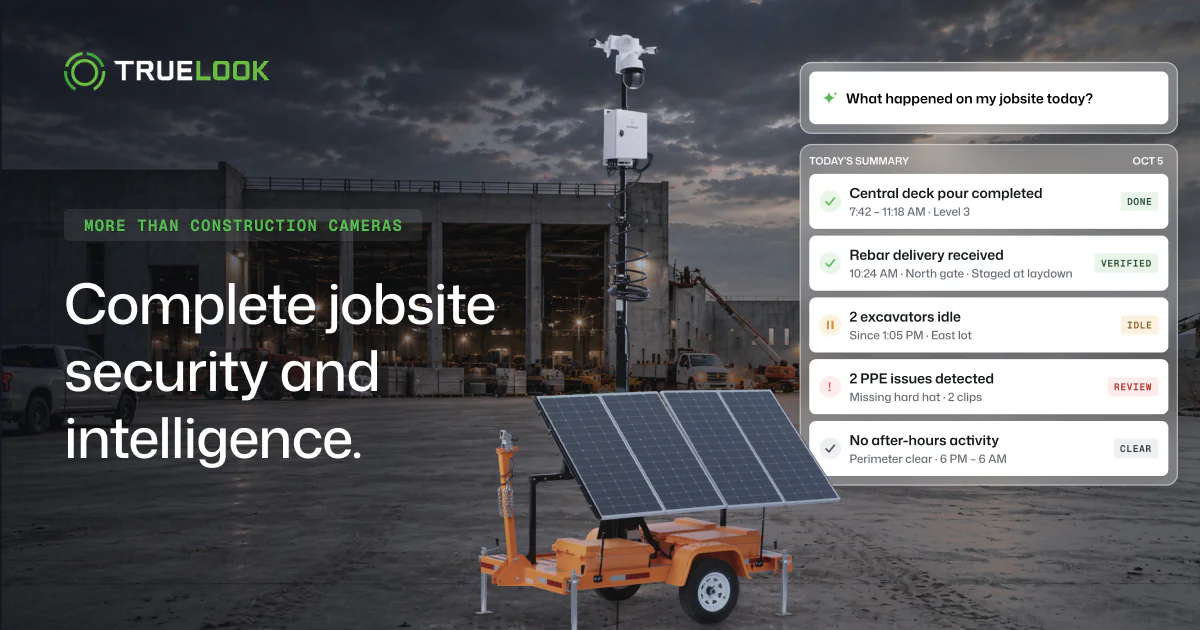
TrueAI is TrueLook’s AI for construction cameras. It reads the photos your TrueLook cameras already take and turns them into answers, alerts, and scheduled briefs, each backed by the images behind it. TrueAI is included in TrueLook’s Advanced and Premium plans, with no extra equipment.
We pulled all 83 questions customers asked TrueAI Chat in its first 10 days, and this is the first time we’ve published them. Customers typed 55 by hand; the other 28 were clicks on suggested prompts, led by “milestones this month” and “recurring safety risks.” The typed questions show what PMs want from jobsite AI in their own words.
Chat. Ask a question the way you’d ask your superintendent, and TrueAI searches every camera on the site and answers with the photos that prove it. The biggest group of typed questions asked when something happened, such as when steel erection started or what time the crane showed up.
One team asked how many days they placed concrete between October 6 and October 26, and described what a pour looks like: concrete trucks plus a red boom pump. TrueAI found six pour days, with photos of each.
| Question type | What a customer actually asked |
|---|---|
| When did it happen (largest group) | “When did steel erection start?” |
| Weather and delay records | “How many days have been impacted by rain or muddy site conditions?” |
| Safety | “Show me every time somebody was working on a ladder in the last month” |
| Vehicle search | “A white F-150 truck coming in around 8:00 to 9:00 a.m.” |
| Site logistics | “How often have the dumpsters been emptied?” |
| Site recap | “What have we been up to this month?” |
Notify. Describe what to watch for in your own words, like after-hours activity or workers near heavy equipment. TrueAI checks every new photo and texts or emails you the image when it finds a match.
Customers already use Chat like a security camera search. A grocery distributor ran 11 vehicle searches in one sitting, from trucks stopped for more than a minute to fire trucks on a specific date. Notify turns a search like that into a standing alert.
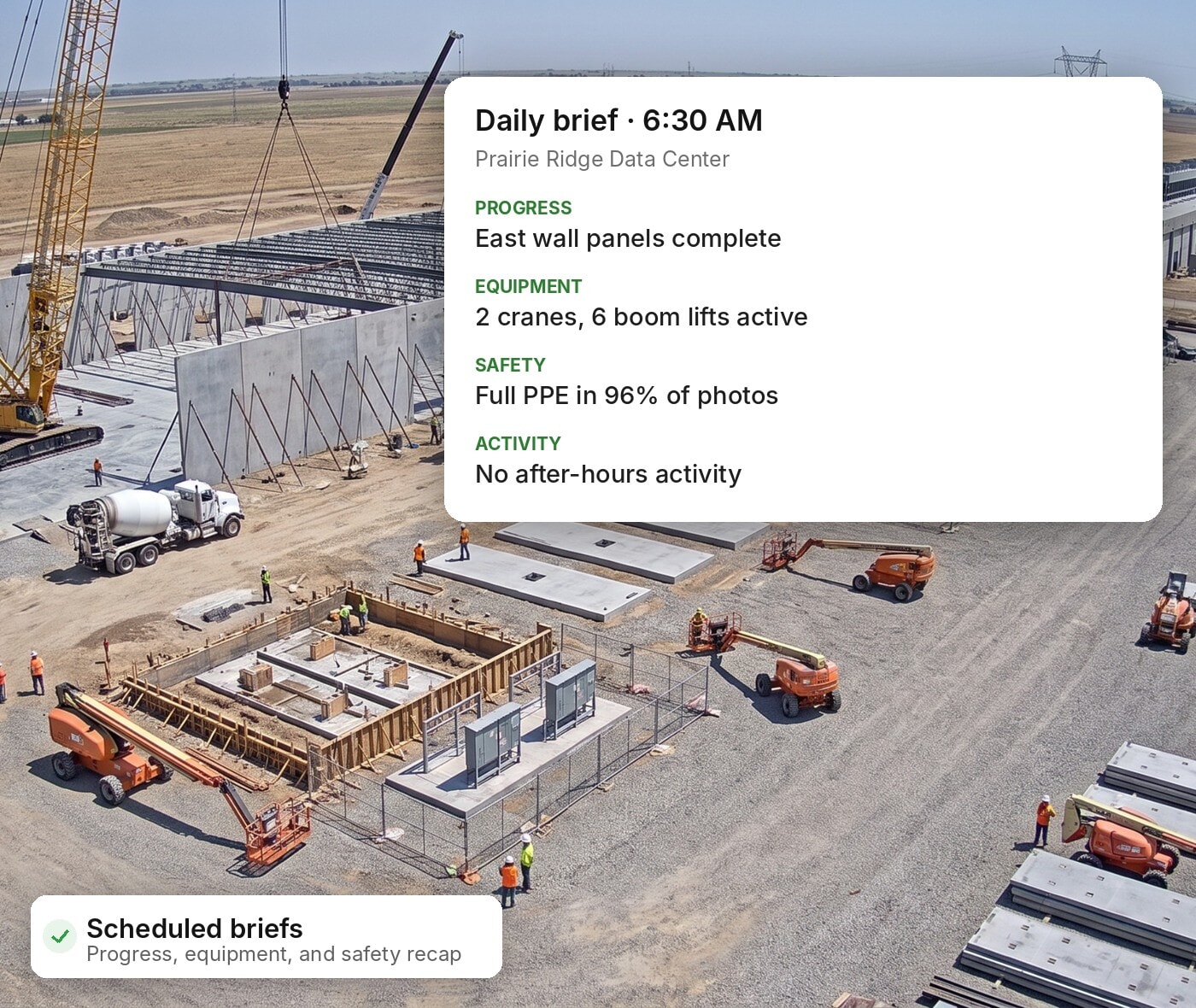
Brief. Pick your topics (progress, equipment, safety, or an executive summary), and TrueAI sends a daily recap to your super and a weekly one to the owner, ready to forward without rewriting. Reporting is the task 84.3% of PMs most want AI to take on, per Mastt.
Evidence. PPE detection checks each photo for hard hats, safety vests and high-visibility clothing, then filters to the misses for your next safety huddle. Safety questions in Chat came from eight projects across three contractors, from “any people without hardhats?” to ladder work over the past month.
Our Chat data points the same way. An engineering firm pasted a full equipment-yard report request into Chat, covering departures, returns, and anything parked 14+ days, then asked for it as a daily email or text. A recurring summary like that is what Brief and Notify are built to send.
Site activity tracking counts people and vehicles by hour and day, and equipment detection tells individual machines apart and flags after-hours movement.
PPE rules vary by site and trade, so treat detections as a prompt for your safety lead to review. More on that in our guide to AI in OSHA compliance.
- Best for: owner calls, delay and change order documentation, after-hours oversight, PPE compliance programs and owner reporting.
Put TrueAI to work on your next project.
TrueLook cameras come with TrueAI on Advanced and Premium plans, so your team can ask the jobsite questions and get photo-backed answers from the first week on site.
2. Procore AI Agent Marketplace: partner AI inside the tool you already use
Procore AI is the AI built into Procore, the construction management platform many GCs already run their projects on. It indexes Procore and third-party project files, then uses a construction reasoning engine to answer questions and carry out workflows where your team already works.
Its pre-built agents take on high-volume admin work:
- Deep Search Agent: answers questions across specs, drawings, RFIs and submittals, with citations.
- Submittal Review Agent: cross-checks submittals against specs and contracts to flag compliance issues.
- RFI Agent: drafts pre-populated RFIs from drawings and project data for your review.
- Daily Log Agent: turns field photos, emails, video and voice notes into completed daily logs.
- Contract Review Agent: reconciles contracts and drawings against internal benchmarks and flags potential conflicts.
Procore AI also reaches outside Procore. Its Agent Marketplace, launched at Groundbreak 2026, lets Procore AI call partner agents through a governed connection. TrueLook is one of the visual intelligence partners, so a PM can ask Procore AI a jobsite question and get a photo-backed answer from TrueAI without leaving Procore.
- Best for: GCs standardized on Procore who want AI working on specs, submittals, RFIs and daily logs.
3. Outbuild: schedule answers and scheduling agents
Outbuild is a construction scheduling platform, and its AI works from your live schedule. The Outbuild Assistant answers questions about progress, delays, critical path, milestones, subcontractor performance, and baseline drift.
Its agents take on the heavier lifting. The Schedule Health agent returns a pass, warning, or fail on each check and names the activities that triggered it. Co-Builder generates and bulk-edits activities from plain-language instructions, and Schedule Generator drafts a full schedule with durations and predecessors for you to refine.
- Best for: schedulers, PMs, and supers running master schedules and lookaheads.
4. Raken: daily report summaries and photo tagging
Raken is a field reporting app, and its AI Daily Report Summaries read each signed daily report (work logs, safety observations, delays, equipment, weather) and write a short, prioritized summary. Summaries require Raken’s Performance Plan.
Raken also auto-tags field photos, uses AI Photo ID at the time clock to stop buddy punching, and offers an MCP connector that links Raken to tools like Claude and ChatGPT. TrueLook integrates with Raken, so camera time-lapses can ride along with daily reports.
- Best for: field teams and PMs reviewing dailies across several active projects.
5. Zero RFI: an AI-native owner’s rep
Zero RFI is an owner’s representative firm built around AI. Founded by KP Reddy and backed by a $13.8 million seed round led by General Catalyst, it acquires owner’s rep and construction management firms, starting with Brookwood Group and BuildingWorks, and runs them on its Foundation Zero platform.
Zero RFI works for the owner, independent of the GC and design team. Owners get AI-backed oversight without buying and rolling out software themselves.
- Best for: owners and developers running capital programs.
6. WithCoverage: AI review of your insurance program
WithCoverage is an insurance brokerage that starts each client engagement with an AI-powered audit of the existing insurance program, analyzing policy language and operational data to find uncovered exposures and overspending, according to FinTech Global. Its construction work includes rolling CCIPs and master builder’s risk programs.
This one matters more each renewal. Carriers have begun filing generative AI exclusions on contractor liability policies, and the first adoptions appeared in August 2025, per Trades Coverage data reported by PHC Pros.
- Best for: GCs and specialty contractors reviewing coverage before renewal or before adding AI tools.
How to choose AI construction management software: 5 questions to ask
I sell cameras for a living, and I’ll still tell you that a slick AI demo proves little. Bring these five questions to every vendor, including us.
- Can I check every answer? An AI that can’t show its source is a liability on a jobsite. Ask to see the photo, report line, or scheduled activity behind each answer before you sign.
- Does it run on data and hardware I already have? Some vendors bundle a hardware refresh into the AI pitch. TrueAI, for example, works from the photos your existing TrueLook cameras already capture.
- Does it work inside the tools my team already opens? Field teams won’t adopt another login. Look for a Procore Agent Marketplace listing, an MCP connector, or a direct integration with your daily report app.
- Is the AI in my plan or an add-on? It’s unfortunate, but some vendors price AI as a separate line item after the contract is signed. Get the plan tier and any per-user or per-camera AI fees in writing.
- What does my insurance say about it? Ask your broker whether any policy on your program carries a generative AI exclusion before an AI tool touches estimating, scheduling, or safety decisions.
Training belongs on the list too. In the Mastt survey, 15.7% of PMs said not understanding how to use AI was their biggest barrier. The right vendor walks your team through setup, and doesn’t leave you with a login and a help article.
Frequently asked questions about AI in construction management
AI in construction management is software that reads project data, such as schedules, daily reports, insurance policies and jobsite camera photos, and turns it into answers, alerts and reports. It helps project managers find information faster and spot risk earlier. The PM still makes the decisions.
PMs use AI to answer questions about site progress, write daily and weekly reports, check schedules for errors, track PPE and equipment, and review insurance coverage. Reporting is the top use case PMs want, named by 84.3% of respondents in Mastt’s 2026 survey.
PMs don’t expect it to. In Mastt’s 2026 survey, 58.3% of construction PMs said they aren’t worried about AI replacing their role in the next five years, and 58.3% are already learning AI tools. AI takes over repetitive reporting and searching, while judgment, relationships and field decisions stay with people.
AI construction cameras analyze the photos a jobsite camera captures to detect people, vehicles, equipment and PPE. With TrueLook’s TrueAI, PMs can ask questions about the site, get text alerts when a described condition appears, and receive scheduled briefs, each backed by the photos behind it.
Not if you already have TrueLook Cameras. TrueAI works from the photos your TrueLook cameras already take, with no extra equipment, and it’s included in TrueLook’s Advanced and Premium plans.
The main risks are inaccurate answers, poor adoption by field crews, and insurance exposure. Choose tools that show the evidence behind each answer, and ask your broker whether your policies carry a generative AI exclusion.
Yes. Procore’s Agent Marketplace lets Procore AI customers install partner agents, including TrueLook, and use them inside Procore with their existing permissions.
Start with the questions you already ask every week
The AI tools that stick on a jobsite answer questions your team is already asking: did the pour happen, and who was on site Saturday night. Pick tools that show their evidence and fit the software your crews already open.
TrueAI gives your TrueLook cameras that job. Ask a question, get the photos that answer it. Get a quote or schedule a demo to see TrueAI on a site like yours.
Get a Camera Matched to Your Site’s Connection
Tell us where the site is, what power it has, and whether a network exists yet. TrueLook’s team will build a quote around the connection, camera type, and mounting your project needs.