

This post was originally published on 11/25/2024 and was last updated on 11/04/2026.
The average American spends 4.65 hours on their phone every day. If you’re a foreman or construction project manager, your daily usage likely eclipses that already astounding mark. You need a strong mobile presence that’s reliable and secure for your project’s most vital details.
For construction professionals in the field, several exceptional construction mobile apps are worth reviewing. From scheduling and documentation to team communication and site monitoring, this guide highlights some of the best apps for construction management so you can explore the unique benefits of each construction management mobile app and find the right fit for your team.
Construction project management apps streamline tasks, improve collaboration, and enhance productivity. The right project management app for construction
centralizes updates without slowing you down. As a construction professional, consider adding some of these construction mobile apps to your digital toolbox, so you’re ready for whatever the job throws at you.
Scheduling and Task Management Apps
Staying on task is key to completing jobs on time. Developers crafted these apps specifically to manage project timelines, assign and complete tasks, and monitor project milestones. If you struggle with timelines and scheduling, or you want to avoid that fear, check out these options, each of which can serve as a practical jobsite app:
Smartsheet
Streamline the phases of your construction project lifecycle to manage the tasks that lead to a completed project easily. Build out workflows for pre-construction, field safety, resource management, quality control, and RFI/RFP management to hit the ground running faster than with paper checklists alone.
Smartsheet also offers construction templates for in-office and on the jobsites and automates task assignments for standardized processes. Construction companies use Smartsheet to receive real-time project updates, collaborate on priority tasks, and scale operations.
Microsoft Project
Microsoft Project is a classic project management app for construction. With dynamic scheduling, interactive dashboards, and task organization features, it is anything but dated. In fact, its robust feature set and affordable monthly subscription options make it one of the most compelling project management platforms available.
Outbuild
Outbuild is a construction scheduling platform built around how field teams plan their work. You can set up a master schedule, break it into lookahead plans, and track weekly commitments with your trade partners in one place. When a crew falls behind, your team spots the constraint early and adjusts before it pushes out the whole timeline.

Document and Blueprint Management Apps
1999 called, and they want their paper documents and filing cabinets back. Today, digital methods exist for storing, viewing, and sharing important documents, like blueprints, building permits, and insurance coverage.
Construction professionals on the go should add these construction mobile apps to their phones or tablets to stay connected to a virtual filing cabinet:
Procore
Procore offers data storage capabilities with no storage limits. It stores documents in protected folders, complete with security levels to prevent unauthorized access. Never lose a vital document again, as Procore backs up all data to serve as disaster recovery.
Procore also offers mobile document upload capabilities, allowing you to do more on the move. Plus, easily share files, log RFI responses and requests, and leverage version tracking to keep everyone on task.
Fieldwire
Fieldwire is undoubtedly one of the most comprehensive construction management apps available today. It lets you view high-quality blueprints, review the project schedule, receive task notifications, and delegate assignments to your team. It unifies document management, scheduling, reporting, markups, and mobile planning. Fieldwire is available for both Android and Apple device users.
Autodesk Build
Another comprehensive construction management app is Autodesk Build, which is complete with tools to manage files, connect RFIs, conduct straightforward meetings, and provide quality assurance. Share crucial docs with team members, mark up design changes, ensure safety compliance, and send updates to vested stakeholders.
Tools that centralize and unify documents and blueprints keep teams from losing files, which is essential to completing projects without issue. Automation features further reduce human error and boost productivity by removing the manual tasks associated with dull administrative work.
Budgeting and Cost Tracking Apps
It would be liberating to complete projects without the constraints of budgets. Unfortunately, cost control is part of the business, and improper management of finances can cause disastrous problems for investors, construction project managers, and even the workers themselves.
To prevent an angry mob hungry for their paychecks, check out these apps that help with budgeting and cost tracking:
- Buildertrend: Residential home builders are on tight budgets, and Buildertrend brings budget tracking, expense management, and invoicing to your construction business. With automation functionality, you can regain countless hours spent on financial tasks and keep finances organized.
- CMiC: Construction industry-leading accounting software designed to connect your general ledger and job costing software. CMiC offers accounts payable, accounts receivable, consolidated general ledger, and billing features in one unified package.
- Jonas Premier: Premium budgeting tools, A/P and A/R features, and integration capabilities with other construction management software. Jonas Premier is an all-in-one solution with real-time expense tracking and reporting, which are key features to protect your bottom line.

Team Communication and Collaboration Apps
Reliable communication is the cornerstone of success, and these communication and collaboration tools are perfect for keeping everyone connected and on the same page:
- Slack: Enjoy instant messaging and group chat capabilities available on virtually any device. Slack enables real-time updates and collaboration for on-site and remote teams, connecting everyone with a single app.
- Microsoft Teams: Microsoft Teams supports video calls, document sharing, and integration with other Microsoft products, like Microsoft Project, making it ideal for team coordination. It’s also free to use for most users, saving money on software costs.
- Buildertrend Client Portal: Residential builders who need to keep homeowners in the loop can share schedules, photos, selections, and change orders through Buildertrend’s client portal. Teams that came over from CoConstruct will find many of the same client communication tools here.
Communication between team members, general contractors, subcontractors, and clients is essential in preventing misunderstandings. When everyone is on the same page, you gain access to collaborative states that produce high-quality results.
Site Monitoring and Field Data Collection Apps
Managing multiple projects is a good sign that your company is growing and attracting the right kinds of business. Yet, with the increase in responsibilities, it becomes crucial to stay in the loop even when you can’t physically be on-site.
Take a look at some of our favorite remote site monitoring, data collection, and field reporting applications you should download today:
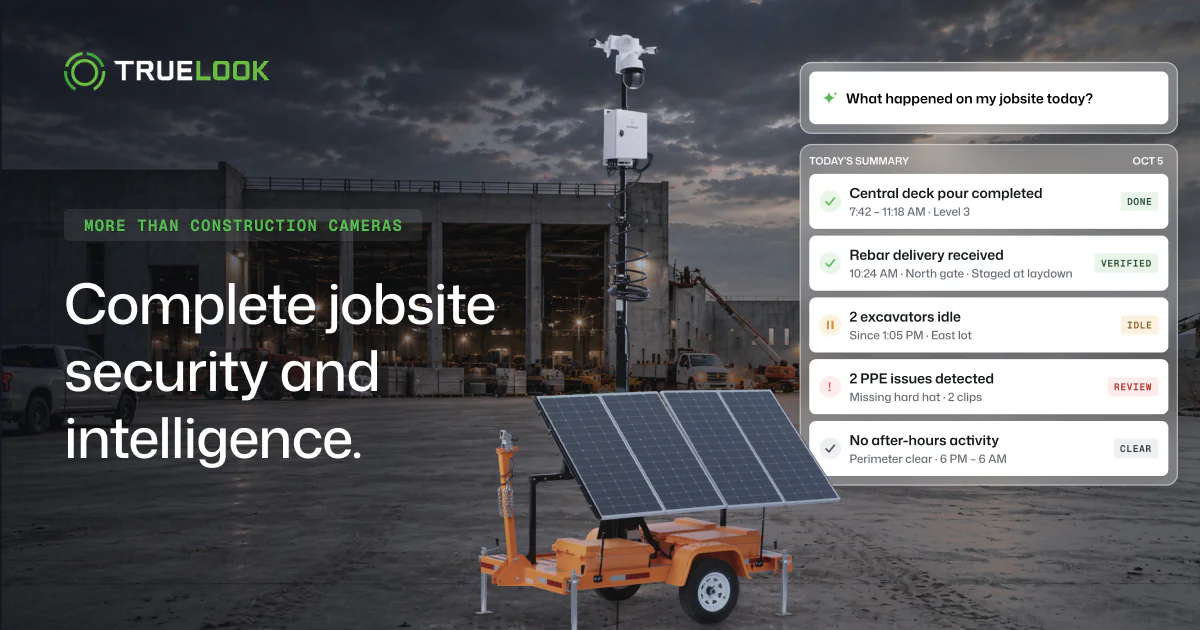
- TrueLook: Real-time, high-quality live video feeds across your sites are possible with TrueLook, a live view app. Combine cameras with advanced documentation, giving project managers a comprehensive overview of any jobsite at a moment’s notice.
- Raken: Raken is a field manager’s best friend, thanks to its digital tools for daily reporting, photo documentation, and field data collection. You can track everything from hours to safety and quality from your phone, helping you track progress.
- DroneDeploy: Capture drone-based images and videos with DroneDeploy’s monitoring functionality. Provides valuable data for progress analysis and project tracking using views only obtainable from the air.
While some of these solutions require additional hardware installations, they’re well worth the extra effort. For example, a remote live view app using TrueLook’s cameras can provide you with an unparalleled view of your construction sites, keeping tabs on progress and safety compliance.


Quality Assurance and Punch List Management Apps
Finally, when your projects come to a close, quality assurance becomes a top priority. These apps focus on quality checks, punch list management, and final inspections to ensure every project meets client expectations and industry standards:
- Buildertrend: Buildertrend is already a favorite for its financial management features, but its punch list features are worth talking about, too. Buildertrend’s punch list and final inspection capabilities allow managers to log and track necessary repairs or corrections before project handoff.
- Procore (QA Module): Procore’s QA capabilities for tracking quality issues, managing punch lists, and documenting resolutions reduce safety incidents and rework.
- Bluebeam Revu: Bluebeam Revu supports digital documentation of punch lists, allowing team members to annotate issues directly on digital blueprints and ensuring you finish construction by project deadlines. Bluebeam’s integrations also keep everyone unified, regardless of which digital tools they use.
These apps streamline the punch list and quality assurance process, reducing the chances of post-project fixes and enhancing client satisfaction. Prevent rework, quality assurance issues, and cost overruns by incorporating one of these apps into your tech stack.
Construction Photo Documentation Apps
A photo taken today can save you a long argument six months from now. Photo documentation apps give your team a dated, organized record of every stage of the build, which is exactly what you want on hand for owner updates, change orders, and claims.
These construction photo apps make that record easy to build and even easier to find:
- CompanyCam: CompanyCam organizes every photo by project and attaches the time and location automatically. Crews can mark up images and add notes in the field, then turn them into client-ready reports without heading back to the office.
- Procore Photos: Photos captured in Procore’s mobile app go straight into the project record, where your whole team can find them alongside drawings and daily logs.
- TrueLook: Phone photos only exist if someone remembers to take them. TrueLook cameras capture jobsite images on a set schedule around the clock and send that imagery into tools like Procore, so your photo record fills in on its own. Pair those daily images with a construction time-lapse, and you have a complete visual history of the project.
See how TrueLook keeps your project’s photo record complete without adding work for your crew.
Frequently Asked Jobsite App Questions
Smartsheet lets you build workflows across the project lifecycle (pre-construction, safety, resources, quality, RFI/RFP), use construction templates, automate task assignments, and get real-time updates for faster scaling. Microsoft Project provides dynamic scheduling, interactive dashboards, and robust task organization with affordable monthly plans. Outbuild supports master schedules, lookahead plans, and weekly work plans, helping field teams catch constraints early and keep the timeline on track.
Procore offers unlimited, secure storage with permission controls, automatic backups for disaster recovery, mobile uploads, file sharing, RFI logging, and version tracking. Fieldwire unifies document management with scheduling, reporting, markups, mobile planning, and task delegation, and supports high-quality blueprint viewing on Android and Apple devices. Autodesk Build connects files to RFIs, meetings, QA workflows, safety compliance, and stakeholder updates, enabling connected, traceable workflows. These tools replace paper filing, centralize plans, and reduce errors with built-in automation.
Buildertrend streamlines budget tracking, expense management, and invoicing—plus automates financial tasks to save time. CMiC is construction-focused accounting that ties the general ledger to job costing and includes A/P, A/R, consolidated GL, and billing in one system. Jonas Premier offers premium budgeting, A/P and A/R, integrations with other construction software, and real-time expense tracking and reporting to protect margins.
Slack provides instant messaging and group chats on virtually any device, enabling fast, real-time coordination for field and office. Microsoft Teams adds video calls, document sharing, and tight integration with Microsoft tools (like Microsoft Project) and is free for most users. Buildertrend’s client portal keeps residential builders and homeowners aligned on schedules, photos, selections, and change orders.
TrueLook delivers real-time, high-quality live video across sites and pairs cameras with documentation; its remote live view and time-lapse capabilities provide unmatched visibility for progress and safety oversight. Raken streamlines daily reporting, photo documentation, and field data collection, letting you track hours, safety, quality, and progress from your phone. DroneDeploy captures drone-based images and videos for progress analysis with aerial perspectives. While some tools require hardware (e.g., cameras or drones), the added visibility is well worth it.
CompanyCam organizes photos by project with automatic time and location stamps, plus markup and reporting tools. Procore Photos keeps images inside the project record next to drawings and daily logs. TrueLook captures scheduled imagery automatically from jobsite cameras and sends it into tools like Procore, giving you a consistent record even on days no one is snapping photos.
Build a Tech Stack That Works in the Field
The right construction project management apps give your team fewer places to hunt for information and more time for the work itself. Start with the category causing the most friction on your current projects, whether that’s scheduling or photo records, and add from there.
TrueLook fits alongside the apps your team already uses, adding live video, scheduled imagery, and time-lapse documentation to every project. Get a quote or schedule a demo to see your jobsite from anywhere.