

Introduction
Most construction time-lapse problems trace back to one decision made before the camera ever goes up: which system to buy. A camera with the wrong power source drops footage mid-project when the battery can’t keep up. A model with weak low-light handling loses the last two hours of every workday. Before comparing brands or specs, here’s what actually separates a system built to run for a year-plus jobsite from one that just happens to take pictures on a schedule.
Key Takeaways
- Construction time-lapse cameras photograph a jobsite at set intervals and compile images automatically into video with no manual editing required on purpose-built platforms
- Fixed cameras produce the cleanest time-lapses; PTZ cameras add flexibility for large or complex sites
- Solar-powered options with built-in 4G LTE work on any jobsite without Wi-Fi or electrical infrastructure
- Cloud-based platforms store every image by date and time, making it possible to pull footage from any specific day, months after the fact
- A timestamped photo archive is one of the most effective tools for resolving subcontractor disputes and supporting delay claims
- Time-lapse footage captured for documentation doubles as marketing content, which is one of the highest-ROI assets a GC can produce
What a Construction Time-Lapse Camera Actually Does
A construction time-lapse camera is not a standard video camera set to record continuously. Instead, it photographs the site at configurable intervals, such as every 5, 10, or 15 minutes during work hours, and then compiles those images into a fast-motion video that compresses months of progress into a few minutes.

The practical difference from a consumer camera or a GoPro is significant. Purpose-built construction systems handle the entire pipeline automatically: image capture on a schedule, upload to cloud storage, and video compilation without manual intervention. You can pull a time-lapse of any date range at any point during the project, not just at closeout.
Modern systems also include built-in cellular connectivity and weatherproof housings, which means they work on any jobsite from day one with no Wi-Fi infrastructure, no IT coordination, and no waiting.
Why Commercial Project Teams Use Time-Lapse Cameras
Project Documentation and Dispute Resolution
A complete, timestamped photo archive is among the most credible forms of documentation in construction disputes. When a subcontractor contests milestone completion, a delivery is disputed, or a weather delay needs to be proven, the ability to pull footage from a specific afternoon months earlier is hard to argue with.
For teams working under AIA A201 general conditions, platforms that log historical weather data alongside the image archive provide additional support for delay claims, which is a standard documentation requirement that most standalone cameras don’t address.
See our full breakdown of the ROI case for time-lapse photography in construction disputes for more on how this documentation holds up in claims and change orders.
Stakeholder Communication and Owner Reporting
Owners, lenders, and investors want progress visibility without driving to the site. A weekly time-lapse clip or email with jobsite images communicates more than a written progress report and takes a fraction of the time to produce. The best platforms generate automated sharing links so stakeholders get updates on a defined schedule with no manual exports on your end.
See how this plays out on real jobsites in Construction Time-Lapses Bring Magic to Life.
Marketing and Business Development
A polished construction time-lapse video is one of the most compelling pieces of marketing content a GC can produce. Watching a complex structure rise from slab to topped-out steel in two minutes demonstrates capability in a way no brochure matches. Because the camera is already capturing footage for documentation, the marketing asset is essentially free.
Learn more about how to use time-lapse video for marketing (and disputes) for your construction firm.
Fixed vs. PTZ: Choosing the Right Construction Time-Lapse Camera
The most important hardware decision is whether to use a fixed camera, a PTZ (pan-tilt-zoom) camera, or both.
Fixed cameras are mounted in one location and capture a consistent, locked field of view throughout the project. This is the ideal setup for time-lapses — the stationary angle produces a clean, continuous visual record with no jumps or repositioning. For most commercial projects, a fixed camera is the right starting point.
PTZ cameras can be remotely panned, tilted, and zoomed to cover different areas of a large site. They can run multiple simultaneous time-lapses from different vantage points, which is useful for large industrial sites, horizontal construction, or projects where a single fixed angle can’t capture the full scope of what’s happening.
For a detailed breakdown of every TrueLook camera model, specs, and which project type each fits best, check out the best construction cameras for time-lapses.
Power and Connectivity
Two questions that used to limit time-lapse adoption on commercial sites: how does it stay powered, and how do images get transmitted?
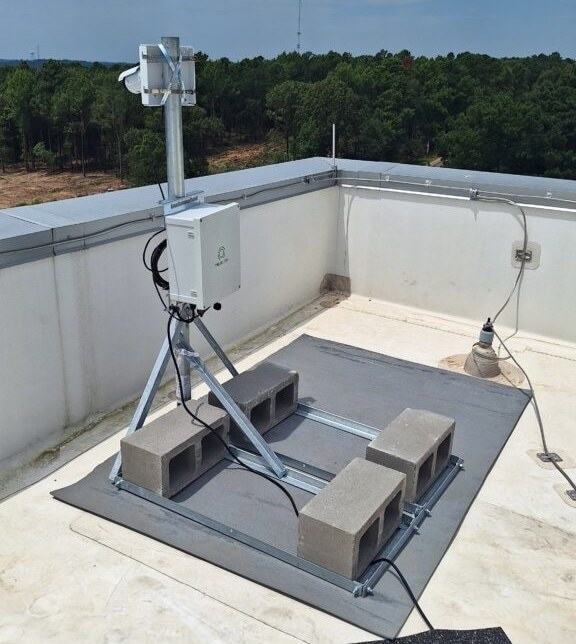
Solar-powered systems eliminate the need for site electrical infrastructure. High-quality solar setups deploy in hours and operate continuously through poor weather and seasonal light changes. For remote sites or projects where running a power line isn’t practical, solar is often the most reliable option.
Built-in 4G LTE means images are transmitted to cloud storage automatically, with no jobsite Wi-Fi required. You can view live footage, adjust capture settings, and download time-lapses from any device. This is what makes purpose-built construction cameras dramatically more practical than consumer alternatives that require internet infrastructure before capturing a single frame.
Mobile surveillance trailers combine camera, power, and connectivity into a relocatable unit, which is useful for sprawling sites or multi-phase projects where the optimal vantage point changes as the build progresses.
Weather and Durability Ratings
A construction time-lapse camera lives outside for the life of the project, through summer heat, winter freezes, and everything the jobsite throws at it. Check the IP rating (IP66 or higher for full weatherproofing), operating temperature range, and housing durability before you commit to a camera that can’t handle your site’s conditions creates the exact gaps in your record this guide is trying to help you avoid.
For a closer look at weatherproofing specs and how to match a camera to your climate, see our outdoor time-lapse camera guide.
Buy vs. Lease: Which Fits Your Project?
The right call depends on project length and how often you’re deploying cameras. Short-term or single-project work usually favors leasing with lower upfront costs and nothing to store or maintain once the project wraps. Ongoing work across multiple sites tends to favor buying, since the per-project cost drops the more the system gets reused.
For a full cost comparison, see should you buy or lease a construction camera.
Construction Time-Lapse Camera Placement and Setup Considerations
Camera placement decisions made on day one affect the quality of your entire project record. The most common mistake is mounting the camera at an angle that’s too tight on the base of the structure — when upper floors are added, the camera may need to be relocated, which creates a visible jump in the time-lapse.
Key setup considerations: mount height, compass orientation (facing north minimizes sun glare across seasons), power source, capture interval, and whether to include night and weekend frames.
For a complete setup and walkthrough, read how to set up a construction time-lapse camera.
Automated Time-Lapse vs. Basic Camera Systems
Having a camera that takes photos is not the same as having a time-lapse platform. What separates purpose-built systems from a basic camera with a timer:
- Automated video compilation on a defined schedule with no manual export or editing
- Cloud photo archive searchable by date and time for the full project duration
- Mid-project export, where you can generate and download time-lapses at any point, not just at closeout
- Stakeholder sharing links give you automated distribution without PM involvement on every send
- Weather data logging alongside the photo archive for delay claim documentation
- PM platform integrations such as Procore, Autodesk Construction Cloud, Raken, DroneDeploy, and others
Get a full breakdown of what to look for when evaluating construction time-lapse software.
Common Challenges and How to Handle Them
- Camera gets obstructed mid-project: Plan for vertical growth. If you’re documenting a multi-story structure, position the camera so it captures the full anticipated height (skyscraper mode) from day one and not just the current footprint.
- Footage has gaps. This is usually a power interruption or a cellular issue. Cloud-based platforms with solar backup and redundant connectivity minimize this. Check your setup a few days after launch rather than discovering problems at closeout.
- Time-lapse includes too much dead time. Most platforms let you strip night frames, weekends, and weather-impacted images before sharing. Configure this at the start rather than editing manually later.
- Dispute arises, and you need specific footage fast. This is where cloud archive with date-and-time search pays off. Being able to pull footage from a specific afternoon six months ago is a fundamentally different capability than having an SD card full of video files.
Cloud-Based Solutions for Construction Time-Lapse Cameras
Cloud-based solutions have revolutionized how construction teams manage and access their time-lapse footage. With cloud storage, every photo and video captured by your construction time-lapse camera is securely uploaded and organized, ensuring your project’s visual history is always safe and accessible—no matter where you are.
Look for automatic video creation, one-click sharing, and search tools that let you pull up a specific date or milestone in seconds.
For a full breakdown of storage tiers, editing tools, and what separates a basic time-lapse app from a construction-grade platform, see our complete guide to construction time-lapse software.
Best Practices for Construction Time-Lapse
Camera Placement
To maximize the impact of your construction time-lapse camera videos, it’s essential to follow industry best practices from setup through editing. Start by selecting a strategic location for your camera—ideally elevated and free from obstructions—to ensure a comprehensive view of the construction site.
Interval Settings
Set your camera to capture photos at intervals that reflect the pace of work, adjusting as needed for different phases or changing site conditions.
Regular Maintenance
Regularly check your camera’s operation and review sample footage to confirm image quality and coverage. This proactive approach helps catch issues early, such as lens obstructions or power interruptions, ensuring you never miss a key moment in your project’s timeline.
Editing and Labeling
When it comes to editing, use software designed specifically for time-lapse video creation. Maintain a consistent editing style throughout the video to provide a smooth, professional viewing experience. Incorporate clear labeling of project phases or milestones to enhance clarity for viewers. By adhering to these best practices, construction teams can produce high-quality time-lapse videos that serve as powerful tools for project management, marketing, and stakeholder review.
TrueLook Time-Lapse: What’s Included
Every TrueLook camera includes automated time-lapse generation, cloud photo archive, and stakeholder sharing as standard, not as an add-on. The platform handles compilation automatically, stores every image by date and time, and integrates directly with Procore and Autodesk Construction Cloud (based on subscription).
For projects requiring an extra polished, edited output, branded with your logo, custom music, color correction, and project milestones, TrueLook’s Premium Time-Lapse service produces proposal-grade video from footage your camera is already capturing.
See how the full platform handles time-lapse, live monitoring, and site security in one system: TrueLook’s Construction Time-Lapse Feature
Frequently Asked Time-Lapse Camera Questions
Primarily for project documentation, stakeholder progress reporting, dispute resolution, and marketing content. On commercial projects, the timestamped photo archive is often used to support change order claims, delay documentation, and subcontractor dispute resolution.
Most systems capture an image every 1 to 10 minutes during daylight or active work hours, though the exact interval is adjustable based on how granular the documentation needs to be.
Purpose-built platforms generate time-lapse compilations at any point during the project, not just at closeout. The full photo archive is also searchable by date and time throughout the project lifecycle.
No. Systems, such as TrueLook, include built-in 4G LTE connectivity and transmit images over cellular. They work on any jobsite from day one without site Wi-Fi or IT infrastructure.
Automated time-lapses are system-generated videos compiled from your capture schedule and are available at any time. Premium time-lapse services involve professional editors who add branding, color correction, custom music, and project milestones to produce polished, client-facing deliverables.
Conclusion and Next Steps
A construction time-lapse camera that’s purpose-built for commercial projects with automated compilation, cloud archive, cellular connectivity, and stakeholder sharing is a practical documentation tool, not a nice-to-have.
The questions worth asking when evaluating platforms are operational: Can I pull footage from any specific day six months from now? Does it connect to Procore? Does it combine time-lapse and live monitoring in one system, or will I be managing two separate tools?
Those answers separate platforms built for commercial construction from cameras that happen to have a time-lapse mode.
Ready to see it in action? Get a quote from TrueLook →
Camera Comparison by Specs & Project Type
- Fixed Camera
- PTZ Camera
- Interior Camera
| Criterion | Fixed Camera | PTZ Camera | Interior Camera |
|---|---|---|---|
| Resolution | 2K, 4K, 8K + digital zoom | 2K, 4K + optical zoom | 5MP + 1080p + digital and optical zoom |
| Battery Life | ⚡ Solar rechargeable | ⚡ Solar rechargeable | 🔌 Hardwired/110V only |
| Weatherproof | ✓ Yes | ✓ Yes | ✓ Yes, but used indoors |
| Ease of Use | Simple — fixed mount, no aiming required | Moderate — PTZ controls need setup | Moderate — fixed mount, plug-in and configure PTZ controls |
| Best For | Security & time-lapse | Active live viewing of construction site | Interior documentation & safety |
| Price Tier |
|
|
|
| Connectivity | 4G LTE / WiFi / Ethernet | 4G LTE / WiFi / Ethernet | 4G LTE / WiFi / Ethernet |
| Cloud Editing | ✓ Yes | ✓ Yes | ✓ Yes |
| Power Source | Solar or hardwired | Solar or hardwired | Hardwired |
- Fixed Camera
- PTZ Camera
- Interior Camera
| Criterion | Fixed Camera | PTZ Camera | Interior Camera |
|---|---|---|---|
| Coverage Area | Wide site overview | Targeted zones | Indoor spaces |
| Remote Control | Not required | ✓ Pan / Tilt / Zoom | ✓ Pan / Tilt / Zoom |
| Power | Solar / hardwired | Solar / hardwired | Hardwired |
| Resolution | 2K, 4K, 8K | 2K, 4K + optical zoom | 4K optical / digital |
| Best For | Documentation & time-lapse | Active supervision | Interior documentation |
| Cost | $ Budget-friendly | $$ Moderate | $$ Moderate |