
State of Construction Site Security Report

State of Construction Site Security Report
2026 Industry Report

The State of Construction Site Security

What 2,000+ Break-Ins Reveal About When, How, and Why Theft Happens on Jobsites and What Actually Stops It.

Data Period January – December 2025
Source TrueLook × Noonlight
Sites Covered Thousands of active U.S. jobsites
2,639
confirmed break-ins monitored in 2025
170K+
total alarms processed by monitoring teams
40%+
of all incidents occur on weekends

Theft Is Not a Minor Line Item

Every general contractor knows the feeling. You get a call at 6 a.m. The site was hit over the weekend. Copper wire, gone. Tools from the Conex box, gone. Maybe a generator. Maybe a skid of materials that won’t be replaced for two weeks.

The theft itself is bad enough. But the real cost is what comes next: the insurance claim, the schedule delay, the conversation with the owner about why you’re two weeks behind before you’ve even poured the slab. The subcontractors who can’t work. The crew standing around while you wait on materials. The paperwork.

Construction site theft costs the U.S. industry an estimated $1 billion annually, according to the National Equipment Register. But that number understates the real damage. Equipment and material losses are recoverable — the schedule impact often isn’t.

“Everyone in this industry has a theft story. The question is whether you have a system that stops the next one — or just a better story to tell afterward.”

To better understand the scope of the problem, TrueLook analyzed monitoring data from thousands of active jobsites across 2024 and 2025, in partnership with Noonlight. What we found confirms what contractors already feel: theft is getting worse, the patterns are predictable, and most sites are most vulnerable exactly when no one is watching.

About This Report

This report is based on data collected through TrueLook’s jobsite monitoring service, in partnership with Noonlight, across thousands of active construction sites in 2025.

The findings reflect real alarm events, verified incidents, authority dispatches, and monitoring outcomes from live commercial construction projects.

What our Monitoring Data Reveals

The numbers are straightforward, and they’re moving in the wrong direction.

1,750+
break-ins monitored in 2024
2,639
break-ins monitored in 2025
800+
break-ins already in early 2026
50% increase year over year

In 2025, TrueLook and Noonlight monitored 2,639 confirmed break-ins across active commercial construction sites. To understand what that number means, here’s the context: in 2024, that figure was under 1,750, which is a 50% increase year over year. And with 2026 barely underway, the early trajectory suggests the trend isn’t slowing down.

This isn’t noise. This is a consistent, accelerating pattern across hundreds of real commercial projects.

The rise isn’t explained by more cameras on more sites alone. The rate of incidents per monitored site is also increasing. Criminals are getting bolder, and unprotected sites are easy targets.

Why the Growth Matters

  • Material costs are high, making copper wire, lumber, and equipment more valuable to steal and easier to resell.
  • The construction boom has created more sites, and more sites mean more targets, particularly in suburban and exurban markets where law enforcement response times are longer.
  • Many sites still rely on passive deterrents: fencing, signage, padlocks. These slow determined criminals down by minutes.
  • The gap between sites with verified monitoring and those without is widening.

When Criminals Show Up

One of the most actionable findings in our 2025 data is how predictable the timing of construction site theft actually is.

Weekends Are the High-Risk Window

40%+
of all break-ins occur on weekends

More than 40% of all incidents occurred on Saturdays and Sundays. Sites are empty, no crew is present, and response time is minimal. Weekend theft is especially damaging because damage isn’t discovered until Monday morning, which burns time before materials can be reordered.

Peak Hours

11 PM – 3 AM
the four-hour window when most incidents occur

The majority of confirmed break-ins fall between 11 p.m. and 3 a.m. — after late-night foot traffic dies down and well before early morning activity begins. This is the window where live monitoring makes the most difference.

If your site’s security plan doesn’t account for what happens between 11 p.m. and 3 a.m. on a Saturday, it’s not a security plan; it’s documentation after the fact.

Seasonal Spikes

🌱

April Spike

Warmer weather means criminals stay out later. Longer evening daylight also gives thieves better visibility to scope sites before dark.

☀️

July–December Surge

The sustained second-half spike reflects peak construction season — more active sites, more materials staged, more opportunity.

If you’re ramping up a project in spring or heading into the summer construction season, your site’s risk profile is meaningfully higher. This is exactly when coverage gaps should be closed, not after the first incident.

How Criminals Get In and What They Take

Understanding the method matters as much as knowing the timing.

The Most Common Entry Method: Just Driving In

The majority of construction site break-ins don’t involve bolt cutters, fence climbing, or sophisticated tactics. The most common scenario is significantly simpler: a truck pulls onto the site.

Many commercial construction sites don’t have locked gates, or have gates left open at end of shift. For criminals who have scouted the site, an unlocked gate is an open invitation.

Most theft isn’t a smash-and-grab. It’s a truck backing up to a Conex box or laydown area, loading up in 10–15 minutes, and driving away. Without active monitoring, there’s nothing to stop it.

The Fence Problem

Unlocked or unsecured gates are the most common enabler of construction site theft. End-of-day gate checks should be a documented close-out procedure, not an assumption.

Even when gates are locked, perimeter fencing alone isn’t a deterrent for some people. We’ve seen people slide under fences and climb over fences you’d never think were possible to climb. The fence stops some, but not someone determined.

The sites that hold up best are those where physical controls, such as gates, locks, and lighting, are combined with cameras with strobes, sirens, and active monitoring that creates a real-time response capability.

What They’re After
  • Conex boxes and storage containers — particularly when locks are visible but not reinforced
  • Laydown areas with staged materials: copper wire, conduit, lumber, roofing materials
  • Heavy equipment left on-site overnight — especially if keys are accessible or can be turned on with multiple key types
  • Generators and temporary power equipment
  • Tools and smaller equipment staged near active work areas

Insider Theft: The Problem No One Talks About

External theft gets the headlines. Insider theft gets ignored until it’s too late.

In talking with customers, we’ve found that insider theft is one of the most prevalent security issues in the industry.

Our monitoring teams regularly flag after-hours activity by credentialed workers. It is our most common occurrence for review. The access that happens outside normal work hours and without a documented reason is more common than most project managers want to admit, and it almost never gets reported as “theft” in post-incident reviews.

The same monitoring system that catches an outside break-in at 1 a.m. will also flag a crew member loading materials into a personal vehicle at 7 p.m. The technology doesn’t distinguish between authorized and unauthorized — that’s exactly the point.
Reducing Insider Theft Exposure
  • Log all after-hours access, such as who accessed what area, at what time, and for what documented reason.
  • Use camera coverage that includes material staging areas, not just perimeter entry points.
  • Establish a clear policy that after-hours site presence requires supervisor authorization.
  • Review monitoring logs after any material shortage, not just after confirmed external break-ins.
The goal isn’t to create a culture of suspicion. It’s to create a system where accountability is built into the site, and where the documentation exists if a question ever arises.

What Actually Works

A layered approach, combining site practices, hardware, and human monitoring, is what separates sites that get hit once from sites that get hit repeatedly.

Start With the Basics (That Most Sites Skip)

  1. Gate check at close of every shiftMake it a documented, signed step in the daily close-out process.
  2. Lighting in high-value areasMotion-activated strobe lights around Conex boxes and laydown areas raise the risk of exposure significantly.
  3. Stage materials strategicallyDon’t make it easy for a truck to back up directly to high-value materials.
  4. Lock Conex boxes with reinforced haspsStandard padlocks are cut in seconds. Hardened steel hasps and puck locks significantly slow entry.
  5. Remove and lock up keys from equipmentThis sounds obvious. It’s routinely skipped.

The Monitoring Team: Where Cameras Become a Response System

Cameras record. Monitoring teams respond. The difference matters at 1 a.m. on a Saturday when no one from your team is checking a phone.

1
Motion triggers an alert

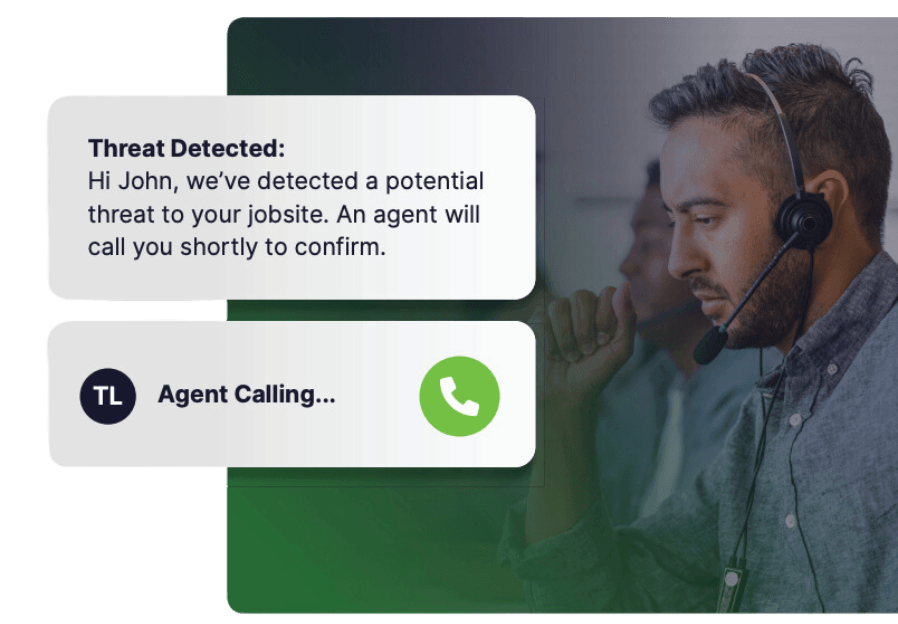
A trained Noonlight agent reviews footage in real time — not an algorithm, not an automated email.

2
Two-way audio challenge

If a talkdown unit is installed, a real voice lets the intruder know they’re being watched and recorded.

3
Strobes & sirens activate

If the unit is equipped, visual and audio deterrents fire immediately on the site.

4
Your primary contact is notified

They can request emergency services or dismiss the alert based on context.

5
Law enforcement dispatched if verified

Police are called only when motion is confirmed as a real threat.

“The 24/7 monitoring was the deciding factor for us. We wanted real protection against break-ins and theft, not just a camera recording after the fact. And because we own the equipment, we take it right to the next jobsite. The live updates and service have been outstanding.”

— Jason Price, Price Development Team

170,000 Alarms. 2,000 Dispatches.

One of the most important, and least discussed, aspects of jobsite security monitoring is what happens to all the alarms that aren’t real threats.

170K+
total alarms monitored
2,000
times authorities were called
29%
caused by routine employee activity

What Triggers a False Alarm

The most common cause of a false alarm is an employee doing something completely normal, such as a super checking on something after hours, a foreman dropping off equipment, or a site manager doing a walk. These account for 29% of all alarm events in our dataset.

Without a human reviewing each alert, these would generate the same response as a genuine break-in. With verified monitoring, a trained agent distinguishes between a foreman checking in and a stranger loading a truck and responds accordingly.

“You can set the level of monitoring that you would like and the hours you want, all from your phone or computer. Therefore, you do not get a lot of nuisance calls, while at the same time you have the safety of the site being monitored and protecting your property.”

— Dominic Summers, Vice President, Kirlin Way

Reasons for Dispatch

Incidents
Active break-in or burglary in progress
Unknown person taking items from outside business
Unknown person inside business, not actively taking or damaging property
Unknown person outside business, not actively taking or damaging property
Other / unclear situation requiring officer presence

Police departments track false alarm rates by address. Verified monitoring, where a trained human reviews footage before escalating, protects that relationship and ensures that when authorities are called, it’s for a real reason.

Your next project deserves better than a padlock and a recording of theft happening.

TrueLook works with project teams to design security coverage that fits the site, not a generic camera-on-a-pole solution.

01

Site Security Audit

Work with our specialists who will design a camera placement plan for your next project before mobilization.

02

Choose Your Hardware

Explore cameras and security solutions that meet your project’s specific needs and risk profile.

03

Add Live Monitoring

Get verified monitoring set up on your current project with a team that creates detection zones to reduce false alarms.

About TrueLook

TrueLook Construction Cameras is the industry’s leading provider of jobsite visibility and security solutions for construction. TrueLook combines enterprise-grade camera hardware with cloud software and professional monitoring to deliver real-time visibility, automated documentation, and intelligent security — built for the way construction teams actually work. Headquartered in Winston-Salem, NC, with a US-based support team available to every customer.

www.truelook.com →

About Noonlight

Noonlight combines advanced technology with real humans to protect and comfort people so they can live freely. Launched in 2013, Noonlight has grown into a connected safety platform delivering modern, affordable 24/7 professional monitoring, video verification, false alarm filtering, and data-rich emergency response. Noonlight protects over 3.5 million people and has handled 3.2 million real alarms and 27 million video verification events.

www.noonlight.com →

Construction Security Camera Buyer’s Guide: How to Choose the Right System for Your Jobsite

  • Guides

Construction Security Camera Buyer's Guide: How to Choose the Right System for Your Jobsite

Guide: Construction Cameras Buyer's Guide

Introduction

Construction theft, vandalism, and liability claims cost the industry billions of dollars every year. Choosing the right security camera for your jobsite is one of the most effective ways to protect your assets, document progress, and keep projects on schedule — but with so many options available, knowing where to start can be overwhelming.

This guide walks you through everything you need to know about how to choose the best construction security camera for your project: camera types, must-have features, power and connectivity options, software, ROI, and the right questions to ask before you sign with a vendor.

What Is a Construction Security Camera and Why Does It Matter?

A construction security camera is more than a standard CCTV unit bolted to a pole. Purpose-built jobsite cameras are engineered to handle outdoor conditions, operate on limited or solar power, stream live footage over cellular networks, and integrate with project management software like Procore or Autodesk.

Beyond theft deterrence, the best systems deliver:

  • 24/7 remote monitoring so project managers can check in without driving to the site
  • Time-lapse documentation that captures every phase from groundbreaking to completion
  • AI-powered motion alerts that notify you instantly when something happens after hours
  • Visual evidence for resolving liability disputes, justifying weather delays, and protecting against false claims

In short, the right camera is a jobsite management tool — not just a security device.

Step 1: Understand the Different Types of Construction Cameras

The first step in choosing the best construction security camera is matching the camera type to your jobsite’s specific needs.

Fixed cameras are locked onto a single view and deliver the highest image resolution and the most stable time-lapses. They excel at access control, documenting a defined work zone, and producing time-lapse footage for marketing or investor reporting. If your priority is crystal-clear documentation of one key area, a fixed camera is often the most cost-effective choice.

PTZ cameras rotate a full 360°, tilt vertically, and zoom optically — up to 32X on advanced models. They’re ideal for large, complex sites, real-time security across multiple zones, and panoramic time-lapses. Look for 1080p or 4K resolution, at least 10X optical zoom, and built-in IR for nighttime visibility.
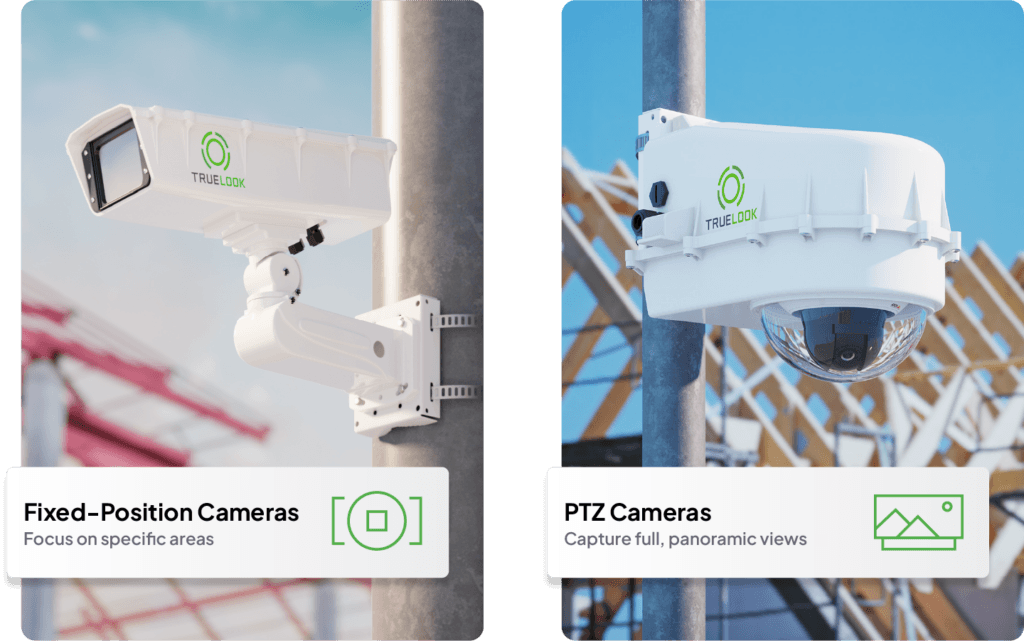
Fixed-position camera that focuses on specific areas beside a pan-tilt-zoom camera that captures panoramic views

Smaller and lighter than outdoor units, interior cameras are easy to reposition as work progresses inside. Common for restaurant remodels, retail buildouts, and warehouse retrofits. Key specs: 1080p minimum, 4G LTE or Ethernet connectivity, operating temperature range.

Most jobsites don’t have reliable grid power. Solar camera systems eliminate the need to run power cables, and many qualify for the Federal Investment Tax Credit (ITC), meaningfully offsetting the cost.

Solar panels with a rugged design built to withstand high winds, hail, and snow

Step 2. Determine What Camera Applications You Need (and Want)

In addition to boosting security, real-time video monitoring via live streaming enables project managers to check in on crews, subcontractors, deliveries, weather conditions, and more to make sure work is being done properly and efficiently. When crews know project managers can monitor sites remotely in real-time or review footage later, it motivates them to stay on task, adhere to corporate policies and safety measures, and be accountable for their work. 

Predicting what will happen on the jobsite throughout the many phases of a large, complex construction project is challenging. Weather delays, late deliveries, and labor shortages can wreak havoc on project budgets and schedules. Real-time insight into jobsite activity enables project managers to track daily progress and gain insight into possible delays or adjust schedules if certain project phases take longer than expected. Managers can also anticipate when certain project phases will be complete with better accuracy and ramp up or thin out crews accordingly. Many advanced camera solutions integrate with popular project management software platforms, so workers and managers can upload and share videos and photos to create a visual history of project progress, keeping everyone informed. 

Photos and videos enable accurate documentation from start to finish, which can be reviewed and used later to forecast and plan for new projects. Managers can watch each phase sequentially and have a better understanding of what occurred during the project. A full photo history of a project is helpful in security investigations, and justifying weather delays, as well as marketing and bidding for new projects. 

With the ability to compare two images from a time-lapse, you can conveniently track the progress of your project over time. By simply clicking and dragging a slider, you can easily visualize and analyze the changes and advancements made over the course of the time-lapse.

Through integrations with project management software, construction cameras improve collaboration between everyone involved in a construction project, from workers on the jobsite to remote stakeholders. Photos and video footage from construction cameras can be shared in real-time via email, text, or through project management software to keep all parties in the loop throughout the construction process. For example, workers can send photos with notes and markups to explain status updates or requests. Project managers can view images remotely to monitor jobsite conditions and keep building owners and investors informed, enabling better and faster decision-making.

Cameras should offer 24/7 continuous security recordings with live video streaming for the ability to monitor the jobsite remotely. Advanced solutions offer high-definition video to capture detailed video evidence and a visual history of security incidents. Some solutions provide motion alerts to notify project managers and/or authorities when the camera’s motion sensor detects movement so they can take immediate action. Another important feature that assists with security concerns is built-in infrared (IR) technology. Advanced camera systems with IR can ensure clear footage even in total darkness, as well as help motion detection capabilities be more accurate. A construction camera with IR is key to having actionable security footage in the case of an incident. In addition to these capabilities, the mere presence of cameras provides a visual deterrent, as would-be thieves are less likely to steal from a jobsite if they know the site is being watched by cameras. 

For jobsites that need extra security, human monitoring ensures that threats are verified and addressed in real time. This can help reduce losses on your jobsite and false alarms, providing you with increased peace of mind. When choosing a provider for this service, it’s important to look for ones that meet the highest industry standards. The best providers are UL listed and 5 Diamond Certified by The Monitoring Association.

Visuals are powerful marketing tools — they’ve been proven to attract up to 300% more traffic to websites, and they can be used to nurture leads and help convert prospects to customers. Construction firms that use video are more likely to rank higher in search, capture the attention of prospective customers, and compel them to click through to learn more. Videos and photos can be used in marketing materials and on websites to showcase large, high-profile projects, create excitement around new construction, make social media posts stand out, and build hype around upcoming events. 

In addition to videos and photos, time-lapse footage from construction cameras provides a versatile marketing tool for promoting your firm’s differentiators to prospects and investors, raising awareness of your brand, generating interest and excitement around projects, and demonstrating your firm’s capabilities. Some additional marketing uses for time-lapse videos include: 

  • Embedding them on your website to bring a page to life and increase the time viewers spend on the page. 
  • Building anticipation for a coming event or the completion of a large project. 
  • Augmenting customer testimonials or case studies you create to market your firm.

 In today’s digital world, effective marketing requires a lot of high-quality photos and videos, which can get expensive. Using photos, video footage, and time-lapses from your construction cameras eliminates the cost and production time of hiring a camera crew while providing timely, authentic visuals of your firm’s excellent work.

If you’re specifically comparing construction time-lapse service providers, see our full breakdown.

Step 3: Identify the Features That Actually Matter

Before choosing a camera solution for your construction project, it’s important to understand the various features and functionalities they offer. 

1080p is the minimum acceptable standard; 4K is worth considering for large sites where you need to zoom into footage after the fact. A wider horizontal field of view means fewer cameras needed to cover the same area.

Construction theft overwhelmingly happens at night. Cameras with integrated infrared (IR) technology maintain clear footage in complete darkness and improve motion detection accuracy. Don’t buy a camera for security without confirming capable IR.

Most jobsites can’t depend on WiFi, making 4G LTE cellular the standard. Confirm what happens when the signal drops — does the camera buffer and upload when connectivity returns, or is that window of footage lost?

Basic motion detection generates too many false alarms. Look for AI-powered motion analysis that distinguishes a person on-site after hours from wind-blown debris. The best systems send real-time alerts to your phone or monitoring team the moment a genuine threat is detected.

For high-value or high-risk sites, AI alerts alone may not be enough. When evaluating monitoring services, confirm the provider is UL Listed and Five Diamond Certified by The Monitoring Association — placing them in the top tier of monitoring centers.

Look for custom time-lapse intervals, image overlay and comparison tools, and photo markup for annotating progress updates. Time-lapse footage serves double duty: documentation and marketing.
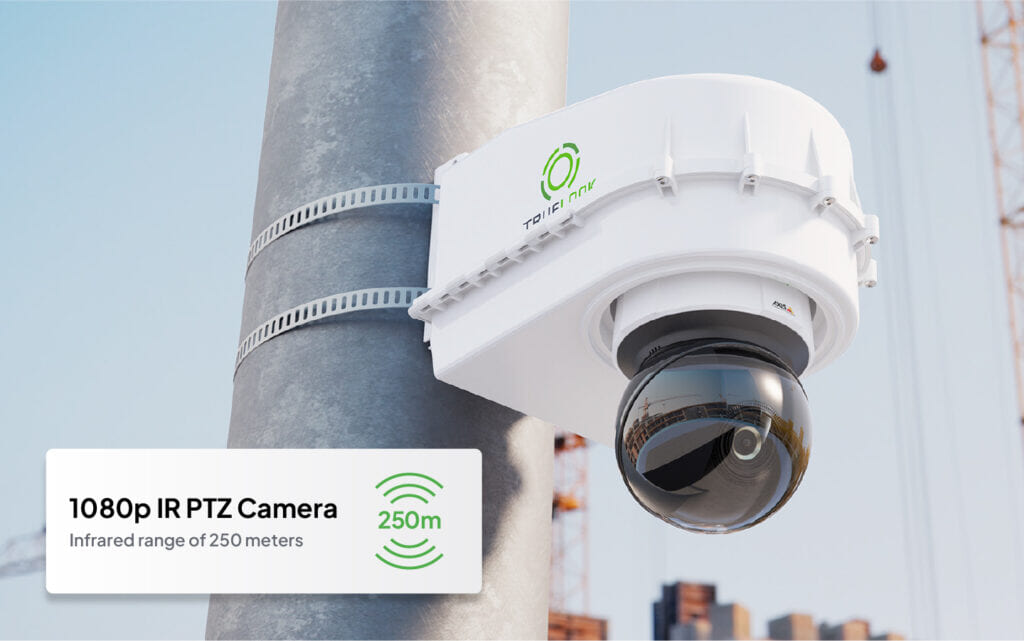
1080p infrared pan-tilt-zoom camera with a 250 meter infrared range

Software Functionality

Today’s construction cameras come enabled with software apps that allow you to access live viewing, control the cameras remotely, mark up and share photos, and access many other camera features. 

Make sure the camera dashboard is intuitive and easy to use. Be sure to ask your vendor if the platform is accessible on different kinds of devices, such as a desktop, laptop, tablet, or mobile phone. It’s worth noting that some vendors may require you to download software. Additionally, some vendors may require a physical connection of a device to the camera to download footage or images. It’s also important to determine if all of the camera’s features are available as part of the standard offering. Some vendors offer select features on all cameras and charge a fee for access to advanced features. Others only offer all features, but only on certain camera models (and sometimes for a higher price). To get the best bang for your buck, go with a vendor that offers all features for one standard price. 

Important features to look for include:

  • A single dashboard to monitor projects and cameras 
  • Live jobsite viewing and ability to view live footage from anywhere
  • View live and historical weather conditions 
  • Custom time-lapse capabilities 
  • Unlimited simultaneous users 
  • 24/7 monitoring and AI-powered motion alerts 
  • Analytics of camera usage
  • Image overlay, comparison, and markup tools 
  • User Interface built with customer experience in mind

Step 3: Evaluate Power and Deployment Options

In today’s competitive climate, most construction firms face tight deadlines and budgets. Complex camera installations can waste precious time, so it’s important that the solutions you choose are easy to install and set up.

Additionally, they should offer a variety of mounting options to accommodate different types of jobsites and applications. These are some key considerations regarding the installation of your cameras: 

Give careful consideration to where you plan to mount your cameras. Consider the camera’s field of view and the application, as well as what type of visuals are most important to capture (time-lapse, still photos, panoramic, or live streaming). 

Need help with camera placement on your jobsite? Your chosen camera provider should offer tailored recommendations via a site map that shows what each camera will be able to see.
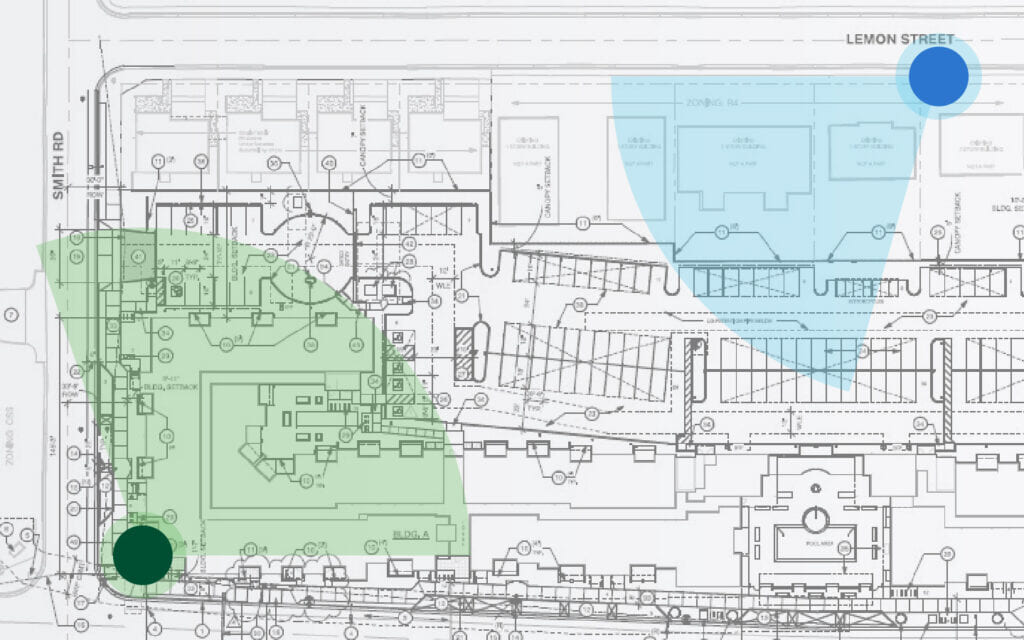
Site plan showing camera coverage areas

There are several options for mounting construction cameras. Most solutions include wall and pole mounting hardware, but many vendors also offer other mounting options. 

Many advanced camera solutions come pre-assembled and ready to use, right out of the box. They simply plug into a power source and come online. Need someone to manage the install process for you? Consider using a vendor that provides full-service installation, so that your crew doesn’t have to spend any time on installation. 
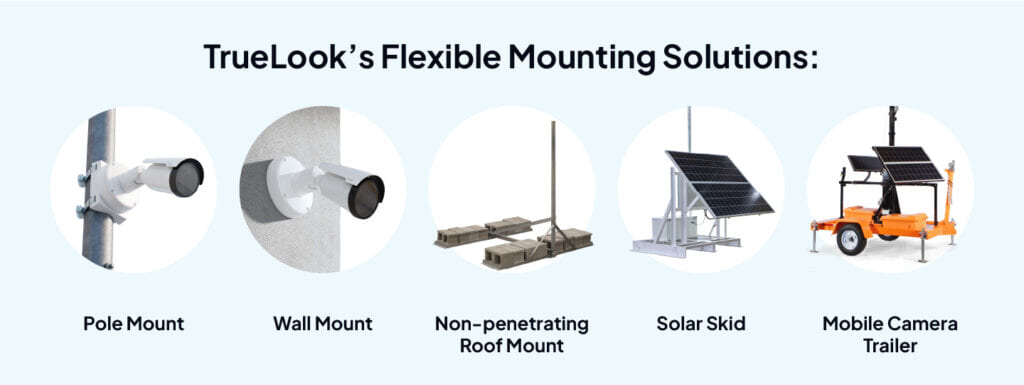
TrueLook mounting options: pole, wall, non-penetrating roof, solar skid, and mobile camera trailer

Camera Deployment Options

Mobile camera trailers are the go-to solution for jobsites that are remote or have mounting difficulties. With a solar-powered trailer, you have all the power, connectivity, and mounting infrastructure needed to achieve your documentation goals. 

  • Adaptable mounting 
  • Eco-friendly power 
  • Easy to move 
  • Battery backup system

Solar skids are an all-in-one camera mounting and power station that offers a simple solution for remote locations, parking lots, and many other jobsites. Designed with mobility in mind, solar skids can easily be lifted using a forklift to any desired location. It doesn’t have to be uninstalled or reassembled at the next jobsite, which means it offers a reduced deployment time. When you’re ready for your next project or even just the next camera angle, simply move your solar skid to the next spot.
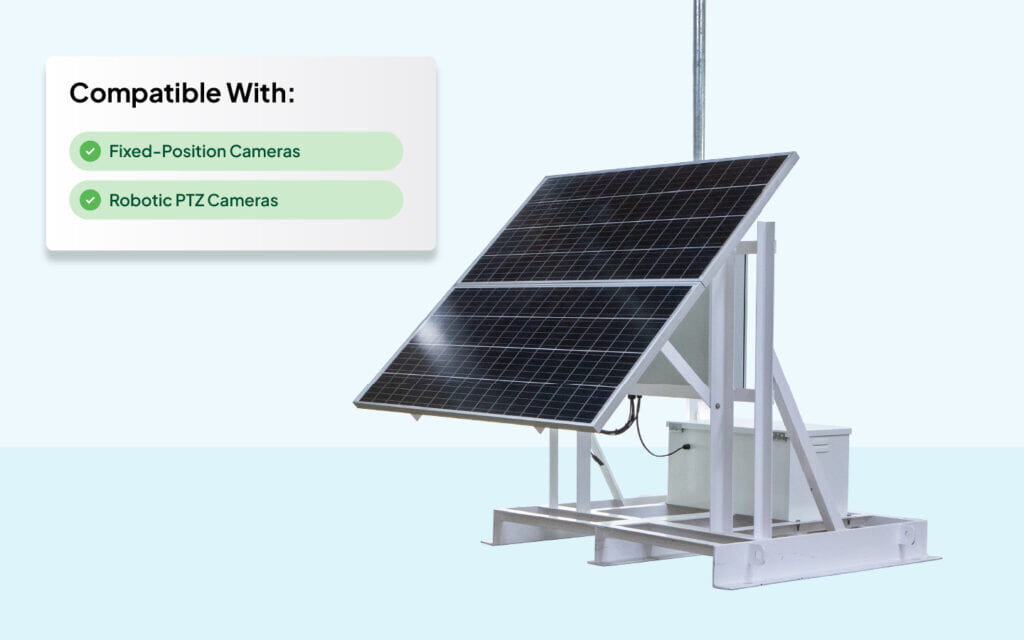
Solar skid compatible with fixed-position and robotic pan-tilt-zoom cameras

Step 5. Decide on Additional Features and Optional Add-on Services

While software integrations streamline your daily workflow and project documentation, physical site security requires real-time vigilance. Moving beyond basic footage logging, active jobsite monitoring provides a proactive layer of protection that deters threats before they impact your timeline and budget

1. Integrations 

Advanced construction camera solutions offer built-in integrations with popular project management software like Procore, Autodesk, and more. 

These integrations play a vital role in enhancing project management by allowing seamless access to videos and photos captured by the cameras. It is advisable for firms to prioritize integrating solutions that offer the best and most immediate benefits and return on investment (ROI). Here are two key advantages of integrating construction cameras with project management software:

Integration between construction cameras and project management software simplifies workflows by enabling the instant transfer of photos and video footage. Project managers can conveniently access live camera feeds directly from their preferred project management platform and easily share photos with contacts stored within the system. This capability ensures that all stakeholders stay informed, promotes faster decision-making, and helps avoid costly delays or rework. 

The integration of construction cameras with project management software enables rapid access to comprehensive and up-to-date documentation. This documentation not only keeps project managers informed about the progress of the project, but also Seamless Integrations to Simplify Your Workflows The TrueLook Platform integrates with the project management tools you’re already using. Easy access to your construction data and imagery via one application makes it simple and efficient to document and review your project’s progress. Procore Connect Autodesk Connect Construction Camera Buyer’s Guide 22 serves as evidence for scope changes, security issues, and compliance disputes. With integrations, visual documentation is readily available to all stakeholders through a web browser, eliminating the need for rekeying or uploading. The project management platform becomes a centralized repository of video footage and photos, providing a visual record of the entire project timeline. 

By leveraging these integrations, firms can streamline their workflows, facilitate better communication, and maintain thorough documentation, ultimately leading to improved project management and successful project outcomes.

2. Jobsite Monitoring 

Jobsite Monitoring combines our Intelligent Motion Alerts with a team of trained monitoring professionals to provide you with powerful peace of mind. Our monitoring center is UL Listed and Five Diamond Certified, ranking it in the top 5% of monitoring centers.

Step 6: Calculate the ROI of Construction Cameras

Construction cameras have a measurable return on investment. Before finalizing your choice, consider:

  • Equipment theft reduction: The FBI estimates construction equipment theft costs the industry $300 million to $1 billion annually. Cameras both deter theft and provide evidence for insurance claims.
  • Labor accountability: Remote monitoring of crews reduces time theft and keeps subcontractors accountable — without requiring a manager on-site.
  • Dispute resolution: A timestamped photo record of every phase of a project is invaluable when resolving scope disputes, weather delay claims, or liability questions.
  • Marketing value: Time-lapse videos and jobsite photos can be used on your website, in proposals, and across social media — eliminating the cost of a production crew.

What Will You Have to Spend on a Camera?

When you are getting multiple quotes for construction cameras, make sure you are comparing apples to apples. Some construction camera companies offer tiered pricing, and certain features are added on as you go. Other companies offer flat rate pricing for all features, with no extra charges for data or storage usage. Take a good look at what you are getting when comparing quotes. 

Another point to pay attention to is leasing vs. purchase. If you are purchasing, are you able to spread the cost of the camera over multiple projects? Do you want to be able to scale your camera solutions up or down after each project? Asking questions like these will help you determine whether leasing or purchasing is best for your situation. 

What Happens When the Project Wraps Up? 

When your project is finished, how do you ensure you can continue to access all the photos and videos the camera captured over the length of the project? And what will you need to do to get a camera quickly up and running on subsequent projects? The vendor that you select should provide ways to easily access all your data and restart service for a new project.

Step 7: How to Choose a Construction Camera Vendor

Not all construction camera vendors are created equal. It’s important to choose the right vendor who delivers on your expectations and provides the support you need to ensure your camera solutions are operating optimally. Here are some important questions to ask during the vendor evaluation process:

Equipment 

  • What camera options are available? 
  • Are the cameras ready out of the box, or will they require additional configuration or assembly?
  • What camera features are available? 
  • What installation and mounting options are available?
  • Is mounting hardware included with the equipment? 
  • What internet connection options are available?

Software 

  • Will I need to install software? 
  •  Is there a mobile platform? 
  • What cloud security measures do you have in place? 
  • How many simultaneous users does the software permit?
  •  How often will I receive software updates?
  •  Are there additional charges for specific features or software upgrades? 
  • What happens to my stored images and videos if I switch vendors in the future? 
  • What project management software integrations are available? 
  • How long will photos and videos be stored?
  • How long will I have access to past projects?
  • Does the software allow for different levels of user permissions? 
  • How can project data be shared externally?

Support 

  • What is your product warranty? 
  • Do you provide 24/7 customer support?
  •  Is onsite help available?
  • What if my equipment fails?
  • Is there a satisfaction guarantee?

Cost

  • Will I be leasing or purchasing the camera?
  • Are there add-on features that I will need to pay for?
  • Are there discounts available for paying upfront?
  • Are there caps on data usage or media storage?
  • If I will be buying in volume, are there enterprise pricing options available? 

Post Project 

  • How long will I retain access to my data after a project is completed? 
  • What do I need to do in order to get a camera up and running on my next project?
  • Can I buy protective cases to keep my hardware safe between jobs and during transportation? 
  • Are services available to uninstall my camera?

Frequently Asked Questions

It depends on your site’s size and priorities. Fixed-position cameras deliver the highest resolution and most stable time-lapses for defined areas, while PTZ cameras are better suited for large sites requiring 360° coverage and optical zoom. Most large projects benefit from a combination of both.

Ready to Choose the Best Construction Security Camera for Your Site?

Choosing the best construction security camera comes down to matching the right hardware, software, and support to the specific demands of your jobsite. Prioritize image quality and IR capability for security, cellular connectivity for reliability, AI-powered alerts to cut through noise, and a software platform your whole team will actually use.

TrueLook offers a full range of fixed, PTZ, interior, and solar-powered construction cameras with an all-inclusive platform, no user limits, and a monitoring center that’s UL Listed and Five Diamond Certified. Get a free camera quote to see what the right setup looks like for your next project.

The 2026 Field-First Playbook: Making Construction Tech Work for You

  • Guides

The 2026 Field-First Playbook: Making Construction Tech Work for You

Guide: Making Construction Tech Work for You

The New Reality of 2026

The U.S. construction industry faces an urgent challenge: it must attract an estimated 349,000 net new workers just to meet current demand. With nearly one-quarter of the existing workforce approaching retirement age, the industry is at a crossroads. Digital transformation is no longer a luxury; it is a baseline for survival.

For the commercial Project Manager (PM), 2026 is the year where tech moves from being an “innovation trial” to a core contract requirement. But for the person in the trailer, the question remains: Does this tool help me build, or is it just one more thing I have to manage?

Let’s dive in.

Customer quote: The goal is not to innovate for the sake of innovation. It's more to go solve problems and help people. Scott Brown, Garney Construction

The “Field-First” Filter

In 2026, 66% of all enterprises are reducing entry-level hiring due to AI. However, a tool that looks impressive in an executive boardroom can become a burden in the field. Successful PMs use a “field-first” filter to vet technology before it hits the jobsite.

  • The Workflow Integration Test: Do not buy tech that requires a new way of working; buy tech that automates an existing one. If your team uses Procore, your new tech must feed data into it automatically.
  • The “One-In, One-Out” Rule: To prevent “app fatigue,” every new digital tool should eliminate at least one manual task. If you implement automated site capture, you should officially retire manual daily photo walks. Scott Brown of Garney Construction insists that for tech to work, “something else has to come off their plate.”
  • The Personal Friction Audit: Before rolling a tool out to the crew, the PM must use it personally for 48 hours. If you find the interface “annoying” or the login process cumbersome, your field team will find it impossible. Ben Stocker of Skender acts as a gatekeeper; if it’s a hurdle for him, it never makes it to the field.


The “Crawl, Walk, Run” Rollout

Implementing Innovation Without the Headache

The biggest mistake PMs make is “The Big Bang” rollout, or trying to launch five new tools on Monday morning. To succeed, use a phased approach: 

1. The Crawl (Zero-Effort Wins)

Start with one piece of tech that requires little to no behavioral change. Start with implementing one camera.  They are the ultimate “Crawl” tool. Once installed, they provide data, security, and history without the field team having to press a single button.

2. The Walk (The Champion Model)

Don’t train 50 people at once. Identify one tech-savvy Foreman or APM as your “Champion.” Let them master the tool and demonstrate the “wins” to their peers.

3. The Run (Burning the Boats)

Once a tool is proven, make it the standard. Stop accepting paper RFI responses or manual photo-dumps. If the digital way is the only way, adoption becomes inevitable.

Customer quote: Just learn how it works, learn how it operates. And then from there, you can start to scale. Austin Lay, Project Manager, Layton Construction


Construction Cameras as a PM Multiplier

How Visual Data Makes Your Life Easier

While many view cameras as simple security devices, in 2026, they have evolved into a PM’s most reliable assistant, handling the “busy work” of project documentation while you focus on the schedule.

  • The “Remote” Hack: Stop spending half your week driving between sites. Use high-definition live feeds to host meetings. Review progress in real-time from the trailer, providing immediate visual answers to design questions without a site walk.
  • The “Vacation” ROI: Visual tech provides constant peace of mind. As industry veterans note, being able to check a high-def camera feed from a phone allows PMs to actually disconnect, knowing exactly what happened on-site that morning without making ten phone calls.
  • Dispute Prevention: Use the historical timeline to “look back in time.” If a dispute arises about a delivery or weather delays, you have timestamped, high-resolution proof that saves millions in litigation.
  • Automated Transparency: Set your cameras to auto-generate weekly time-lapses and send you or your boss images via email. This automates your client reporting, providing professional updates to stakeholders and marketing teams without you lifting a finger.


The Intelligent Jobsite Stack

Using AI Software to Analyze Your Visual Data


In 2026, the most efficient PMs don’t just “watch” video; they use AI-driven software to audit it. By integrating your site cameras with specialized AI platforms, you transform raw images into a sophisticated project-tracking machine that works while you sleep.

  • Automated Progress Auditing: Stop walking the site with a clipboard to verify percent-complete. When you feed data into AI platforms, a software automatically maps visual progress against your schedule and budget. It provides an objective audit of subcontractor work, making pay approvals a matter of data, not debate.
  • AI-Powered Safety & PPE Detection: You can’t be everywhere at once, but AI can. Specialized analytics tools, such as TrueAI PPE can now scan your live feeds in real-time to detect safety violations, such as missing hard hats or high-visibility vests. These “digital safety officers” alert you to high-risk areas immediately, allowing you to correct behavior before an inspector arrives or an incident occurs.
  • Risk Mitigation through Visual Mapping: By syncing your camera’s “visual record” with your floor plans, an AI software can create a walkthrough history of the project. If a leak occurs behind a wall six months from now, you can use the AI-indexed archive to “travel back in time” and see exactly how the piping was installed before the drywall went up.
OnsiteIQ project view showing a TrueLook live camera feed of an excavation site

TrueLook + OnsiteIQ

Gain a smarter view of your jobsite with the integration of TrueLook cameras into OnsiteIQ’s progress intelligence platform. Bringing your documentation tools together saves valuable time while consolidating site imagery and insights in one seamless workflow.

Red Flags & When to Say No

Identifying the “Shelfware” of Tomorrow

Not every innovation belongs on your jobsite. Ben Stocker of Skender warns that if a tool requires “hoops to jump through” or complex workarounds, field teams will simply stop using it. To avoid wasting budget on “shelfware”or expensive tech that sits in the trailer gathering dust.

Watch for these critical deal-breakers:

If the software doesn’t integrate seamlessly with your existing tech stack (like Procore or Autodesk Build), it will likely be ignored. Your camera feed, AI alerts, and progress photos should live where your drawings do. If your team has to remember a fifth password to see the jobsite, they won’t.

Lead with the Result

If you want your team to adopt new technology, don’t start with the manual. Start with the “why.” Show them the final deliverable—the saved rework report, the 4K time-lapse that impressed the owner, or the hour they get back in their day because they didn’t have to drive to a remote site.

In 2026, the best Project Manager isn’t the one with the most gadgets; it’s the one who uses technology to clear the path for their team to do what they do best: build.

Ready to make your life easier?

Get a custom quote on TrueLook Construction Cameras and start your “Field-First” rollout today.


Get a Quote

A Strategic Guide to Visual Risk Management in Data Center Construction

  • Guides

A Strategic Guide to Visual Risk Management in Data Center Construction

Data Center risk management guide header

The High-Stakes Transparency Gap

In the current data center gold rush, the primary currency is certainty. With billions of dollars in capital expenditure flowing into mission-critical infrastructure, the margin for error has vanished.

Yet, most developers still manage their most expensive assets using 20th-century reporting methods. When an owner or investor sits in a boardroom, they are often looking at data that is days or weeks old. This “Visibility Gap” is where risks hide—where a perimeter breach goes unnoticed, or a schedule slip becomes an unrecoverable delay.

This paper outlines a new framework for visual oversight, a strategy that uses high-performance construction cameras to tighten site security and provide investors with the radical transparency they demand.

Let’s dive in.

Tightening the Critical Perimeter

A data center is a target long before the first server is racked. The density of high-value commodities—copper, specialized switchgear, and cooling units—makes construction sites a magnet for sophisticated theft.

Traditional security guards have blind spots; 4K construction cameras do not. To protect the build, developers are now deploying:

  • Perimeter Monitoring: Detecting movement at the fence line during off-hours, providing instant alerts for unauthorized site ingress.
  • High-Definition Gate Logging: Capturing every vehicle and person that enters the site. This creates an unalterable log that is vital for forensic investigations and insurance disputes.
  • Material Staging Surveillance: Dedicated units focused on high-value “long-lead” equipment yards to ensure that the $2M generator that took 18 months to arrive doesn’t disappear overnight.
The NICB identifies copper and high-value equipment as the primary targets for organized theft during the rough-in phase


The Investor Portal

Moving from “Trust” to “Verification”
Data center investors are increasingly hands-on. They don’t just want to know that the project is “on track”—they want to see the steel rising.

The ROI of Transparency

  • Eliminating Travel Fatigue: A centralized visual dashboard lets stakeholders conduct “virtual site walks,” saving thousands in travel costs and hundreds of hours in executive time. For example, Kris Davis, QuikTrip’s Senior Construction Manager, “was traveling every other week, and even that wasn’t enough.” Now, with a construction camera on site, he says, “I can go every third week or even longer without visiting in person. The ability to log in remotely and use the zoom function has been incredible.” This saves thousands in travel costs and hundreds of hours in executive time.
  • Milestone Validation: When a funding draw is tied to a milestone (e.g., the roof is watertight), a high-resolution photo is worth more than a signed affidavit. It provides instant, undeniable proof of progress.
  • Global Standardization: For REITs managing 15 builds across three states, cameras provide a “baseline.” You can compare the progress of a build in Wisconsin to one in Northern Virginia side-by-side, ensuring that your “execution engine” is running at the same speed everywhere.
TrueLook dashboard showing 4K infrared fixed camera views of a site buildout

I was traveling every other week, and even that wasn’t enough. Now, with a construction camera on site, I can go every third week or even longer without visiting in person. The ability to log in remotely and use the zoom function has been incredible.

Kris Davis, Sr. Construction Manager, QuikTrip


Defending the Schedule

Visual Documentation as Insurance
In the mission-critical world, a delay isn’t just a nuisance; it’s a breach of contract with the end-tenant. Construction cameras provide the historical record needed to defend the schedule.

  • Weather & Force Major Claims –  When a project is delayed by weather, the visual record provides the exact data needed for insurance claims. You can see precisely when the cranes were grounded and when work resumed, removing the “gray area” from delay claims.
  • Subcontractor Accountability –  By having a 24/7 record of site activity, owners can verify man-hours and site presence. If a critical-path trade isn’t showing up with the agreed-upon headcount, the visual record flags the issue weeks before it shows up in the budget.


Technical Requirements for Mission-Critical Builds

Why Consumer-Grade Solutions Fail
A data center site is a harsh, high-interference environment. Your visual oversight system must be as resilient as the building itself.

  • Power Autonomy: Cameras must be solar-powered with battery backups. On a data center site, power cutovers are frequent; your security cannot go dark when the grid does.
  • Cellular Redundancy: Relying on on-site Wi-Fi is a mistake. Professional systems use dedicated 5G/Satellite uplinks to ensure the feed never drops.
  • Archival Integrity: For a 2-year build, you need a system that stores every frame securely. This is a massive asset for the facility’s operations team during the handover phase.

TrueShield: A Security Solution to Satisfy Builder’s Risk Requirements

TrueShield, an advanced security solution from TrueLook, has been purposefully designed to meet the stringent requirements of builder’s risk insurance. TrueShield offers unparalleled protection for construction sites and similar environments, shielding them from theft, vandalism, and unauthorized entry. With continuous security recording and advanced security protocols, TrueShield minimizes risks and ensures that projects progress smoothly and securely. This robust system is indispensable for contractors and project managers committed to safeguarding valuable on-site assets.

Key Features of TrueShield

  • Includes up to three infrared cameras per unit
  • After-hours motion alerts are investigated in real-time by trained monitoring professional
  • Operates through a Five Diamond, UL-certified monitoring center for off-hours surveillance and rapid emergency response
  • Offers live audible talkdown capabilities via bullhorn to deter intruders
  • Strobe lights and sirens for immediate audio-visual deterrents
  • Flexible power options, including solar or 110V, with tamper-proof backup batteries
  • Features GPS tracking for real-time unit location monitoring 
TrueShield at night

The New Standard of Delivery

The era of “building in the dark” is over. As data center portfolios scale toward the gigawatt level, the developers who win will be the ones who provide the most security and the most transparency.

High-performance construction cameras are no longer an “extra”—they are the foundation of Speed, Scale, and Certainty.

Schedule your site security audit

Talk to our mission-critical specialists to design a visual coverage map for your next data center project.

How Smart GCs Maximize Their Construction Tech Budget With Jobsite Cameras

  • Guides

How Smart GCs Maximize Their Construction Tech Budget With Jobsite Cameras

How to Pay for Cameras header

Too often, GCs treat cameras like overhead or a nice-to-have add-on. But the smartest contractors treat them like any other long-term asset in their construction tech budget—buy the hardware once, then charge it to every project. That way, the cost is covered on the first project, and the camera keeps working for you on every project after.

Here’s exactly how it works:

Step 1: Buy the Camera Once

Let’s say you purchase a jobsite camera for $2,500*. That’s your upfront investment. This is no different than buying a trailer or generator. From then on, you control where it goes and how it gets used.

*This is an example price. Actual camera costs may be lower or higher depending on the model.

Camera cost of $2,500

Step 2: Add it to the Construction Tech Budget For Each Job

When you set up a project, include the camera as a reimbursable line item in the estimate, just like fencing or temporary power:

  • Camera Equipment Rental: $400/month
  • Monitoring Subscription: $300/month
$300 per month equipment rental and $400 per month monitoring subscription

On a 12-month project, that’s $8,400 reimbursed by the Owner — already a strong return on investment. You’re well past break-even on your one-time purchase. This approach pays for your camera in full and generates extra value while making the most of your construction tech budget.

Step 3: Bill It Like Any Other Project Resource

Just like you would with a dumpster or site trailer, the camera is billed as a project expense. It shows up on the owner’s invoice, not in your overhead. The monthly subscription sits right alongside other recurring site services.

Step 4: Show Owners the Value

This part sells itself. Cameras deliver tangible benefits to Owners, lenders, and insurers:

  • Live viewing: Remote access means fewer site visits.
  • Security coverage: Lowers theft and liability risks.
  • Time-lapse video: Great for board reports, investors, or marketing.
  • Documentation: Provides punch list and warranty proof that protects everyone.
  • Safety: Monitors PPE compliance to help protect your team and prevent accidents.

Once Owners experience the value, most want cameras on future jobs, too.

Step 5: Move It to the Next Job

When the project wraps, roll the same $2,500 camera to your next site. Reset the line item in that budget and start the cycle over. By the third or fourth project, that single camera has generated multiple times its cost, which is all thanks to smart construction tech budget allocation.

Step 6: Scale It Across Your Projects

Here’s what the math looks like:

  • 1 Camera, 1 Project (12 months): $8,400 billed → already a 3x return.
  • 1 Camera, 3 Projects (36 months): $25,200 billed → more than 10x return.
  • 5 Cameras in Rotation: $126,000 billed over three years.
Camera ROI: 1 camera on 1 project over 12 months returns $8,400, 3 projects over 36 months returns $25,200, and 5 cameras in rotation bill $126,000 over three years

That’s the power of a high-performing construction camera ROI strategy. Now, you have a steady income and stronger project delivery from assets you already own.

Why This Works

  • No overhead hit: Every cost is tied to the job.
  • Recurring coverage: Monthly billing keeps projects accountable.
  • High ROI: Hardware pays for itself in the first job, and continues delivering value.
  • Owner goodwill: They see you as a partner, adding security and transparency.

Bottom line: Your construction tech budget doesn’t have to stretch thin. With the right structure, you maximize your ROI by buying once, billing to the project, and keeping each camera in rotation for years. Over time, you’ll build a fleet of jobsite assets that make every project more secure, better documented, and more efficient.

How to Get Team Buy-In for Construction Tech

  • Guides

How to Get Team Buy-In for Construction Tech

Graphic showing the title of the guide, "How to Get Buy-In for Construction Technology"

Introduction

Technology has the potential to transform construction, but only if everyone is on board. From real-time monitoring to streamlined communication, the benefits are clear. Yet despite all the innovation available, one thing often stands in the way of progress: buy-in.

Whether it’s your executive team, field crew, or the client, getting buy-in for new tech can be a challenge. The good news is that starting early increases your chances of success.

Start at the Source: Preconstruction

Including technology as a dedicated line item in your proposal sends a clear message to all stakeholders. It shows that:

  • Tech is considered essential from the start.
  • It plays a vital role in achieving project goals.
  • Your team is committed to efficiency and innovation.

When leadership and clients see technology built into the budget and timeline, they are more likely to support it..

Construction projects come with many uncertainties. Leadership is always looking for ways to reduce risk. Introducing tech early helps you present it as a proactive way to manage those risks.

Tech can reduce delays, limit miscommunication, and keep all teams aligned. It becomes a safeguard for your timeline and budget.

Highlight the Benefits That Matter

Technology helps eliminate bottlenecks and administrative burdens. When everyone has access to the same information, decisions can be made faster and with fewer errors.

Connecting office and field teams can be a challenge. With cloud-based tools and jobsite cameras, you can close the communication gap and keep everyone on the same page.

Catching issues early prevents them from becoming costly problems. Technology allows teams to flag issues quickly and avoid rework. For example, a project manager at Stonebridge Construction spotted a dirt work issue on the live feed, and made a phone call to correct it right away. Without the camera, that would have probably been a $50,000 mistake. Remote tools also reduce the need for travel, saving time and money.

Clients appreciate visibility into progress. Time-lapse cameras, project dashboards, and live monitoring tools provide transparency and keep clients informed without requiring frequent site visits.

Build Internal Support

Even if leadership gives the green light, adoption in the field is what drives success. That means engaging the right people and setting them up for success.

Bring in project managers, superintendents, and field leads during the evaluation process. Their feedback will ensure the tools you select solve the problems they face every day.

Training should be simple, hands-on, and directly connected to real tasks. Quick demos, short videos, and easy-to-follow guides will increase confidence and adoption. 

Make the ROI Easy to Understand

Help leadership see the full value of tech by connecting it to financial outcomes.

  • Compare the cost of the technology to the potential cost of delays or rework
  • Emphasize the savings on travel and in-person meetings
  • Highlight long-term value, such as better documentation for insurance, dispute resolution, or warranty claims

Maintain Momentum

Once you have buy-in, keep it going by showing results and continuing to improve.

  • Share early successes with your team and clients
  • Collect feedback to refine your process
  • Use wins as a launchpad for expanding adoption on future projects

Conclusion

Tech adoption doesn’t begin with training or implementation. It begins in preconstruction, when you first define the project’s approach. By making technology part of the conversation early on, you set the tone for a more efficient, better-connected project.

Construction technology is more than a tool. It is a strategic investment. When you show leadership how it supports timelines, budgets, and client relationships, buy-in becomes a much easier conversation.


A Project Manager’s Guide to Builder’s Risk Insurance and Site Security Requirements

  • Guides

A Project Manager’s Guide to Builder’s Risk Insurance and Site Security Requirements

Guide: Builder's Risk Insurance and Site Security Requirements

Construction projects face numerous risks throughout their lifecycle, and these challenges can quickly derail even the most carefully planned builds. Theft and vandalism are among the most immediate threats; when valuable materials are stolen or equipment is vandalized, the financial losses can be significant, potentially costing millions and causing delays that set a project back by weeks or months.

In addition to theft and vandalism, construction projects face significant risks from natural disasters such as storms, floods, and fires. These events can cause severe damage, leading to unanticipated repair costs and delays that can disrupt even the most meticulously planned projects. Builder’s risk insurance provides a vital layer of protection, helping construction teams navigate these challenges. “Building with Confidence: A Project Manager’s Guide to Builder’s Risk Insurance and Site Security Requirements” explains the key aspects of builder’s risk insurance and details the site security measures that are often the responsibility of the project manager to ensure comprehensive coverage.

Let’s dive in.

Understanding Builder’s Risk Insurance

Builder’s risk insurance, also called “course of construction” insurance, is specialized property insurance designed
to protect buildings while under construction. This temporary policy remains in effect until the project is completed and is a critical component of a comprehensive risk management strategy.

What Builder’s Risk Insurance Covers

The coverage provided by builder’s risk insurance can vary between carriers, and policies are often customizable to
address the specific risks of a project. Project owners must work closely with their providers to ensure all potential risks are covered. Generally, builder’s risk insurance offers comprehensive coverage for a wide range of exposures, including:

  • Fire and water damage
  • Weather-related damage
  • Theft and vandalism
  • Transit and off-site storage
  • General liability (injuries to non-workers)
  • Structural collapse
  • Soft costs (such as lost revenue, taxes, and loan interest due to project delays)


What Builder’s Risk Insurance Does Not Cover

Equally important is understanding what builder’s risk insurance typically does not cover. Policies generally exclude:

  • Normal wear and tear on equipment and materials
  • Employee theft
  • Professional liability (e.g., accidents covered by liability insurance)
  • Contractual liabilities
  • Mechanical breakdowns
  • Earthquakes and landslides
  • Governmental actions


What May Affect Coverage

Coverage under builder’s risk insurance can be significantly affected, and claims may even be denied if “reasonable security” measures are not implemented on the construction site. Underwriters often stipulate specific security requirements as a condition of coverage, and failure to meet these standards can result in partial or total denial of a claim in the event of a loss. This is why it is crucial for project managers not only to meet but exceed these site security requirements. By doing so, they make the project fully protected, reducing the risk of uncovered losses and demonstrating a commitment to proactive risk management to insurers. Exceeding security requirements not only safeguards the project but also strengthens the likelihood of a favorable outcome should a claim be made.

City skyline with high-rises and tower cranes


Site Security Requirements for Builder’s Risk Insurance


The insurance marketplace has recently hardened due to several substantial fire losses involving wood-frame construction projects. As a result, builder’s risk insurance underwriters are imposing additional safeguards to reduce their exposure to loss. These safeguards, typically outlined in an underwriter’s minimum site security requirements, may vary depending on the underwriter, but they generally address perimeter coverage, monitoring, intrusion detection, deterrents, and power.


Site Perimeter Coverage

To meet most perimeter coverage requirements, the site must have at least four surveillance units, each equipped with at least two cameras. These cameras should provide complete coverage of the site perimeter, including entry and exit points such as gates, doors, and windows, and high-traffic areas like storage zones, offices, and equipment yards. Cameras should be positioned at elevated locations to maximize coverage and eliminate blind spots susceptible to theft or vandalism.

Each surveillance unit must also include at least two infrared (IR) or thermal imaging cameras for visibility in all lighting conditions, particularly in low-light environments. A third fisheye camera should also be installed to cover the area directly beneath the unit. These measures provide comprehensive site coverage by eliminating blind spots.


Real-Time Monitoring

A UL-certified monitoring center must monitor the surveillance units, which guarantees oversight by qualified professionals. TMA Membership and Five Diamond certification offer further assurance of quality and expertise.

Continuous monitoring of the site perimeter, even during non-working hours, is required to reduce the risk of security breaches during periods of low activity. The surveillance units must be armed during these non-working hours, with a failsafe method to automatically activate the system according to a predetermined schedule. The monitoring center must also provide round-the-clock oversight to address potential issues and make sure the system remains operational and capable of detecting intrusions or security breaches at all times.

TrueLook dashboard showing four project sites


Intrusion Detection

The surveillance unit’s cameras should also be able to detect and differentiate between intrusions by people or vehicles, automatically sending these events to the monitoring center for verification and immediate response.

The cameras should be equipped with automatic visual content analytics and zone calibration to minimize false alerts. This setup allows the monitoring center to verify incidents and respond promptly. Video feeds should also be accessible from mobile devices to enable real-time monitoring.


Deterrent Features

To effectively deter intruders, the system should include essential features such as live audible voice-over capabilities, allowing security personnel to communicate directly with intruders at any point along the site perimeter. Additionally, strobe or lighting features are crucial, as they provide visual indicators that alert intruders to the fact that they have been detected, further discouraging unauthorized access.


Power and Backup Systems

To maintain uninterrupted operation, the surveillance unit must include a tamper-proof backup battery system with an eight-hour lifespan. Solar-powered units are also viable, provided they have a 72-hour lifespan and are installed in areas with reliable year-round sunlight.

Daily health checks and camera inspections are critical to avoid coverage loss or equipment malfunction. Additionally, the system should have a battery backup capable of powering the entire setup for at least four hours during an AC power outage. Monitoring of all batteries, whether primary or backup, is essential, with alerts notifying site personnel to restore power if battery life drops to two hours. Any sudden or unexpected loss of backup power should also trigger a response akin to handling a site intrusion.

TrueShield: A Security Solution to Satisfy Builder’s Risk Requirements

TrueShield, an advanced security solution from TrueLook, has been purposefully designed to meet the stringent requirements of builder’s risk insurance. TrueShield offers unparalleled protection for construction sites and similar environments, shielding them from theft, vandalism, and unauthorized entry. With continuous security recording and advanced security protocols, TrueShield minimizes risks and ensures that projects progress smoothly and securely. This robust system is indispensable for contractors and project managers committed to safeguarding valuable on-site assets.

Key Features of TrueShield

  • Includes up to three infrared cameras per unit
  • After-hours motion alerts are investigated in real-time by trained monitoring professional
  • Operates through a Five Diamond, UL-certified monitoring center for off-hours surveillance and rapid emergency response
  • Offers live audible talkdown capabilities via bullhorn to deter intruders
  • Strobe lights and sirens for immediate audio-visual deterrents
  • Flexible power options, including solar or 110V, with tamper-proof backup batteries
  • Features GPS tracking for real-time unit location monitoring 
Redesigned TrueShield unit with multiple cameras mounted on a wooden pole

The Future of Builder’s Risk Insurance

The future of builder’s risk insurance will likely be shaped by the integration of advanced technologies in construction site security. Surveillance systems are expected to become more sophisticated, with artificial intelligence (AI) and intelligent technology playing a central role in this evolution. AI-powered analytics could enhance security by detecting unusual behavior, automating alerts, and predicting potential threats based on historical data. Biometric access controls, such as fingerprint and facial recognition, may become standard, ensuring that only authorized personnel can access specific areas and reducing the risk of unauthorized entry.

Drones for aerial surveillance are also anticipated to become more common, offering rapid response capabilities and comprehensive coverage for large or complex construction sites.

As these technologies advance, cloud-based data management and Internet of Things (IoT) devices are expected to play an integral role in site security. Cloud systems could provide secure, remote access to vast amounts of data, while IoT devices may create a more interconnected and responsive security environment.

These technological advancements in site security have the potential to help builders meet increasingly stringent builder’s risk insurance requirements while contributing to safer and more efficient construction sites. By reducing the risk of theft, vandalism, and other costly incidents, these innovations could ultimately lead to more secure and resilient construction projects.

Jobsite Winter Preparation

  • Guides

Jobsite Winter Preparation for Construction Cameras

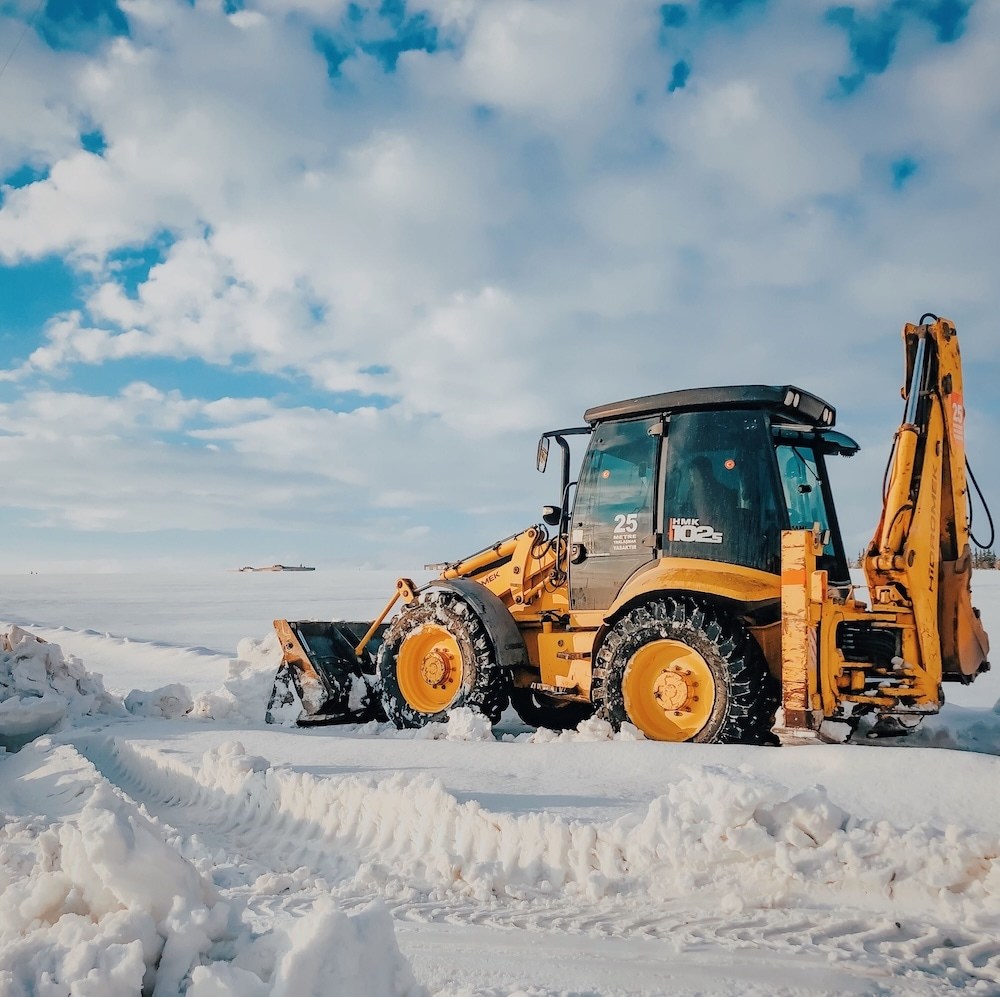
Backhoe loader clearing snow

Did you know that bad winter weather causes 45% of construction projects to be delayed? These setbacks cost the global construction industry billions of dollars every year. To avoid these costs, construction managers must prepare their jobsites and equipment for the cold season. 

Preparing your jobsite for winter is crucial to avoid costly delays and equipment damage. This guide walks you through essential jobsite winter preparation steps, focusing on keeping your construction cameras and equipment in top shape during the cold season.

Let’s dive in.

How to Prepare Construction Cameras for Winter

The chilly winter months can take a toll on many types of construction equipment. For cameras, unusual or extended weather extremes can affect connectivity, image quality, and power supply. TrueLook has cameras that can operate in conditions as low as -40° F and as high as 140° F, meaning the risk is lower — but no equipment is perfect. 

So, we’ve put together a straightforward checklist to keep your cameras in top shape and ensure uninterrupted monitoring and data collection all winter long.

Step #1: Be Prepared for Severe Weather

Most monitoring cameras face the same general issues in the wintertime. To keep them performing at their best, start by checking if they have enough power. Cold temperatures can reduce battery life on solar construction site cameras, so consider using extra power sources or having battery backups on hand. 

Next, make it a habit to regularly check connections to keep the live feed running smoothly. Lastly, don’t forget to clean your lenses regularly for clear and accurate visuals. Snow and ice can build up on camera lenses, leading to distorted images.

Step #2: Navigate Your Jobsite Safely

Despite taking the proactive steps above, severe snow storms can still wreak havoc on your jobsite. After severe weather, always wait until it’s safe to access your jobsite. Scan for any potential hazards, like fallen debris or icy surfaces, before proceeding. 

Once you’ve addressed any hazards, check all of your cameras and equipment for damage. Make a note of any damaged parts that you may need to replace or repair. 

If you find that your TrueLook Cameras do need repairs, don’t hesitate to reach out to our support team.

Step #3: Maintaining Jobsite Solar Panels During Winter

Solar panels operate at the highest efficiency in cold, sunny conditions. However, extended snowy weather can significantly hinder their performance. Here’s how you can make sure your solar panels stay efficient, year after year:

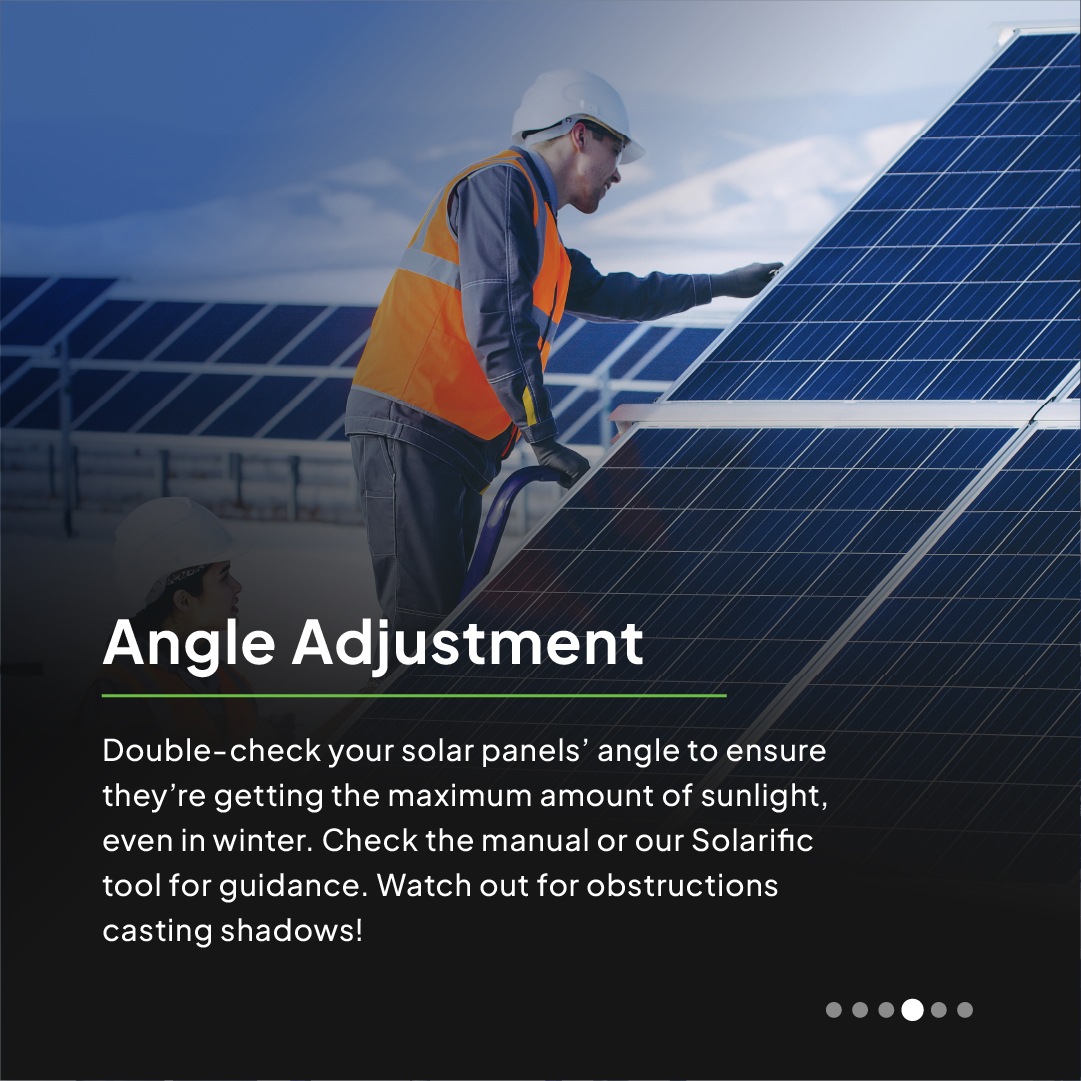
Angle Adjustment: double-check your solar panels' angle for maximum winter sunlight, with a worker adjusting a panel
Icy Interruption: check equipment and material temperature ranges before cold weather, with a camera in the snow
  • Regularly check your solar panels for snow buildup.
  • If you find snow on your solar panels, allow sunlight to melt it naturally. Manually removing snow from solar panels can damage the surface. 
  • Inspect cables for damage or fraying. Cold temperatures can make cables more brittle, leading to increased outages.
  • Routinely monitor battery levels and voltage to ensure uninterrupted power supply. 

Not sure which solar panel angle is optimal for your jobsite’s location? Find the right angle for your location.

Step #4. Leverage TrueLook Support

The winter months can be tricky to navigate, but you’re not alone in this. Our team is here to assist you with any camera challenges you face.

Bonus Tip: If you encounter connectivity issues, take a picture of your camera’s cellular modem lights. This picture can assist the support team in quickly diagnosing the problem.

Jobsite Winter Preparedness Tips

Now that you know how to protect your cameras and solar panels, it’s time to dive into the steps you need to take to protect your jobsite in its entirety. 

Tip #1: Monitor the Weather and Plan Accordingly

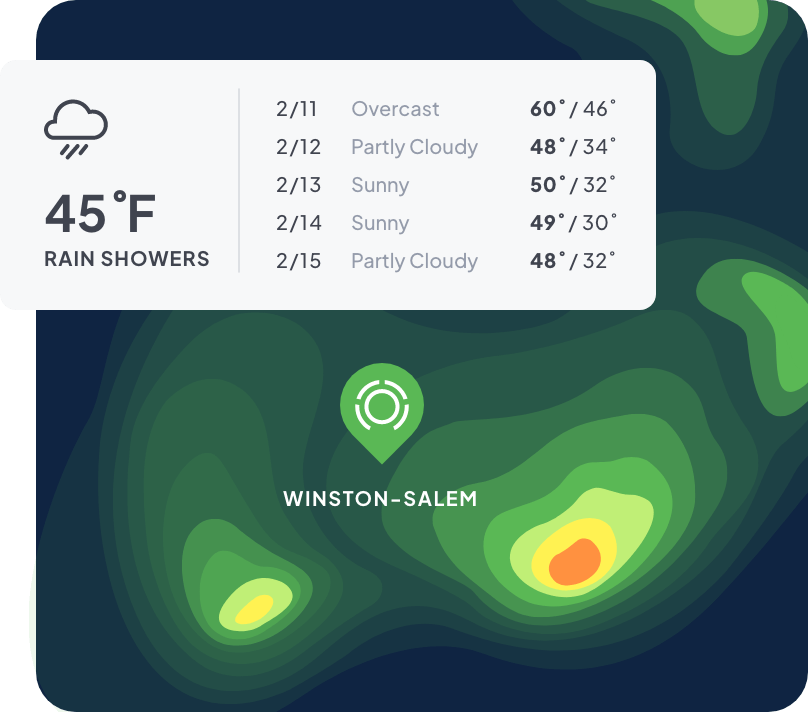
Stay ahead of the game by monitoring weather forecasts days (and even weeks) in advance. This allows you to plan tasks accordingly, avoiding extreme conditions when possible. TrueLook’s weather data can help by showing daily weather information, upcoming predictions, and a log of historical weather.

For example: If you see a cold snap coming, schedule outdoor tasks for the warmest parts of the day to minimize your workers’ exposure to cold temperatures. Additionally, provide necessary equipment to your workers if you know that they’ll need to work during colder hours. 

Tip #2: Manage Exposure & Provide Warmth

When planning your day or week, schedule projects in shorter blocks to reduce prolonged exposure to cold weather.

When your workers have to be out in the cold, make sure that they wear warm clothing, non-slip footwear, gloves, and hats to prevent hypothermia and falls. You can also use radiant heaters or shield work areas from drafts to provide warmth.

You should create heated spaces for workers when they’re taking breaks. Encourage your workers to take frequent breaks in these designated areas to warm up, avoiding any dangerous cold-related health risks or incidents.

Tip #3: Daily Site Checks & Work Area Prep

Employers must clear snow, spread salt or sand, and chip away significant ice areas before work on a site can begin. Make it a habit to clear snow and ice from overhangs, rooftops, pathways, scaffolding, and equipment to proactively prevent falling hazards.

Bonus Tip: Under no circumstances should workers use scaffolding when ice and snow are present.

Tip #4: Vehicle Readiness & Hazards Awareness

Inspect vehicles in your jobsite for functionality and equip them with winter emergency kits. Winter emergency kits can include items like:

  • Ice scrapers
  • Blankets or sleeping bags
  • Warm clothing (gloves, hat, scarf)
  • A flashlight with extra batteries
  • First aid kit

Tip #5: Training Your Workers

Educate your workers on frostbite and hypothermia prevention. In training, teach them how to recognize the symptoms. Additionally, have a clear plan in place in the unfortunate event of a health emergency.

Workers in safety vests beside snow removal trucks and a roadwork sign

How TrueLook’s Features Help

When it comes to construction projects, winter weather doesn’t have to be difficult to track. TrueLook’s platform offers a range of features to help you navigate winter challenges and make informed decisions.

Using TrueLook, you’ll have access to both current and historical weather data to make data-driven decisions based on past patterns and trends. You can also stay updated with current weather conditions, including radar, hourly forecasts, and 14-day predictions. This feature enables you to proactively manage projects, mitigate delays, and reduce unexpected costs caused by adverse conditions.

Additionally, our live viewing feature allows you and your stakeholders to see the jobsite without anyone having to travel in dangerous weather conditions. Plus, TrueLook’s 24/7 security recordings and time-lapses provide visual evidence for weather-related delays.

Prepare, Protect, and Be Proactive

As winter approaches, don’t let the cold weather catch you and your team off guard. By following the comprehensive steps outlined here, you’ll enhance your operations, protect your equipment, and keep your workers safe.

Winter can be challenging, but with TrueLook’s guidance and technology at your side, you’ll be well-equipped to tackle the season with confidence. Our support team is always ready to assist you, so don’t hesitate to call or visit our support website for more information. 

The Construction Marketer’s Secret Weapon

  • Guides

The Construction Marketer's Secret Weapon

Hand pointing at a bar chart on a tablet

Digital Marketing Takes Hold in Construction

Marketing as a practice in the construction industry tends to be a bit “old-school.” Many firms rely heavily on referrals and word of mouth — which, for large, established firms can be sufficient. But for smaller or newer firms looking to raise brand awareness and attract and convert new accounts, a more modern approach is essential. This is also true for established firms, as their customers and prospects increasingly turn to digital channels and content for information and recommendations.

To drive new business, firms must present clients with engaging, relevant content that really sells their capabilities. Traditional marketing tactics such as text-based emails sent to current clients and simple websites with a few static photos are no longer enough to differentiate a construction firm from competitors. Marketers in construction must embrace new digital strategies to meet their target audience where they are — on Google, Facebook, LinkedIn, Instagram and other online platforms.

Make Digital Marketing a Visual Experience

Digital marketing strategies such as video marketing and paid social advertising are some of the most effective ways to attract and convert new business. Visuals have been shown to increase people’s desire to read content by 80%, and articles that feature an image every 100 words get 2X the shares of other articles. Not only do digital ads, blogs and websites with rich visual content increase engagement, high-quality images enable marketers to leverage such digital channels as YouTube, Instagram, Snapchat and TikTok. These platforms are rapidly rising in popularity and revolutionizing how people consume content and learn about businesses.

Time-lapse player of the Intercontinental Hotel in San Diego built by Hensel Phelps

Digital content that features rich visuals can help to boost your rankings on search engines, as well, and that’s important, because 71% of commercial buyers begin their research on Google. If you rank higher, more people will view your content and potentially choose you for their next project.
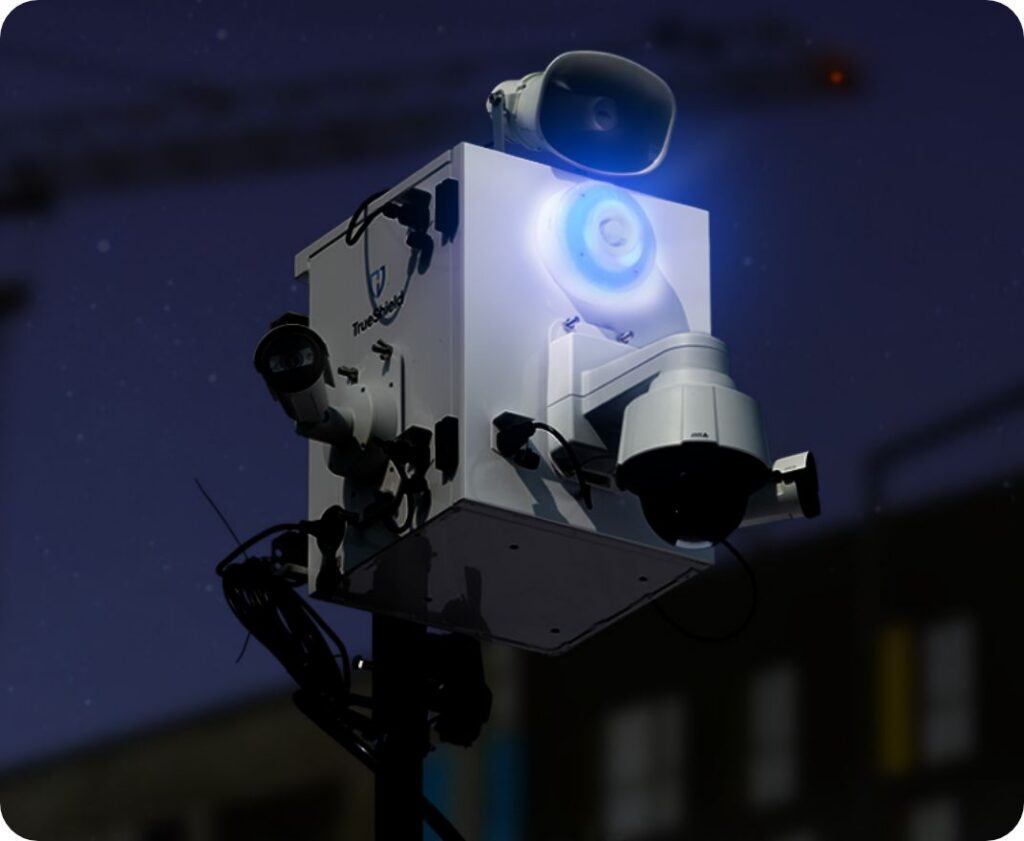

Many construction firms don’t realize that they already have access to tons of sharable still photos and video footage. Where do these digital assets come from? Construction cameras installed on the jobsite. Photos and video taken by construction cameras are high-quality and can be used to enhance a broad array of digital marketing assets, such as emails, blog posts, social media posts, websites and more.

What’s in this Ebook?

  • How still photos and video footage from construction cameras can be powerful marketing tools
  • Different ways to use jobsite footage and photos for marketing
  • Various types of video available from construction cameras — and how to best use them to promote your firm

Using Photos from Jobsite Cameras in Marketing

Sharing high-quality photos of your projects via social media and blog posts can help drive website traffic and encourage people to take action. But hiring a photographer to capture photos of work being performed can be extremely expensive. A more cost-effective option is to leverage the construction cameras you already have installed at the jobsite to generate high-quality imagery that you can reuse for marketing purposes.

80% of marketers use visual assets in social media marketing, and 32% say visual images are the most important form of content

Construction firms that use jobsite cameras have a wealth of visual content readily available at no extra cost. These cameras can capture high-quality still photos throughout every phase of your project, automatically storing them in the cloud for easy access later. Some vendors even provide editing and markup features, making it simple to use these photos for marketing. Beyond adding them to your website, here are some creative ways to leverage still photos from your construction cameras:

Tell a story

Feature before-and-after photos of large or complex projects in your marketing emails, social media posts, ads, or printed materials like brochures. Showcasing the transformation of a building is a powerful way to highlight your firm’s skills and capabilities.

According to Buzzsumo, Facebook posts with images see 230% more engagement than those without images, and tweets with images receive 150% more retweets than all-text tweets. But the images have to be relevant and authentic. Many marketers rely on stock photos because they’re cheap and easy to obtain, however, viewers can tell the difference. It’s much more compelling to use real jobsite photos — not only does it build trust by making your firm more human and real to viewers, it’s an opportunity to showcase your work.

Today, 96% of consumers go online to research and find products and services, and more than 50% of those searches are zero-click. That means many people never make it to your website but make their decision based on the information they find in your Google Knowledge Panel — that box on the right that shows up when people search for your business. Rich, complete Google My Business (GMB) listings help sell your firm on Google and convince people to choose you over competitors. In fact, GMB listings with more than 100 images receive 960% more views and 520% more calls than those with fewer photos.

Blog posts are boring and text heavy without images to break them up and help tell the story. In an analysis of over 1 million articles, Buzzsumo found that articles with an image once every 75-100 words received double the social media shares as articles with fewer images.

Chart: Google Images counts for 26.79% of US searches, YouTube 3.71%

Ready, Set, Action! Using Jobsite Video to Make an Impact

Video content continues to dominate the internet, with its popularity among consumers showing no signs of slowing down. Online videos now make up a significant portion of all consumer internet traffic, a trend that has steadily grown over the years. Smart marketers recognize the power of video and are increasingly using it as a key tool to drive business growth: 81% of businesses use video as a marketing tool.

Not only is video extremely engaging, it brings a human touch to your marketing materials and allows you to build and tell a more complete story than a static photo. A recent study found that marketers who take advantage of video grow revenue 49% faster than those who don’t, and using video on a landing page on your website can increase conversions by 80% or more.

About 87% of marketing professionals use video as a marketing tool and video clips are perhaps the most common type of video they use. Video enhances any digital marketing asset, from websites to emails to social media posts and more.

You Don’t Need a Video Crew

As construction firms incorporate more digital elements into their marketing strategies, access to high-quality video — and a lot of it — will be key. But creating usable video can get expensive. Hiring a video crew to shoot and produce a single short video can cost thousands of dollars.

Fortunately, if you have construction cameras installed on your jobsites, you don’t need to hire expensive crews and wait weeks as they edit and produce a staged video that may or may not resonate with your target audience.

Using video footage from your construction cameras eliminates the cost and production time of hiring a video crew to shoot a staged performance, and it’s much more authentic. And as noted earlier, authenticity is increasingly critical to gaining customer trust. As consumer interest and demand for authentic content increases, video from jobsite cameras may be more effective for engaging audiences.

Types of Construction Camera Videos

Marketers are coming up with innovative ways to use videos every day, as new technologies enable advanced formats and capabilities. For example, today’s construction cameras provide remote live-viewing and time-lapse capabilities, along with high-definition image quality and editing features that make creating videos for marketing outreach simple and cost-effective. Let’s examine both of these types of video formats and how you can leverage them in your construction marketing outreach.

Remote Live Viewing Puts Viewers in the Middle of the Action

People crave instant access to information, making live streaming increasingly popular. Live streaming delivers video in real-time, without the need for recording or storage beforehand. Incorporating live video streams into your firm’s website adds a dynamic element, allowing viewers to feel like they’re part of the action.

This real-time view of your ongoing work builds excitement and anticipation for the final result. Best of all, if you’re already using construction cameras, live streaming comes at no additional cost. Once embedded on your website, you can further engage customers and local communities by sharing these live streams across platforms like Facebook, Instagram, and YouTube, maximizing your ROI and driving more traffic to your site.

Laptop showing the TrueLook camera dashboard beside a dome camera

Time-lapse Videos Captivate Viewers from Start to Finish

Nothing is more powerful for showcasing your firm’s capabilities than watching a construction project as it unfolds. Time-lapse videos capture a project’s progress over time and condenses the action into a fast-paced, engaging video. Every 10 seconds of a time-lapse video spans hundreds of individual images — and they’re fun to watch.

Time-lapse footage can be integrated with marketing outreach to help tell a compelling story about your firm and the quality and scope of your work. For example, a time-lapse video can span the entire project — from breaking ground, to building the superstructure, interior construction activities and all the way to landscaping. This time-lapse video of the San Diego Convention Center sails roof replacement and this new pickleball court by PickleRage provide two excellent examples of stories told with time-lapse content.

Time-lapse player of PickleRage indoor pickleball courts in Brighton, Michigan

Here are some additional construction marketing uses for time-lapses from cameras:

  • They can be embedded on your website, bringing a page to life and increasing the time viewers spend on the page.
  • They can be used to build anticipation for a coming event, or to promote the upcoming project completion date for a large commercial project.

  • They can improve customer testimonials or case studies you create to market your firm.

TrueLook provides custom time-lapse videos of every construction project. Here area few examples.

Beyond Marketing: Using Jobsite Video and Stills for Community Relations

Keeping communities informed about local construction projects can generate excitement, showcase your successes, and help your firm build trust and connections with the community. Sharing photos and videos from your jobsite is an effective way to strengthen community relations, raise brand awareness, and highlight how your work benefits the area.

Time-lapse videos are particularly valuable for this, as they condense weeks, months, or even years of progress into just a few minutes, providing an impressive and comprehensive view of the project without taking up too much of the viewer’s time.

Case study: Magic Lantern and Visit Hagerstown Built Community Excitement

Increase Transparency with Live Updates

Construction projects often take a long time to complete and can be disruptive to the surrounding neighborhoods, and people may be anxious to know when your project will be complete. Embedding a live stream video from the jobsite on your website keeps people informed with minimal effort — you can inform the public of the live stream in social posts and other public forums, driving them to your site to check the status of your project. This level of transparency builds trust and good will with the public, helping to improve your image and reputation.

Deepen the Public’s Understanding

Large construction projects can disrupt communities, sometimes leading to frustration or anger. Time-lapse videos can help your firm communicate what’s happening on the jobsite and explain why complex projects take time to complete. By providing a visual overview, you can help the community better understand the construction process and appreciate the effort involved. Seeing the work in action can even foster patience, especially for projects that impact traffic or create noise near residential areas.

Conclusion

Visuals are powerful marketing tools, and they can be used to nurture leads and help convert prospects to customers. Construction firms that use photos and video are more likely to rank higher and be found in search, successfully capture the attention of prospective customers, and compel them to click through to learn more.

Whether you’re using static photos, video clips, time-lapse videos, or live streaming to enhance your digital marketing efforts, construction cameras offer a cost-effective and efficient alternative to hiring photographers and video crews. They also give you more control over how, when, and where you use your imagery. Additionally, the genuine, on-the-ground visuals from your jobsite can help you connect meaningfully with your audience, building trust and encouraging engagement.

However, not all construction cameras or vendors are the same. It’s important to understand your options before selecting a camera solution for your project. Key features to look for include HD-quality images, automatic uploads, and cloud-based storage. Use this checklist to guide your search.

The Missing Link in Jobsite Security

  • Guides

The Missing Link in Jobsite Security

24 hour video surveillance warning sign in a window

Introduction

Today’s jobsite security cameras offer a multitude of features – from AI-powered motion alerts to PPE detection. However, one of the options you’ll likely be offered when purchasing a jobsite camera is professional monitoring. It can often seem like a weighty decision, as it means tacking on another monthly fee for something you may (hopefully) never use, but we believe that the one time you need it, it’ll be worth the cost. Here’s why professional monitoring is the missing link in your jobsite security.

Professional Monitoring vs. Unverified Monitoring for Your Jobsite

You can find two types of monitoring options for jobsite security cameras: professional and unverified monitored.

Professionally Monitored vs. Unverified Monitoring

Unverified Monitoring

A jobsite security camera with unverified monitoring sends you text alerts when motion is detected on your jobsite, but it stops there— it’s on you to see the notification on your phone and then determine what follow-up actions to take. And if you put your phone on silent or don’t have it on hand 24/7, you may miss the alerts entirely.

Professionally Monitored

If you have a professionally monitored jobsite security camera, a trained monitoring professional gets alerted when something triggers your motion alerts. Within about a minute of the motion, that monitoring service will verify if the threat is real. If the threat is confirmed, they will alert the phone numbers on file to make sure everything is okay. To dismiss an alarm, you need to answer the call and provide a pin number or code word as verification. If you don’t have the code or don’t answer the phone, the service automatically contacts the police or fire department. 

TrueLook gives you the choice between unverified monitoring and using our Jobsite Surveillance service, which provides professional monitoring from a center that is Five Diamond Certified and UL listed. These credentials mean that we rank in the top 5% of monitoring centers.

Five Diamond Certified Monitoring Center: only 200 of 3,700 North American monitoring centers qualify

Additionally, with TrueLoook’s AI-powered Motion Alerts, you can choose what hours and areas of your jobsite you want to monitor. If you’re worried about specific entrances and areas of your jobsite after hours, you can set detection and exclusion zones for your camera’s motion detection. These customization features can also help you avoid false alarms. For example, if your jobsite is located near a busy sidewalk, you can exclude this zone from your monitored areas.

The Perks of Professional Jobsite Monitoring

Let’s put things into perspective- You’re out to dinner on a Friday night, finally getting your mind off of work and into ‘weekend mode’, when suddenly you receive a notification on your mobile device. The text notification is alerting you of a motion alert at your jobsite – how are you to proceed next?

90% of all job site equipment thefts occur between 6 p.m. Friday and 6 a.m. Monday

With an unverified monitoring security system, you would need to have notifications enabled on your phone at all times to receive this alert (i.e. Do Not Disturb mode is not an option for you) and also have a game plan for what to do when you receive that text alert. This game plan would likely involve you checking the camera live feed to verify the threat, then contacting the correct authorities to provide them with all of the necessary site details (access points, entrance codes) and describe the threat in progress (location on the jobsite and intruder descriptions). You can imagine this process is not ideal and has a lot of potential for error and delaying response time. While unverified monitoring jobsite cameras may be a cost-efficient approach, there can be drawbacks.

Threat detected alert and incoming agent call over a monitoring agent wearing a headset

With professional monitoring, you get that same text alert but, if the motion alert is verified as a threat, it is followed by a phone call from the monitoring service. This agent has access to your live camera feed and will provide you with details of the event in progress and the option to request emergency services. If you request emergency services, the agent will contact the correct authorities for you, providing them with all of the jobsite access details (provided by you during your initial set-up), as well as a description of the threat in progress.

Note that professional monitoring doesn't completely deter jobsite theft, with two workers reviewing plans

Two Tips Before Bringing on Professional Monitoring Services

While we do recommend professional jobsite monitoring, here are a few tips to keep in mind prior to bringing on professional monitoring services.

To reduce false alarms you’ll need a camera with customizable, AI-powered motion alerts – at TrueLook we include this with every camera. With advanced customization options, you can define the areas of your jobsite that you want your camera to cover while ignoring everything outside of these areas. With this customization, you can effectively monitor the area you want, and reduce the number of unnecessary motion alerts, such as cars driving by. You’ll also select specific hours that you want to activate your motion alerts, typically during evening hours and weekends when no one should be on site.

We don’t recommend jobsite security cameras or monitoring services that require a lengthy service contract. TrueLook offers no-contract service plans, giving you the ability to choose to add Jobsite Surveillance for certain jobsites or even select months during your build process. This type of stop-and start flexibility is most accommodating for today’s construction projects

Don’t Leave Your Jobsite Security to Chance

Ready to protect your jobsite without sacrificing your nights and weekends? Discover how TrueLook’s flexible, no-contract Jobsite Surveillance can give you 24/7 peace of mind.